Just curious if a slightly darker shade of green would work nicer on the buttons ?
(and/or)
If on-mouse-over (hover) the buttons turned into a darker shade of green instead of blue ? (light green -> dark green)
Amitz, a very stable genius (it's true!) and Grand Rectumfier of the official LESLOS® (LES League of Shitposters).
Certified braindead since 1974 and still perfectly happy.
I have been a bit busy lately but I'm hoping to push a few updates tomorrow or the day after and fix the thanks button and a few inconsistencies in the dark theme. If the thing you reported in has not been fixed in the next update and I have not replied to you explaining why not, please point me to your report either in this thread or via PM.
Thank you so much for all your efforts to make this a pretty place, @solaire!
Amitz, a very stable genius (it's true!) and Grand Rectumfier of the official LESLOS® (LES League of Shitposters).
Certified braindead since 1974 and still perfectly happy.
"Mark all viewed" doesn't seem to work. Don't know if that's been mentioned here yet, but when I click it, threads with unread posts only stop showing as such on the front page until someone posts in them again. The threads are not "caught up", so if there are 100 unread posts in a thread when I mark all viewed, then when someone posts again, the thread then shows up as having 100 or 101 unread posts, instead of 1.
@Solaire said:
I have been a bit busy lately but I'm hoping to push a few updates tomorrow or the day after and fix the thanks button and a few inconsistencies in the dark theme. If the thing you reported in has not been fixed in the next update and I have not replied to you explaining why not, please point me to your report either in this thread or via PM.
Thanks for the hard work, mate. You've done a lot already and we can wait a bit for more icing on the cake.
On "Mark all viewed", the script should search the current page and remove the bold attribute from the 'Title' class elements (and children), and remove the HasNew class from the NewCommentCount element should not be that hard
@AnthonySmith there have been more requests for this so maybe you can take a look.
@willie said:
"Mark all viewed" doesn't seem to work. Don't know if that's been mentioned here yet, but when I click it, threads with unread posts only stop showing as such on the front page until someone posts in them again. The threads are not "caught up", so if there are 100 unread posts in a thread when I mark all viewed, then when someone posts again, the thread then shows up as having 100 or 101 unread posts, instead of 1.
This is a feature if I understand Vanilla correctly. Basically, what they're doing is they mark the discussions as read but not the posts, meaning that if there are any new posts to this discussions after the last time you hit "Mark all viewed", you'll be taken to the post that was made since you last opened the discussion. That way, they want to ensure you read through every post in a discussion.
SpeedBus said: Just curious if a slightly darker shade of green would work nicer on the buttons ?
Yeah maybe. That's something for later to look into if you don't mind
Anyway, small fixes to the dark theme have been applied and should be rolled out shortly! Again, if I forgot anything, gently remind me
Solaire said: That way, they want to ensure you read through every post in a discussion.
But that's a bug-- clicking "mark all viewed" is supposed to tell the software that I'm NOT going to read all the posts . Maybe it could be called "catch up" or whatever.
Does not sort it for me, to be honest. iOS, dark theme. test
Scratch that. Works!
Amitz, a very stable genius (it's true!) and Grand Rectumfier of the official LESLOS® (LES League of Shitposters).
Certified braindead since 1974 and still perfectly happy.
@Solaire said:
Mind clearing your cache? ? That should sort it
Did try that. Seems it works nicely in Firefox, but the embedded whatever browser in "Station.app" for Mac does seem to be able to get it right ... (never mind) ... I deleted everything there, so not sure how it wouldn't work ...
This is a Vanilla feature. It appends your new post to the end of the page you're currently on. So if you make a post while you're at the first (or third in your case) page, it'll put your post there until you refresh. It's just one of those things....
This is a Vanilla feature. It appends your new post to the end of the page you're currently on. So if you make a post while you're at the first (or third in your case) page, it'll put your post there until you refresh. It's just one of those things....
But, I've refreshed, gone back to the home page, no change. Also, there were 5 posts on the 26th, but the date still shows as 25th. Presumably that thread is near the top for you?
Edit to add that the bug report post is at the top, where I'd expect it.
@uhu its a vanilla feature, seriously though its pretty rare, it does happen and I believe its when you are actively logged in on more than 1 device you get them on neither.
There are a few outstanding issues with the dark theme which I believe are being looked at, mainly the white text, white background on the dark theme (spoilers tag for example)
Pretty soon i will be opening up the forum to advertising at a fair, tracked and modest cost which will allow me to pay for someone to make some significant improvements to functionality overall and truly tailor the platform for the community instead of forcing it in to a vanilla shaped bubble.
@AnthonySmith said: @uhu its a vanilla feature, seriously though its pretty rare, it does happen and I believe its when you are actively logged in on more than 1 device you get them on neither.
I'm only on Chrome, albeit it with multiple tabs. As long as no one thinks I'm ignoring them when I'm ignoring them, no worries.
@AnthonySmith said: @uhu its a vanilla feature, seriously though its pretty rare, it does happen and I believe its when you are actively logged in on more than 1 device you get them on neither.
I'm only on Chrome, albeit it with multiple tabs. As long as no one thinks I'm ignoring them when I'm ignoring them, no worries.
Not entirely sure but I think using the quote selector (selecting text and then hitting the quote button that magically appears) doesn't trigger a notification whereas pressing the "Quote" button does. Not sure if this is a bug or simply something that was never implemented in this plugin.
On iOS (Safari) and using the dark theme, the cogwheel in the upper right of the posting (to edit it) is not visible. If you know where to click, then it appears, but it's not there in a visible way before. Could that get changed?
/Edit: WTF? Now it's there...
Amitz, a very stable genius (it's true!) and Grand Rectumfier of the official LESLOS® (LES League of Shitposters).
Certified braindead since 1974 and still perfectly happy.
@Amitz said:
On iOS (Safari) and using the dark theme, the cogwheel in the upper right of the posting (to edit it) is not visible. If you know where to click, then it appears, but it's not there in a visible way before. Could that get changed?
/Edit: WTF? Now it's there...
It's been sorted before . Probably iOS saw the light and emptied it's cache.
Again, @Solaire, thank you very much for all your efforts!
Amitz, a very stable genius (it's true!) and Grand Rectumfier of the official LESLOS® (LES League of Shitposters).
Certified braindead since 1974 and still perfectly happy.
@AnthonySmith@Solaire
Browser: Chrome, Haven't try other yet.
Device type: PC and Mobile is both affected.
OS: Tested so far in Windows and Android.
Theme: Both Light and Dark is affected.
Open any topic
Post a comment
Click cogwheel / settings on top right of your comment
Click edit
Click cancel
Now if you click the cogwheel / settings on top right of your comment again, nothing will happened on PC. Expected behavior is that it's supposed to also show Edit Options again. Reloading will make you able to reset it back.
On mobile, clicking it will just dim the layout without showing an edit options.
Selling US/Asia/Singapore KVM/OpenVZ SSD VPS and Dedicated Server at IndoVirtue.
In a long list of thanked by people at the bottom of a post, the names expanded after clicking "Show More" are of a slightly larger font size than the ones preceding them (see screenshot, the names after "FHR").
Click URL button...it asks for http link...type it in and click ok. That populates the post body but another window comes up asking for http link again.
Figured out a way around it tho. At second box clicking in body of post makes second url window thing go away.


Comments
Fix the damn font size of the Thanks button to match Flag, annoying as hell.
Just curious if a slightly darker shade of green would work nicer on the buttons ?
(and/or)
If on-mouse-over (hover) the buttons turned into a darker shade of green instead of blue ? (light green -> dark green)
#4b8b56-- https://www.colorhexa.com/4b8b56#427a4c-- https://www.colorhexa.com/427a4cCrownCloud - Internet Services | Los Angeles, California | Frankfurt, Germany | Amsterdam, The Netherlands | Atlanta, Georgia | Miami, Florida
Do you want a bigger flag or a smaller thanks
Deals and Reviews: LowEndBoxes Review | Avoid dodgy providers with The LEBRE Whitelist | Free hosting (with conditions): Evolution-Host, NanoKVM, FreeMach, ServedEZ | Get expert copyediting and copywriting help at The Write Flow
I vote for a smaller "Thanks". Dark theme.
Amitz, a very stable genius (it's true!) and Grand Rectumfier of the official LESLOS® (LES League of Shitposters).
Certified braindead since 1974 and still perfectly happy.
I have been a bit busy lately but I'm hoping to push a few updates tomorrow or the day after and fix the thanks button and a few inconsistencies in the dark theme. If the thing you reported in has not been fixed in the next update and I have not replied to you explaining why not, please point me to your report either in this thread or via PM.
Thank you so much for all your efforts to make this a pretty place, @solaire!
Amitz, a very stable genius (it's true!) and Grand Rectumfier of the official LESLOS® (LES League of Shitposters).
Certified braindead since 1974 and still perfectly happy.
Agree. UX gets more seamless each day. Tks @Solaire.
BF/CM - Buyer Beware. Conduct your own due diligence on the sustainability of the deals presented here as well as the provider's track record.
Vanilla is buggy as shit. Pls to be fixing.
And I, for one, welcome our new insect overlords.
I will leave that to @Solaire and @Phill be> @WSS said:
Super helpful thanks.
https://inceptionhosting.com
Please do not use the PM system here for Inception Hosting support issues.
QA is my passion.
And I, for one, welcome our new insect overlords.
"Mark all viewed" doesn't seem to work. Don't know if that's been mentioned here yet, but when I click it, threads with unread posts only stop showing as such on the front page until someone posts in them again. The threads are not "caught up", so if there are 100 unread posts in a thread when I mark all viewed, then when someone posts again, the thread then shows up as having 100 or 101 unread posts, instead of 1.
Thanks for the hard work, mate. You've done a lot already and we can wait a bit for more icing on the cake.
Deals and Reviews: LowEndBoxes Review | Avoid dodgy providers with The LEBRE Whitelist | Free hosting (with conditions): Evolution-Host, NanoKVM, FreeMach, ServedEZ | Get expert copyediting and copywriting help at The Write Flow
Tuesday evening nitpick: Could we have a forum stats section to the right below the tags? Something like Xenforo?
On "Mark all viewed", the script should search the current page and remove the bold attribute from the 'Title' class elements (and children), and remove the HasNew class from the NewCommentCount element should not be that hard
@AnthonySmith there have been more requests for this so maybe you can take a look.
I also have this error in console:
Probably some missing dep
This is a feature if I understand Vanilla correctly. Basically, what they're doing is they mark the discussions as read but not the posts, meaning that if there are any new posts to this discussions after the last time you hit "Mark all viewed", you'll be taken to the post that was made since you last opened the discussion. That way, they want to ensure you read through every post in a discussion.
Yeah maybe. That's something for later to look into if you don't mind
Anyway, small fixes to the dark theme have been applied and should be rolled out shortly! Again, if I forgot anything, gently remind me
Is it just me or is there some lag when typing a reply in the comment box? I am only seeing it on this site.
Hi, I encountered a scrolling problem on my smartphone, don't know if it has been reported already
For me, it isn't possible to scroll when tapping on read posts (I think there is some overlaying field on read posts) and they float around kind of.
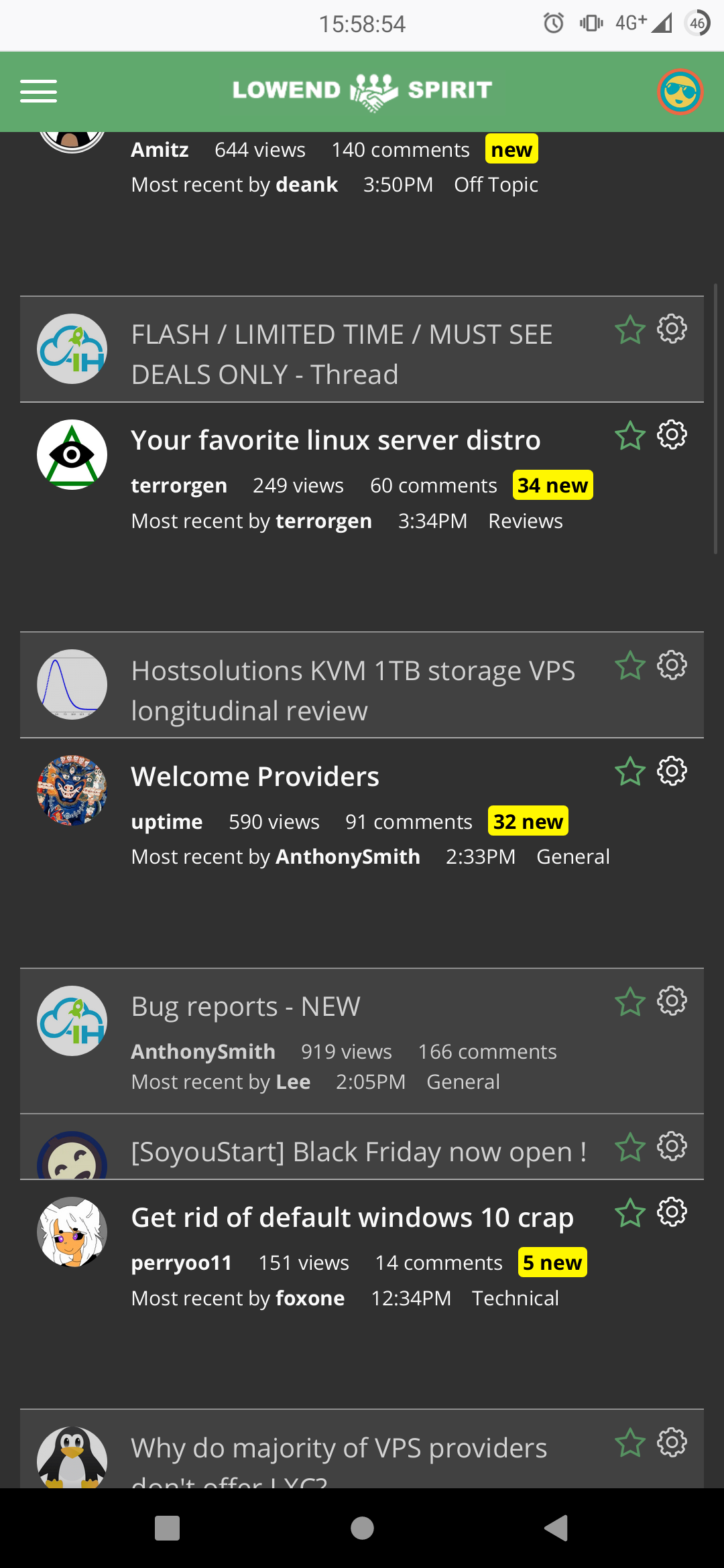
I am using mobile Firefox version 68.2.1 on my Xiaomi Mi 9T Pro (6,3" and 19:9 I think) while logged in.
After another interaction the posts jump back to their normal position... Looks kinda glitchy
Is it just me or has the dark mode suddenly gone white?
screenshot?
is it mobile or desktop?
https://inceptionhosting.com
Please do not use the PM system here for Inception Hosting support issues.
But that's a bug-- clicking "mark all viewed" is supposed to tell the software that I'm NOT going to read all the posts . Maybe it could be called "catch up" or whatever.
It's not you. Hold @AnthonySmith 's tea.
Desktop. Windows 10. Chrome 78
Refresh . Should be sorted.
sorry I am a huge dick head with a cherry on top.
I deserve to have a sign round my neck like a naughty dog that shit in the kitchen.
Dark theme fixed.
https://inceptionhosting.com
Please do not use the PM system here for Inception Hosting support issues.
Fixed. Thank you Ant.
Minor dark mode bug:
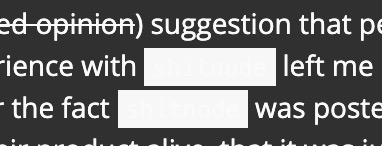
Some posts have
codetype stuff showing in bright on bright colours, like this:Mind clearing your cache? ? That should sort it
Does not sort it for me, to be honest. iOS, dark theme.
testScratch that. Works!
Amitz, a very stable genius (it's true!) and Grand Rectumfier of the official LESLOS® (LES League of Shitposters).
Certified braindead since 1974 and still perfectly happy.
How about now?
edit: scratch that edit cross over!
https://inceptionhosting.com
Please do not use the PM system here for Inception Hosting support issues.
Did try that. Seems it works nicely in Firefox, but the embedded whatever browser in "Station.app" for Mac does seem to be able to get it right ... (never mind) ... I deleted everything there, so not sure how it wouldn't work ...
Bug or feature? I just commented on the following thread, but it is still at the bottom of page 3 for me, with a last updated of Nov 25th.
https://talk.lowendspirit.com/discussion/52/free-for-life-kvm-storage-1tb-hdd-for-the-customer-number-100-200-300-400-500-600-700-800-900-999#latest
This is a Vanilla feature. It appends your new post to the end of the page you're currently on. So if you make a post while you're at the first (or third in your case) page, it'll put your post there until you refresh. It's just one of those things....
But, I've refreshed, gone back to the home page, no change. Also, there were 5 posts on the 26th, but the date still shows as 25th. Presumably that thread is near the top for you?
Edit to add that the bug report post is at the top, where I'd expect it.
I sunk the thread, not a bug, moderation.
https://inceptionhosting.com
Please do not use the PM system here for Inception Hosting support issues.
Damned buggy moderators getting in the way of me winning something!
Is anyone else getting intermittent notifications?
As an example, I got them from funkywizard and Rahul, but not dedicados in this thread:
https://talk.lowendspirit.com/discussion/139/what-hobbies-do-you-have-other-than-buying-servers-to-let-them-idle
If no one else is seeing it I'll either make a note of all of the times it happens, or I'll fall asleep.
@uhu its a vanilla feature, seriously though its pretty rare, it does happen and I believe its when you are actively logged in on more than 1 device you get them on neither.
https://inceptionhosting.com
Please do not use the PM system here for Inception Hosting support issues.
Thanks plugin updated, thanks @Solaire
There are a few outstanding issues with the dark theme which I believe are being looked at, mainly the white text, white background on the dark theme (spoilers tag for example)
Pretty soon i will be opening up the forum to advertising at a fair, tracked and modest cost which will allow me to pay for someone to make some significant improvements to functionality overall and truly tailor the platform for the community instead of forcing it in to a vanilla shaped bubble.
https://inceptionhosting.com
Please do not use the PM system here for Inception Hosting support issues.
I'm only on Chrome, albeit it with multiple tabs. As long as no one thinks I'm ignoring them when I'm ignoring them, no worries.
Not entirely sure but I think using the quote selector (selecting text and then hitting the quote button that magically appears) doesn't trigger a notification whereas pressing the "Quote" button does. Not sure if this is a bug or simply something that was never implemented in this plugin.
On iOS (Safari) and using the dark theme, the cogwheel in the upper right of the posting (to edit it) is not visible. If you know where to click, then it appears, but it's not there in a visible way before. Could that get changed?
/Edit: WTF? Now it's there...
Amitz, a very stable genius (it's true!) and Grand Rectumfier of the official LESLOS® (LES League of Shitposters).
Certified braindead since 1974 and still perfectly happy.
It's been sorted before . Probably iOS saw the light and emptied it's cache.
Again, @Solaire, thank you very much for all your efforts!
Amitz, a very stable genius (it's true!) and Grand Rectumfier of the official LESLOS® (LES League of Shitposters).
Certified braindead since 1974 and still perfectly happy.
@AnthonySmith @Solaire
Browser: Chrome, Haven't try other yet.
Device type: PC and Mobile is both affected.
OS: Tested so far in Windows and Android.
Theme: Both Light and Dark is affected.
Now if you click the cogwheel / settings on top right of your comment again, nothing will happened on PC. Expected behavior is that it's supposed to also show Edit Options again. Reloading will make you able to reset it back.
On mobile, clicking it will just dim the layout without showing an edit options.
Selling US/Asia/Singapore KVM/OpenVZ SSD VPS and Dedicated Server at IndoVirtue.
Minor thing:
In a long list of thanked by people at the bottom of a post, the names expanded after clicking "Show More" are of a slightly larger font size than the ones preceding them (see screenshot, the names after "FHR").
Posting urls with custom text is weird. Doesn't result in the expected behaviour and seems to remember stuff across page refreshes
I've taken to just posting links as straight text
Windows chrome
example?
https://inceptionhosting.com
Please do not use the PM system here for Inception Hosting support issues.
Any link.
Click URL button...it asks for http link...type it in and click ok. That populates the post body but another window comes up asking for http link again.
Figured out a way around it tho. At second box clicking in body of post makes second url window thing go away.
https://theregister.co.uk/
https://inceptionhosting.com
Please do not use the PM system here for Inception Hosting support issues.