I see from your profile that you are new here. Welcome to LES! It is great to meet you!
Want to introduce yourself? I'm sure everyone would be interested to know your name, where you are from, and something about your Linux experience. Also, what do you want to do on the server?
I'm looking forward to hearing more from you!
Best wishes and kindest regards,
Tom
Hi
Actually I'm new to this forum kind of stuffs , More like this is first forum I've joined .
And I'm Actually from India,
I've been Using a Debian 11 for nearly a year , I'm new to linux community though
I've been looking for a free server to host some of python projects , most likely telegram and Discord Bots That I've made ,
Also I've never used any other distro than debian, i would love to explore a new distro :-)
Thanks for your intro! Again, it's nice to have you with us! I hope you enjoy the server!
I made your account already. Your password is in a file in your home directory. Please change your password when you have a chance. Since password login has been disabled, I need your ed25519 ssh public key. If you kindly post your key, I will drop it into your account. Then you hopefully will be able to log in via IPv4 or IPv6 using your key.
Wonderful to hear from you! I see that you have been here on LES for awhile, and that your profile might have less activity than some others. Would you like to introduce yourself by telling us who and where you are plus something about your Linux experience? Also, what do you want to do on the server?
I'm looking forward to reading some interesting solutions which might be posted by some of the other guys.
MetalVPS doesn't make any backups. Quoting from the OP:
Please make your own redundant, offsite backups! It's easy to download or sync or clone your backup to a safe place. Please also make sure that you actually can restore from your backups! Please think of your MetalVPS account as ephemeral! It might blow up! We or you might reinstall the node! 🤦♂️
For myself, I'm like you. I make tar archives and download them with scp. Once in a while I use rsync. One of the users over at Darkstar used Borgbackup. Borgbackup seemed to work pretty well! There's also rclone, which I haven't tried yet.
A couple of users have, cleverly, I think, "eliminated" the backup process by "reversing" the common use pattern of the server. These guys never leave hardly anything on the server. Maybe a couple of almost empty directories. When they want to use the server, they bring in their files with something like ansible or rsync.
It's important to make sure backups actually can be restored. I make sha256sums to check the downloads, and then I untar the archives and check the files. Often I make sha256sums of individual files if they are important.
Hope this helps! Best wishes!
P.S. @terrorgen I'd be interested to hear more about any new backup procedures that you try. @Everyone, what are you using for backups?
@terrorgen said:
Been using metalvps as a build machine for the multiple VPSs running NixOS. Compiling software from source on this thing is fast!
It usually take my own PC 20 minutes to finish compiling Zerotier (NixOS doesn't keep its binary on their repo for licensing reasons) but just couple minutes on metalvps!
It's so great that you are doing this! I'd be interested to hear more details about whatever you are installing on the server with Nix. Congrats again on getting Nix working!
@Not_Oles said: LXC still is not expected to work yet partly because lxcbr0 isn't present because /etc/network/interfaces hasn't been updated yet. There is no bridge in the current setup. I sent the possible new interfaces configuration to Cloudie, so we will see what he says.
Haven't yet heard back from @Cloudie. He is a great guy! Sometimes he gets busy, and that's okay.
Later today or tomorrow I might mess around with the networking a little to see whether I can get LXC going. There might be some downtime. Please remember that you can check the IPv4 and IPv6 monitors.
If you are running anything that needs stability, please let me know and I will hold off awhile. Thanks!
I see from your profile that you are new here. Welcome to LES! It is great to meet you!
Want to introduce yourself? I'm sure everyone would be interested to know your name, where you are from, and something about your Linux experience. Also, what do you want to do on the server?
I'm looking forward to hearing more from you!
Best wishes and kindest regards,
Tom
Hi
Actually I'm new to this forum kind of stuffs , More like this is first forum I've joined .
And I'm Actually from India,
I've been Using a Debian 11 for nearly a year , I'm new to linux community though
I've been looking for a free server to host some of python projects , most likely telegram and Discord Bots That I've made ,
Also I've never used any other distro than debian, i would love to explore a new distro :-)
Thanks for your intro! Again, it's nice to have you with us! I hope you enjoy the server!
I made your account already. Your password is in a file in your home directory. Please change your password when you have a chance. Since password login has been disabled, I need your ed25519 ssh public key. If you kindly post your key, I will drop it into your account. Then you hopefully will be able to log in via IPv4 or IPv6 using your key.
@terrorgen said:
Connection to 1.1.1.1 and 8.8.8.8 seems to not work for some reasons
fmt:~$ mtr 1.1.1.1
-ash: mtr: not found
fmt:~$ traceroute 1.1.1.1
traceroute to 1.1.1.1 (1.1.1.1), 30 hops max, 46 byte packets
 1  10.100.4.1 (10.100.4.1)  0.228 ms  0.250 ms  0.198 ms
 2  149.112.26.23 (149.112.26.23)  0.480 ms  0.293 ms  0.168 ms
 3  45.45.210.98 (45.45.210.98)  0.346 ms  0.370 ms  0.413 ms
 4  *  *  *
 5  *  *  *
 6^C
149.112.26.23 is Lambda-IX.
45.45.210.98 is OHANACRAFT LLC game hosting.
Route leak happening?
I see from your profile that you are new here. Welcome to LES! It is great to meet you!
Want to introduce yourself? I'm sure everyone would be interested to know your name, where you are from, and something about your Linux experience. Also, what do you want to do on the server?
I'm looking forward to hearing more from you!
Best wishes and kindest regards,
Tom
Hi
Actually I'm new to this forum kind of stuffs , More like this is first forum I've joined .
And I'm Actually from India,
I've been Using a Debian 11 for nearly a year , I'm new to linux community though
I've been looking for a free server to host some of python projects , most likely telegram and Discord Bots That I've made ,
Also I've never used any other distro than debian, i would love to explore a new distro :-)
Thanks for your intro! Again, it's nice to have you with us! I hope you enjoy the server!
I made your account already. Your password is in a file in your home directory. Please change your password when you have a chance. Since password login has been disabled, I need your ed25519 ssh public key. If you kindly post your key, I will drop it into your account. Then you hopefully will be able to log in via IPv4 or IPv6 using your key.
I see from your profile that you are new here. Welcome to LES! It is great to meet you!
Want to introduce yourself? I'm sure everyone would be interested to know your name, where you are from, and something about your Linux experience. Also, what do you want to do on the server?
I'm looking forward to hearing more from you!
Best wishes and kindest regards,
Tom
Hi
Actually I'm new to this forum kind of stuffs , More like this is first forum I've joined .
And I'm Actually from India,
I've been Using a Debian 11 for nearly a year , I'm new to linux community though
I've been looking for a free server to host some of python projects , most likely telegram and Discord Bots That I've made ,
Also I've never used any other distro than debian, i would love to explore a new distro :-)
Thanks for your intro! Again, it's nice to have you with us! I hope you enjoy the server!
I made your account already. Your password is in a file in your home directory. Please change your password when you have a chance. Since password login has been disabled, I need your ed25519 ssh public key. If you kindly post your key, I will drop it into your account. Then you hopefully will be able to log in via IPv4 or IPv6 using your key.
I see from your profile that you are new here. Welcome to LES! It is great to meet you!
Want to introduce yourself? I'm sure everyone would be interested to know your name, where you are from, and something about your Linux experience. Also, what do you want to do on the server?
I'm looking forward to hearing more from you!
Best wishes and kindest regards,
Tom
Hi
Actually I'm new to this forum kind of stuffs , More like this is first forum I've joined .
And I'm Actually from India,
I've been Using a Debian 11 for nearly a year , I'm new to linux community though
I've been looking for a free server to host some of python projects , most likely telegram and Discord Bots That I've made ,
Also I've never used any other distro than debian, i would love to explore a new distro :-)
Thanks for your intro! Again, it's nice to have you with us! I hope you enjoy the server!
I made your account already. Your password is in a file in your home directory. Please change your password when you have a chance. Since password login has been disabled, I need your ed25519 ssh public key. If you kindly post your key, I will drop it into your account. Then you hopefully will be able to log in via IPv4 or IPv6 using your key.
Hey @raveen2k3! Maybe you can get in! Please let us know! Best wishes!
Thanks i got logged in:-)
Hey ,
Sorry to distrub , Just read messages edited*
When I try to install something it says permission denied
Can someone help me how can I use apk package manager
Wonderful to hear from you! I see that you have been here on LES for awhile, and that your profile might have less activity than some others. Would you like to introduce yourself by telling us who and where you are plus something about your Linux experience? Also, what do you want to do on the server?
I'm looking forward to setting up your account!
Best wishes!
Tom
Hello@Not_Oles!
My name is Michal, I'm from Poland, it's true that my profile is not very active, but I read a lot of LES:), and I'm often a client on LES, my experience with Linux is mainly based on work Oracle environments, now playing with K8s, I think a shell account will be great for homelab with Kubernetes
I see from your profile that you are new here. Welcome to LES! It is great to meet you!
Want to introduce yourself? I'm sure everyone would be interested to know your name, where you are from, and something about your Linux experience. Also, what do you want to do on the server?
I'm looking forward to hearing more from you!
Best wishes and kindest regards,
Tom
Hi
Actually I'm new to this forum kind of stuffs , More like this is first forum I've joined .
And I'm Actually from India,
I've been Using a Debian 11 for nearly a year , I'm new to linux community though
I've been looking for a free server to host some of python projects , most likely telegram and Discord Bots That I've made ,
Also I've never used any other distro than debian, i would love to explore a new distro :-)
Thanks for your intro! Again, it's nice to have you with us! I hope you enjoy the server!
I made your account already. Your password is in a file in your home directory. Please change your password when you have a chance. Since password login has been disabled, I need your ed25519 ssh public key. If you kindly post your key, I will drop it into your account. Then you hopefully will be able to log in via IPv4 or IPv6 using your key.
Hey @raveen2k3! Maybe you can get in! Please let us know! Best wishes!
Thanks i got logged in:-)
Hey ,
Sorry to distrub , Just read messages edited*
When I try to install something it says permission denied
Can someone help me how can I use apk package manager
Regards
Raveen
Can you send the error here? There are various reasons why you are denied. It can be your user doesn't have apk permission, non-sudo (ERROR: Failed to open apk database: Permission denied), or misconfigured resolv (looks like this ERROR: [URL]: Permission denied).
I see from your profile that you are new here. Welcome to LES! It is great to meet you!
Want to introduce yourself? I'm sure everyone would be interested to know your name, where you are from, and something about your Linux experience. Also, what do you want to do on the server?
I'm looking forward to hearing more from you!
Best wishes and kindest regards,
Tom
Hi
Actually I'm new to this forum kind of stuffs , More like this is first forum I've joined .
And I'm Actually from India,
I've been Using a Debian 11 for nearly a year , I'm new to linux community though
I've been looking for a free server to host some of python projects , most likely telegram and Discord Bots That I've made ,
Also I've never used any other distro than debian, i would love to explore a new distro :-)
Thanks for your intro! Again, it's nice to have you with us! I hope you enjoy the server!
I made your account already. Your password is in a file in your home directory. Please change your password when you have a chance. Since password login has been disabled, I need your ed25519 ssh public key. If you kindly post your key, I will drop it into your account. Then you hopefully will be able to log in via IPv4 or IPv6 using your key.
Hey @raveen2k3! Maybe you can get in! Please let us know! Best wishes!
Thanks i got logged in:-)
Hey ,
Sorry to distrub , Just read messages edited*
When I try to install something it says permission denied
Can someone help me how can I use apk package manager
Regards
Raveen
Can you send the error here? There are various reasons why you are denied. It can be your user doesn't have apk permission, non-sudo (ERROR: Failed to open apk database: Permission denied), or misconfigured resolv (looks like this ERROR: [URL]: Permission denied).
I see from your profile that you are new here. Welcome to LES! It is great to meet you!
Want to introduce yourself? I'm sure everyone would be interested to know your name, where you are from, and something about your Linux experience. Also, what do you want to do on the server?
I'm looking forward to hearing more from you!
Best wishes and kindest regards,
Tom
Hi
Actually I'm new to this forum kind of stuffs , More like this is first forum I've joined .
And I'm Actually from India,
I've been Using a Debian 11 for nearly a year , I'm new to linux community though
I've been looking for a free server to host some of python projects , most likely telegram and Discord Bots That I've made ,
Also I've never used any other distro than debian, i would love to explore a new distro :-)
Thanks for your intro! Again, it's nice to have you with us! I hope you enjoy the server!
I made your account already. Your password is in a file in your home directory. Please change your password when you have a chance. Since password login has been disabled, I need your ed25519 ssh public key. If you kindly post your key, I will drop it into your account. Then you hopefully will be able to log in via IPv4 or IPv6 using your key.
Hey @raveen2k3! Maybe you can get in! Please let us know! Best wishes!
Thanks i got logged in:-)
Hey ,
Sorry to distrub , Just read messages edited*
When I try to install something it says permission denied
Can someone help me how can I use apk package manager
Regards
Raveen
Can you send the error here? There are various reasons why you are denied. It can be your user doesn't have apk permission, non-sudo (ERROR: Failed to open apk database: Permission denied), or misconfigured resolv (looks like this ERROR: [URL]: Permission denied).
Yeah sure here it is :-
This means you don't have permission. Reach out to Not_Oles if you need the permission.
Just wanted to let you know Hetrix reported three IPv4 plus IPv6 ping monitor downtime/uptime cycles last night. I haven't checked the times exactly to try to correlate them with what a few of us were seeing about 8.8.8.8 and 1.1.1.1 and HE IPv6 Public DNS 2001:470:20::2 not seeming to respond to ping. Obviously the connections were working to some extent while we were logged in.
Both IPPv4 and IPv6 Hetrix monitors still are set to Maintenance because of the recent equipment updates and my understanding that some work on the new equipment might be continuing. I do not know anything more about what happened last night, but, when he has time, I'm sure i will hear from @Cloudie on the server /etc/network/interfaces configuration and also the connectivity issues last night.
I see from your profile that you are new here. Welcome to LES! It is great to meet you!
Want to introduce yourself? I'm sure everyone would be interested to know your name, where you are from, and something about your Linux experience. Also, what do you want to do on the server?
I'm looking forward to hearing more from you!
Best wishes and kindest regards,
Tom
Hi
Actually I'm new to this forum kind of stuffs , More like this is first forum I've joined .
And I'm Actually from India,
I've been Using a Debian 11 for nearly a year , I'm new to linux community though
I've been looking for a free server to host some of python projects , most likely telegram and Discord Bots That I've made ,
Also I've never used any other distro than debian, i would love to explore a new distro :-)
Thanks for your intro! Again, it's nice to have you with us! I hope you enjoy the server!
I made your account already. Your password is in a file in your home directory. Please change your password when you have a chance. Since password login has been disabled, I need your ed25519 ssh public key. If you kindly post your key, I will drop it into your account. Then you hopefully will be able to log in via IPv4 or IPv6 using your key.
Hey @raveen2k3! Maybe you can get in! Please let us know! Best wishes!
Thanks i got logged in:-)
Hey ,
Sorry to distrub , Just read messages edited*
When I try to install something it says permission denied
Can someone help me how can I use apk package manager
When a package manager like apk is used to install packages, the programs which are installed need to be written to the directories where the terminal shell will look to find the programs when you want to run them. These directories taken together make up what is called the "executable path." Only a "privileged" user like root or a member of the "sudo group" is allowed to write files to these protected directories.
Even before the writing of the installed files happen, apk maintains a database of the programs which are available for install and which previously have been installed. apk "locks" the database during install so that we never can have two instances of apk running at the same time and making inconsistent changes in the database.
My guess is that the way the lock is maintained could be apk writing a file. When the lock file is present, the database is locked. Possibly the directory where the lock file goes also might be one of the directories to which only "privileged" users can write.
My guess is that the failure to open error, the second error you saw, might be because the first step in opening might be to check the status of the lock file and write the lock file if it is not present. Since the write step failed, the open step could not complete. Thus, the open step also ended in failure.
To understand all of this better, maybe you want to study up on file permissions and privileges in Linux. Also, you can look at man apk and even at the apk source code.
@rcdfrd got apk working without writing to the protected locations. If you read this thread and find @rcdfrd's posts (there are several) you can see how he did it. Also, @terrorgen got the Nix package manager working. You could use either or both of these methods.
Since I can do it, I installed neofetch for you. Hope you have a great day! Best wishes!
fmt:~# apk info neofetch
neofetch-7.1.0-r1 description:
A CLI system information tool written in Bash that supports displaying images

neofetch-7.1.0-r1 webpage:
https://github.com/dylanaraps/neofetch

neofetch-7.1.0-r1 installed size:
348 KiB

fmt:~# apk -U add neofetch
fetch http://mirror.fcix.net/alpine/edge/main/x86_64/APKINDEX.tar.gz
fetch http://mirror.fcix.net/alpine/edge/community/x86_64/APKINDEX.tar.gz
fetch http://mirror.fcix.net/alpine/edge/testing/x86_64/APKINDEX.tar.gz
(1/1) Installing neofetch (7.1.0-r1)
Executing busybox-1.35.0-r29.trigger
OK: 1566 MiB in 356 packages
fmt:~# which neofetch
/usr/bin/neofetch
fmt:~# ls -l /usr/bin/neofetch
-rwxr-xr-x    1 root     root        341595 Oct 24 13:54 /usr/bin/neofetch
fmt:~#
Wonderful to hear from you! I see that you have been here on LES for awhile, and that your profile might have less activity than some others. Would you like to introduce yourself by telling us who and where you are plus something about your Linux experience? Also, what do you want to do on the server?
I'm looking forward to setting up your account!
Best wishes!
Tom
Hello@Not_Oles!
My name is Michal, I'm from Poland, it's true that my profile is not very active, but I read a lot of LES:), and I'm often a client on LES, my experience with Linux is mainly based on work Oracle environments, now playing with K8s, I think a shell account will be great for homelab with Kubernetes
Just wanted to let you know Hetrix reported three IPv4 plus IPv6 ping monitor downtime/uptime cycles last night. I haven't checked the times exactly to try to correlate them with what a few of us were seeing about 8.8.8.8 and 1.1.1.1 and HE IPv6 Public DNS 2001:470:20::2 not seeming to respond to ping. Obviously the connections were working to some extent while we were logged in.
Both IPPv4 and IPv6 Hetrix monitors still are set to Maintenance because of the recent equipment updates and my understanding that some work on the new equipment might be continuing. I do not know anything more about what happened last night, but, when he has time, I'm sure i will hear from @Cloudie on the server /etc/network/interfaces configuration and also the connectivity issues last night.
Thanks! Best wishes for a good day!
Tom
Hi Guys! Heard from Cloudie. He said he is checking. Best! Tom
Hi, here is my public SSH key. ssh-rsa AAAAB3NzaC1yc2EAAAADAQABAAABgQDntE+N38zRGvpDB3eKffGBoUrTFR+4wylNevShXAXlZZA3ihJm9dHagj3+XT/cAdIParvZbJiqtjXPNOaRsKORClOjQLKqEnhtXlIHEFZnfjBCMVpYc5+Jnh/1MtsHDnD/ZkE3OWS1eGN+Ge3IU0aHELDJ6SzqGOUyI8qkpMfMuWK7kQzsoVBJJdsFSoQ4T4HtaqolR9HAIPxni6Ayo4ekZCm2WaRufTVI1aRCUGSdpWjAlE/S+HHajQaZ5LuhEDBQkGV7NJejwcuEM8nJIyQif0aB85eFHdVF1VQFn7wA9hFIHchvsVsjZSI4azrxenIWblrdKcgXI7gZR3qcGpzr8Pflgtb0P9rB2VShO/tj30soLvtkL+sZLHanFTnDPrqofA1S2R9pPsAFa6y1YUdwDnJvJptFuaJgme2qSmU6AdfFqbJjJDE5XxIIk7j6YbSdkyJJPZEeM5G1Sj0NkAhcssabL9CejP3vR4EJXyHfNuIBh4IEo1jKNCL1GJPeTHM= user@TME-PC
Last night, logged in as unprivileged user notoles, I couldn't resist trying @rcfrd's python install scripts, which went through several versions as I was trying them.
It was so much fun! <3 Maybe I haven't had that much fun since @uptime 🙏 was active at MetalVPS!
Eventually, after changing the script to substitute full file paths instead of ./ I might have succeeded in getting python3 and and pip3 to tell me their versions. If interested, please check lines 3211 through 3222 of the numbered transcript.
One thing I noticed was that the script seemed to start two additional shells at lines 42 and 54.
I apologize for lines 2926 through 3207. I expected ps to return only my processes. I wanted to see how many shells were running.
I had been trying various other versions of the script. I think I cleaned up /home/notoles and logged out and back in again before running the transcript.
It might be important that the script seems to use the main repository from the latest version rather than the edge repository. Using a different repository from the node could cause tricky problems.
The default for $LD_LIBRARY_PATH seems to be empty.
I had trouble getting that binary and the library paths correct. I thought that trouble might have been due to the multiple shells or to something residual from my previous testing.
Hopefully all this will be fun for everyone! Best wishes!
This is the script I use to install gcc. It is worth mentioning that the apk fetch is used to obtain the package here, so that the repository is consistent with the system.
$LD_ LIBRARY_ PATH is the designation of a custom software library, and its default value is null.
thanks @Not_Oles and @rcdfrd
this script works really well
thanks for support and guidance :-3
Hey @Not_Oles sir , It will be useful if you can add me in nix group , so i can workaround with packages easily as a non root user, Also i can explore something new :-)
Hey @Not_Oles sir , It will be useful if you can add me in nix group , so i can workaround with packages easily as a non root user, Also i can explore something new :-)
Regards
Raveen
Hi @raveen2k3! I added you to the nix group. Have fun! Tom
@tme said:
Hi, here is my public SSH key. ssh-rsa AAAAB3NzaC1yc2EAAAADAQABAAABgQDntE+N38zRGvpDB3eKffGBoUrTFR+4wylNevShXAXlZZA3ihJm9dHagj3+XT/cAdIParvZbJiqtjXPNOaRsKORClOjQLKqEnhtXlIHEFZnfjBCMVpYc5+Jnh/1MtsHDnD/ZkE3OWS1eGN+Ge3IU0aHELDJ6SzqGOUyI8qkpMfMuWK7kQzsoVBJJdsFSoQ4T4HtaqolR9HAIPxni6Ayo4ekZCm2WaRufTVI1aRCUGSdpWjAlE/S+HHajQaZ5LuhEDBQkGV7NJejwcuEM8nJIyQif0aB85eFHdVF1VQFn7wA9hFIHchvsVsjZSI4azrxenIWblrdKcgXI7gZR3qcGpzr8Pflgtb0P9rB2VShO/tj30soLvtkL+sZLHanFTnDPrqofA1S2R9pPsAFa6y1YUdwDnJvJptFuaJgme2qSmU6AdfFqbJjJDE5XxIIk7j6YbSdkyJJPZEeM5G1Sj0NkAhcssabL9CejP3vR4EJXyHfNuIBh4IEo1jKNCL1GJPeTHM= user@TME-PC
@Not_Oles said:
Hi @chitree! Welcome to LES! Congratulations on your first post! Want to introduce yourself to the community? Please tell us a little about who and where you are, your experience, and what you want to do on the server. Also, we will need your ed25519 ssh public key to give you an account. Thanks! Tom
Thanks @Not_Oles! Sure, I'm a privacy advocate and work in the computer security field. I'm a New Englander and I've been using Linux since it began in the 90s. I would like to explore in my Alpine Linux shell, as I know it's very different approach to an OS. My ed25519 ssh public key is here
ssh-ed25519 AAAAC3NzaC1lZDI1NTE5AAAAIAaMPrmXnsbLYdSg9j14Ry65FqOmv1k/iWWkUMi7F7uT
Thanks
Excellent! Do you have a website or other presence elsewhere on the web where we can learn more about your position on privacy and about your work in computer security? Thanks!
I don't have a website as that would defeat the point of good OpSec, privacy, and security I've honestly already shared lots about me that I don't normally share. I work with many local people and only do work in-person. My position on privacy and security is to not use any operating systems that heavily surveil their users (Microsoft and Apple). I only utilize free and open source software and help others do the same. I'm still interested in an Alpine Linux shell if you're still open to granting me one. Thank you.
Wonderful to hear from you! I see that you have been here on LES for awhile, and that your profile might have less activity than some others. Would you like to introduce yourself by telling us who and where you are plus something about your Linux experience? Also, what do you want to do on the server?
Wonderful to hear from you! I see that you have been here on LES for awhile, and that your profile might have less activity than some others. Would you like to introduce yourself by telling us who and where you are plus something about your Linux experience? Also, what do you want to do on the server?
@Not_Oles said:
Hi @chitree! Welcome to LES! Congratulations on your first post! Want to introduce yourself to the community? Please tell us a little about who and where you are, your experience, and what you want to do on the server. Also, we will need your ed25519 ssh public key to give you an account. Thanks! Tom
Thanks @Not_Oles! Sure, I'm a privacy advocate and work in the computer security field. I'm a New Englander and I've been using Linux since it began in the 90s. I would like to explore in my Alpine Linux shell, as I know it's very different approach to an OS. My ed25519 ssh public key is here
ssh-ed25519 AAAAC3NzaC1lZDI1NTE5AAAAIAaMPrmXnsbLYdSg9j14Ry65FqOmv1k/iWWkUMi7F7uT
Thanks
Excellent! Do you have a website or other presence elsewhere on the web where we can learn more about your position on privacy and about your work in computer security? Thanks!
I don't have a website as that would defeat the point of good OpSec, privacy, and security I've honestly already shared lots about me that I don't normally share. I work with many local people and only do work in-person. My position on privacy and security is to not use any operating systems that heavily surveil their users (Microsoft and Apple). I only utilize free and open source software and help others do the same. I'm still interested in an Alpine Linux shell if you're still open to granting me one. Thank you.
Seems you might already have extensive Linux experience and also abundant server resources? How would it work for you to set up Alpine on a server from Racknerd or Dedipath?
I will keep trying to give you an account. Thank you for your interest!


Comments
sounds great , i would like to have a try, thx for all
question: how do you back up data on metalvps?
my idea is to set up a cron job that would scp my home folder periodically.
Any other ideas?
DM us for private tracker invite.
Hi @raveen2k3!
Thanks for your intro! Again, it's nice to have you with us! I hope you enjoy the server!
I made your account already. Your password is in a file in your home directory. Please change your password when you have a chance. Since password login has been disabled, I need your ed25519 ssh public key. If you kindly post your key, I will drop it into your account. Then you hopefully will be able to log in via IPv4 or IPv6 using your key.
Please keep us updated as your projects progress!
Best wishes!
Tom
Hi @qmesso!
Wonderful to hear from you! I see that you have been here on LES for awhile, and that your profile might have less activity than some others. Would you like to introduce yourself by telling us who and where you are plus something about your Linux experience? Also, what do you want to do on the server?
I'm looking forward to setting up your account!
Best wishes!
Tom
Hi @terrorgen!
I'm looking forward to reading some interesting solutions which might be posted by some of the other guys.
MetalVPS doesn't make any backups. Quoting from the OP:
For myself, I'm like you. I make tar archives and download them with scp. Once in a while I use rsync. One of the users over at Darkstar used Borgbackup. Borgbackup seemed to work pretty well! There's also rclone, which I haven't tried yet.
A couple of users have, cleverly, I think, "eliminated" the backup process by "reversing" the common use pattern of the server. These guys never leave hardly anything on the server. Maybe a couple of almost empty directories. When they want to use the server, they bring in their files with something like ansible or rsync.
It's important to make sure backups actually can be restored. I make sha256sums to check the downloads, and then I untar the archives and check the files. Often I make sha256sums of individual files if they are important.
Hope this helps! Best wishes!
P.S. @terrorgen I'd be interested to hear more about any new backup procedures that you try. @Everyone, what are you using for backups?
It's so great that you are doing this! I'd be interested to hear more details about whatever you are installing on the server with Nix. Congrats again on getting Nix working!
Haven't yet heard back from @Cloudie. He is a great guy! Sometimes he gets busy, and that's okay.
Later today or tomorrow I might mess around with the networking a little to see whether I can get LXC going. There might be some downtime. Please remember that you can check the IPv4 and IPv6 monitors.
If you are running anything that needs stability, please let me know and I will hold off awhile. Thanks!
Hey,
Thanks for the reply ☺️
And here is my public key
ssh-ed25519 AAAAC3NzaC1lZDI1NTE5AAAAICTSdu+z+191g3COcxlUDMS7jcJgSqtsg178O4mAnWoz
Connection to 1.1.1.1 and 8.8.8.8 seems to not work for some reasons
DM us for private tracker invite.
149.112.26.23 is Lambda-IX.
45.45.210.98 is OHANACRAFT LLC game hosting.
Route leak happening?
The last flan is taken. 🍮 affbrr
Hey @raveen2k3! Maybe you can get in! Please let us know! Best wishes!
Real network engineer uses mtr.
The last flan is taken. 🍮 affbrr
Thanks i got logged in:-)
HE IPv4 DNS seems to be working.
Maybe this will work for now? I will ask @Cloudie about what happened / is still happening.
It's late here. Sorry, but I need to sleep. More tomorrow. Friendly greetings!
works now with the new resolv.conf!
DM us for private tracker invite.
Please feel free to try mtr!
Hey ,
Sorry to distrub ,
Just read messages edited*
When I try to install something it says permission denied
Can someone help me how can I use apk package manager
Regards
Raveen
Hello@Not_Oles!
My name is Michal, I'm from Poland, it's true that my profile is not very active, but I read a lot of LES:), and I'm often a client on LES, my experience with Linux is mainly based on work Oracle environments, now playing with K8s, I think a shell account will be great for homelab with Kubernetes
Can you send the error here? There are various reasons why you are denied. It can be your user doesn't have apk permission, non-sudo (
ERROR: Failed to open apk database: Permission denied), or misconfigured resolv (looks like thisERROR: [URL]: Permission denied).Yeah sure here it is :-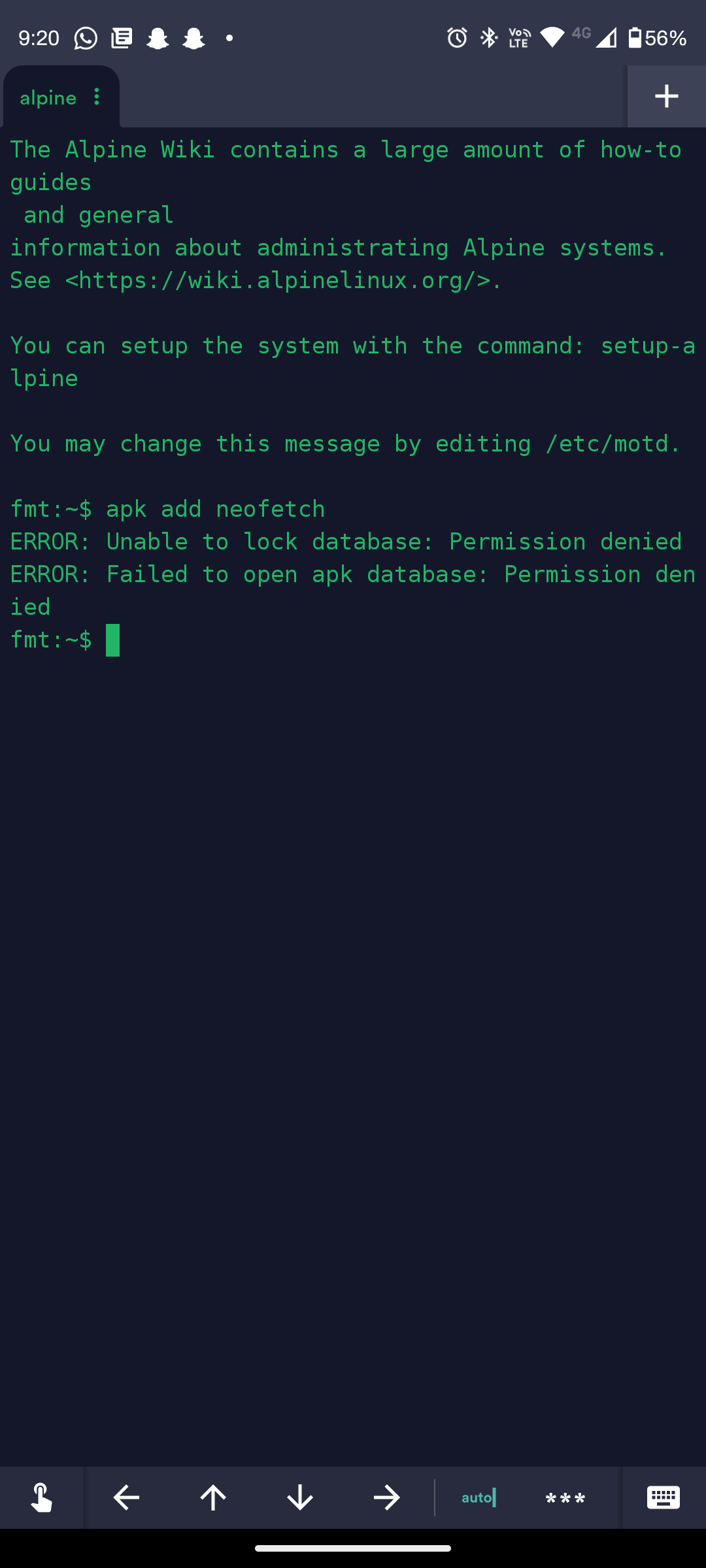
This means you don't have permission. Reach out to Not_Oles if you need the permission.
Hello!
Just wanted to let you know Hetrix reported three IPv4 plus IPv6 ping monitor downtime/uptime cycles last night. I haven't checked the times exactly to try to correlate them with what a few of us were seeing about 8.8.8.8 and 1.1.1.1 and HE IPv6 Public DNS 2001:470:20::2 not seeming to respond to ping. Obviously the connections were working to some extent while we were logged in.
You can check Hetrix directly if you wish:
IPv4
IPv6
Both IPPv4 and IPv6 Hetrix monitors still are set to Maintenance because of the recent equipment updates and my understanding that some work on the new equipment might be continuing. I do not know anything more about what happened last night, but, when he has time, I'm sure i will hear from @Cloudie on the server /etc/network/interfaces configuration and also the connectivity issues last night.
Thanks! Best wishes for a good day!
Tom
Hey @raveen2k3!
When a package manager like
apkis used to install packages, the programs which are installed need to be written to the directories where the terminal shell will look to find the programs when you want to run them. These directories taken together make up what is called the "executable path." Only a "privileged" user like root or a member of the "sudo group" is allowed to write files to these protected directories.Even before the writing of the installed files happen,
apkmaintains a database of the programs which are available for install and which previously have been installed.apk"locks" the database during install so that we never can have two instances ofapkrunning at the same time and making inconsistent changes in the database.My guess is that the way the lock is maintained could be
apkwriting a file. When the lock file is present, the database is locked. Possibly the directory where the lock file goes also might be one of the directories to which only "privileged" users can write.My guess is that the failure to open error, the second error you saw, might be because the first step in opening might be to check the status of the lock file and write the lock file if it is not present. Since the write step failed, the open step could not complete. Thus, the open step also ended in failure.
To understand all of this better, maybe you want to study up on file permissions and privileges in Linux. Also, you can look at
man apkand even at theapksource code.@rcdfrd got
apkworking without writing to the protected locations. If you read this thread and find @rcdfrd's posts (there are several) you can see how he did it. Also, @terrorgen got the Nix package manager working. You could use either or both of these methods.Since I can do it, I installed neofetch for you. Hope you have a great day! Best wishes!
Hello @qmesso Michal!
That sounds great! Could you please post your ed25519 ssh public key so I can set up your account? Thanks!
Tom
Nix seems to be a usefull tool for none root user!
@Not_Oles Could you add me to the nix group so I can try it out?
Congrats @subenhon! You're in the nix group! Have fun! Please let us know how it goes. Thanks!
Thanks!
Hi Guys! Heard from Cloudie. He said he is checking. Best! Tom
@terrorgen @Not_Oles
I get a “Permission denied” error msg.
Is there something else need to be done before I use it?
@terrorgen
Hi, here is my public SSH key. ssh-rsa AAAAB3NzaC1yc2EAAAADAQABAAABgQDntE+N38zRGvpDB3eKffGBoUrTFR+4wylNevShXAXlZZA3ihJm9dHagj3+XT/cAdIParvZbJiqtjXPNOaRsKORClOjQLKqEnhtXlIHEFZnfjBCMVpYc5+Jnh/1MtsHDnD/ZkE3OWS1eGN+Ge3IU0aHELDJ6SzqGOUyI8qkpMfMuWK7kQzsoVBJJdsFSoQ4T4HtaqolR9HAIPxni6Ayo4ekZCm2WaRufTVI1aRCUGSdpWjAlE/S+HHajQaZ5LuhEDBQkGV7NJejwcuEM8nJIyQif0aB85eFHdVF1VQFn7wA9hFIHchvsVsjZSI4azrxenIWblrdKcgXI7gZR3qcGpzr8Pflgtb0P9rB2VShO/tj30soLvtkL+sZLHanFTnDPrqofA1S2R9pPsAFa6y1YUdwDnJvJptFuaJgme2qSmU6AdfFqbJjJDE5XxIIk7j6YbSdkyJJPZEeM5G1Sj0NkAhcssabL9CejP3vR4EJXyHfNuIBh4IEo1jKNCL1GJPeTHM= user@TME-PC
Hope I can get in
thanks @Not_Oles and @rcdfrd
this script works really well
thanks for support and guidance :-3
I tried nix too , Got same error :P if you solve it or Gita a solution .tag me :-)
@raveen2k3
According to to the manual,set the NIX_REMOTE environment variable,and make sure you are in the nix user group.
https://nixos.org/manual/nix/stable/installation/multi-user.html
I run the command suceessfuly now.
Thanks for information,
Hey @Not_Oles sir , It will be useful if you can add me in nix group , so i can workaround with packages easily as a non root user, Also i can explore something new :-)
Regards
Raveen
Hi @raveen2k3! I added you to the nix group. Have fun! Tom
Hi @tme!
Welcome to MetalVPS! Haha, I also hope you can get in! Wanna try something like
ssh [email protected] -p 42365Might work over both IPv4 and IPv6.
Password login has been disabled, but your account's password is in a file in your home directory. Please feel free to change your password.
I hope you have fun on the server!
Best wishes and kindest regards!
Tom
Heard again from @Cloudie, who said one of the routers is misbehaving.
Let's pause adding new accounts until the situation with the router is resolved. Hopefully soon!
Thanks everyone!
Sorry just saw this. Glad that you have it solved! Somehow I didn't have to set the envar.
DM us for private tracker invite.
I don't have a website as that would defeat the point of good OpSec, privacy, and security I've honestly already shared lots about me that I don't normally share. I work with many local people and only do work in-person. My position on privacy and security is to not use any operating systems that heavily surveil their users (Microsoft and Apple). I only utilize free and open source software and help others do the same. I'm still interested in an Alpine Linux shell if you're still open to granting me one. Thank you.
VPS providers to check out:
Hey @terrorgen ,
Looks like a new issue is popped up for me
It would be great if you can look into it :-)
Here i post images
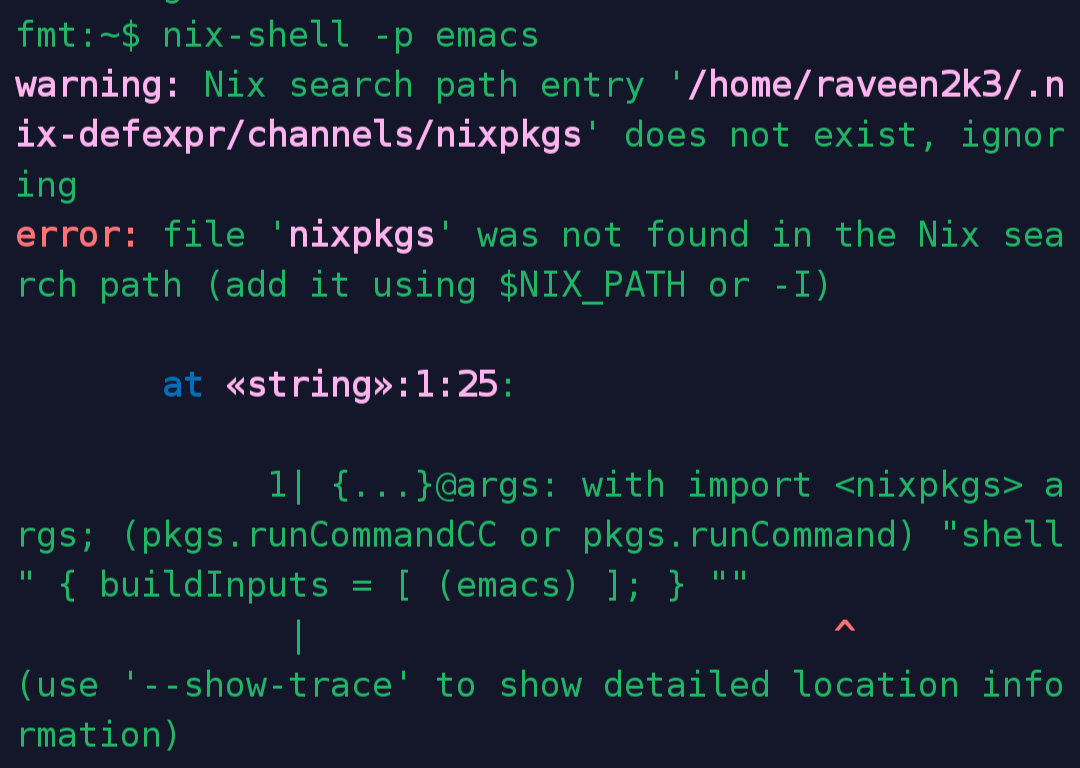
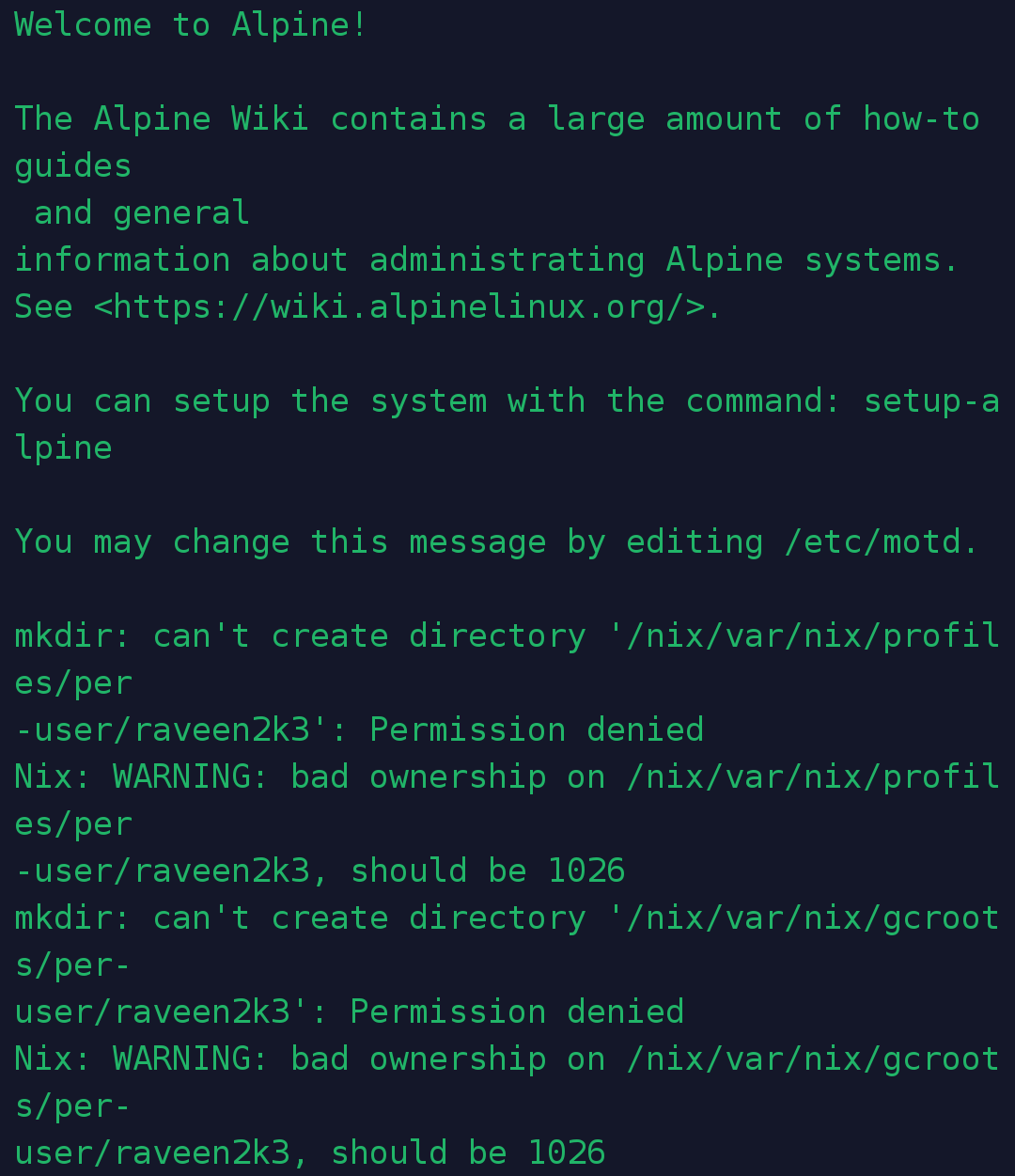
The first one is happening i try to use a nix cmd
And the second is a text before the shell when I login
Regards
Raveen
Add a nix channel and update it.
DM us for private tracker invite.
Hey,
Thanks for the reply,
And here is my public key
ssh-ed25519 AAAAC3NzaC1lZDI1NTE5AAAAILWazqchQhVol2yJiXwkAfX4ROyZiX2xII7B0UAuc2DW
thx for all
Hi @qmesso!
I added your account. Welcome again!
When you get a chance, could you please try to log in via IPv4 and IPv6 with your ssh key and something like:
ssh [email protected] -p 42365and let us know whether it works?
Password login has been disabled, but your account's password is in a file in your home directory. Please feel free to change your password.
Hope you have fun on the server!
Best!
Tom
Hi @chitree!
Seems you might already have extensive Linux experience and also abundant server resources? How would it work for you to set up Alpine on a server from Racknerd or Dedipath?
I will keep trying to give you an account. Thank you for your interest!
Always best wishes and kindest regards,
Tom
Hi there!
I am excited to try this.
Thanks.