

HostMantis Enterprise Reseller Hosting
 bikegremlin
ModeratorOG
bikegremlin
ModeratorOG
Looks like some very high resource limits, at a relatively low price:
https://www.hostmantis.com/enterprise-reseller.php
"Fluctuating" pricing policy aside ("Let yourself be surprised with the renewal price!"  ), do these current prices look too good to be true?
Or are they too high (doesn't seem like it to me)?
Edit - referring to the cPanel reseller hosting offers.
HostMantis Enterprise Reseller Hosting
- What does it look like to you?31 votes
- Too cheap to be true3.23%
- Too expensive25.81%
- Looks fine (and OK price)25.81%
- OK price, but beware of the renewal cost hikes29.03%
- They'll deadpool in a year16.13%
Comments
Are you referring to their cPanel or DA pricing. DA starts at 160$/year, cPanel at 200$+/year. Resource limits seem to be a bit higher than their regular reseller, but I don't really feel a need of upgrading from their regular reseller entry plan to the Enterprise edition.
Ympker's VPN LTD Comparison, Uptime.is, Ympker's GitHub.
My bad - cPanel.
DA is still not mature enough in my opinion.
The "Entry" option looks good if you have a few websites that need more resources (2.5 CPU - since CPU seems to be the bottleneck with WordPress website performance, at least from what I could test).
Looks cheaper than paying for a managed VPS, or 3 separate high-resource shared hosting accounts.
Even the Advanced, at 50 euros per month doesn't seem that bad, when you compared the given resources.
All of my websites are happily running on the resources provided by their Entry plans, but I've had some projects that were more resource-hungry and didn't have many reseller hosting options for those.
🔧 BikeGremlin guides & resources
Ah, gotcha! For more resource hungry projects this might just be it and imho more preferable to a VPS
Ympker's VPN LTD Comparison, Uptime.is, Ympker's GitHub.
Once upon a time, maybe.. I don't see how I could trust their prices again though.
Get the best deal on your next VPS or Shared/Reseller hosting from RacknerdTracker.com - The original aff garden.
Unreasonably high escalations in their pricing but these levels look sustainable. For a business/ Mid end market, they could be a good option given their service levels and performance.
They (maybe intentionally?) priced themselves out of the LE market.
blog archives
Yeah, saw Hostmantis enterprise reseller plan, though the resources are high, they can be ONLY useful for types of sites:
1. any business hosting huge php/forum/wordpress site with millions of visitors
2. heavy woocoomerce site with 50,000+ products and equivalent number of daily visitors
But looking at Hostmantis' IP address on bgp.he.net/myip.ms and other public sites that track users' site on particular host, I did not find any site (hosted at Hostmantis) having much traffic/unique daily visitors that can claim they're using such resources, neither any of the site hosted with them seems in Alexa ranking less than 100,000.
So what's the point for having such huge resources, when such (heavy) customers go with mature, reliable provider like Cloud companies or liquid web/rackspace type premium ones!
★ 30GB cPanel Hosting $1.49/mo | VPS & Reseller Hosting $14.38/yr
(aff)
Not really - for millions, I wouldn't really be comfortable with just 8 GB/5 5C usually. Maybe couple hundred thousand, but there's bound to be contention since it's shared and wouldn't be profitable otherwise.
It's exactly that! Few people will actually use all those resources - any bigger site will typically host with a more "specialized" environment- so they can safely offer it/overprovision without fear of people actually utilizing it
They generally suspend sites without prior notification in case if it has large influx of traffic.
it's enterprise reseller so..might be better...
https://webhorizon.net
In my experience, HostMantis has been very reliable (uptime, stability, even performance).
Highly reputable (and a lot more expensive) hosting providers don't offer such packages. I've asked - had a project that needed more resources and wanted to fit it on a reseller hosting environment, for my convenience, and to cut costs.
That website's problem was solved by better optimization (my idea was to do the homework first, and then throw more resources if it's really necessary).
But some things grow. And I've been on the lookout for a cheap, easy-to-use and reliable solution for when that happens. This offer looks like a good idea, a good solution for such use-cases.
@Abdullah
I've had some poor optimization and poor caching implementation problems on my websites. That would cause CPU load to go high once a new article is published. But it wasn't a constantly high CPU load - maybe that's why I've never been suspended.
I've also had a "rogue" site go 50 to 100% CPU load constantly. Intervened personally within the first few hours - wasn't waiting to see what the provider would do (opened a ticket, relayed what's going on and what I'm doing to fix it, asked for help). Again - maybe that's why it wasn't suspended.
For any shared hosting environment (shared hosting, reseller hosting, and non-dedicated VPS hosting) - it's a good idea for the provider to intervene in case of a very high load. The alternative is to have all the hosted websites go slooow, because a few are hogging all the resources.
Would you want a provider who just lets that go?
There are dedicated servers, and "dedicated VPS" services for such use cases. They cost a lot more, of course.
🔧 BikeGremlin guides & resources
I meant they could have allowed a 24-hour notice so I could move it somewhere else.
there's Cloudlinux LVE limits (site remains slow but functional) so should not affect the neighbours..
..instead, they suspend account with no notification - my monitoring ticked me & only after ticketing them did I know it was using high resources so was suspended.
Just saying, it might be possible they perfectly fit someone else's use case for the price
https://webhorizon.net
agree. Hostmantis suspends without notice even if the CPU usages goes beyond 15% to 20%.
They don't like sites getting traffic?
I've one with racknerd for my clients. It's a WP site and it hits 80% CPU many-a-times as its has "Cache-generation" plugin which generates full-page cache after during new page-publishing, so the page publish take 30-35 seconds wait-time and CPU goes up to 80% for 30 seconds.
Same with my Ramnode reseller account which is again E3 server and is super-premium.
I've not seen hosts other than Hostmantis shutting down sites without notice.
On my old buyshared instance too the CPU hit 100% for beyond 45 seconds, there was a notification generated. that's it. Never got sites suspended.
And if a customer is paying 10x to 20x more for a hosting plan, and they are beyond LE type market, they should definitely allocate time and resources (staff) for such things!
★ 30GB cPanel Hosting $1.49/mo | VPS & Reseller Hosting $14.38/yr
(aff)
That doesn't sound good.
Were you able to retrieve the backups, or get to log into your cPanel/DirectAdmin?
Was it a shared, or a reseller hosting account?
On that note - some providers (Veerotech for one) are fine with a user hitting their LVE limits for as long as they like (asked them about the policy, to be sure).
Their prices are roughly double that of HostMantis (for reseller hosting).
And their resource limits are lower.
CPU is the bottleneck when it comes to WordPress performance (what I mostly use) at least.
And, apart from a site going "mad" for a short period (a plugin conflict), websites with a good caching plugin rarely go crazy all the time but do need short bursts of more CPU power when category edits are made, for example, so visitors don't notice any hiccups.
🔧 BikeGremlin guides & resources
Just saw this blog post by HM: https://my.hostmantis.com/announcements/153/Now-using-CloudLinux-Reseller-Limits.html
That seems like quite the "downgrade", right? Afaik every subaccount on reseller (e.g. Entry reseller) received 100% CPU, 3GB RAM... Now ALL subaccounts seem to share that?
Ympker's VPN LTD Comparison, Uptime.is, Ympker's GitHub.
It depends. Most don't ever use anywhere near those resources, so even with what people 'perceive' to be less resources (X GB, X% total vs Y RAM/CPU x Z accounts) - most people may not actually see an impact. If anything, they'll have more flexibility and be able to set aside more resources to accounts that need it or have better tiering. It also arguably makes Hostmantis's job (tracking/fairly allocating resource capacity + burst) easier.
While I agree that it adds certain flexibility, and Cloudlinux is more than welcome, this is yet another aspect that does not bode well, looking at the previous PR stunts (pricing). Hmm..
Ympker's VPN LTD Comparison, Uptime.is, Ympker's GitHub.
The immediate suspension only applies when you're overselling (I suppose this means more than Entry limit), that's what their support told me.
Yup, that's the nail in the coffin! If the Reseller Account has 1CPU, 1GB RAM, all sub accounts will have to share that 1CPU, 1GB RAM, so now reseller can't have 5-10 accounts. Just a WP site where Opcache and APCu are enabled, it caches functions in PHP into RAM, my single site uses 250MB RAM 24/7 for this. So if I'm Hostmantis reseller, all I can afford to host MAX 4 WP sites or for 4 cpanel / directadmin sub-accounts under my reseller plan.
eeekks! that's terrible downgrade!
★ 30GB cPanel Hosting $1.49/mo | VPS & Reseller Hosting $14.38/yr
(aff)
There are plenty of gullible types who will fall for marketing and affiliate “ganging”.
Affa for cloudways rocks (ie rocks the boat) on that front in wp fb groups and other places. HM can follow suit and yet remain profitable
blog archives
It's not explained clearly enough. It could mean at least two different things.
For me, that would be a big step-down in the available resources - if you get say 1 vCPU and 3 GB of RAM to share between all the cPanel accounts.
On the other hand, it could mean this:
Their setup used to be such that every cPanel account got the limits of the lowest shared hosting account (0.7, then upgraded to 1.0 vCPU core etc).
Only the "main" reseller account got the full resources - depending on the reseller account tier.
For me that (previous) setup was useless. I use a dummy domain for the main reseller account - for flexibility.
So, if that quote now means that every other cPanel account gets the reseller tier default resources - that's a boost!
It could be something third, of course. The only way to be sure is to test and confirm. But I think it's worth asking for some clarification from @HostMantis - if they care to chime in.
🔧 BikeGremlin guides & resources
I am not 100% sure, but I'd understand it in the way, that the previous model was allocating the full 1vCPU+3GB RAM to each cPanel account on that reseller. So if you created, say, 10 accounts they could each use the full resources amounting to a total of 10 vCPUs and 30GB RAM alltogether in this case. If you look at previous resource limits in the knowledge base (e.g. waybackmachine), I think you will find that it said smth like "all cPanel accounts created on reseller will have the resource limits from Reseller Entry plan. Main reseller account will have resources of the reseller plan booked if advanced plan or higher than entry in general".
At least that's how I remember it. Again, Cloudlinux is more than welcome, and with only 1 cPanel leftover account on my reseller there, this change wont really affect me, but I am kind of glad I dont have 20+ accounts on my reseller there these days. Maybe they can clarify.
Ympker's VPN LTD Comparison, Uptime.is, Ympker's GitHub.
>
A few weeks ago I had a website go 50 to 100% CPU (full-retard! ).
).
If that were the case, wouldn't all the other websites have been affected?
I hadn't noticed any problems with any of the other websites.
Still, I hadn't actively tested for this, so it's more of a hint than a conclusion. To confirm it, I would need to put some load tests on two separate cPanel accounts, and monitor the behaviour of the other websites (other cPanel accounts).
🔧 BikeGremlin guides & resources
Yeah, there is quite a bit of uncertainty regarding these changes. Let's see if HM replies
Ympker's VPN LTD Comparison, Uptime.is, Ympker's GitHub.
I opened a (low-priority) ticket to ask for clarification.
If it is how I hope it is - with the Advanced reseller plan (with 1.5 vCPU per cPanel) I could, for example:
set the cycling website to have 1.5 vCPU
set my blog that no one reads to 0.5 vCPU
And follow the loads, adjusting accordingly, with 1 vCPU to spare for those two accounts.
From what I could test, 1 vCPU limit per account is quite enough on their hosting for everything I hosted so far, apart from the above mentioned one "exotic" project (turned out to have been just a very poorly optimized website).
🔧 BikeGremlin guides & resources
on this page new Hostmantis states (updated) clearly:
https://my.hostmantis.com/knowledgebase/260/System-Resource-Limits.html
so those are now combined limits and not divided or separate limits any more for sub-reseller account. sad.
★ 30GB cPanel Hosting $1.49/mo | VPS & Reseller Hosting $14.38/yr
(aff)
If that is the case (waiting for confirmation), then Enterprise Entry reseller hosting - at $24/Mo, with 2.5 vCPU and 50 cPanel limit,
is better for my use than Reseller Advanced - at $30/Mo with 1.5 vCPU and 75 cPanel limit.
Considering that CPU is by far the biggest bottleneck with WordPress, and I don't need a huge amount of cPanel accounts (while 25 accounts of the lowest-tier reseller account were just a bit too "tight" for all the testing and playing around and stuff like my blog that mostly idle ).
).
🔧 BikeGremlin guides & resources
Yup - it's confirmed.
Using my Advanced Reseller hosting account for an example:
Old policy: potentially available resources - 75 x 1 vCPU core (if I really used that on a server with even 32 cores, it would be in trouble with my account alone, of course, but I still could get 3 or 4 websites to go to 70% CPU usage, which is a more realistic scenario).
New policy: 1 x 1.5 vCPU core - this is reasonable to expect to really be provided.
I love the flexibility of being able to provide 2, or 3 vCPU to an account (on larger plans), but I don't like the total resource cut.
Since I only have a few high-visit (resource-demanding) websites, this could be a better option than going with Veerotech who (at least they used to) provide 1 vCPU for each reseller cPanel account.
Pricewise, HostMantis has practically become more expensive!
And I'm not very happy with frequent (too frequent for my taste) price and resource changes.
Still, I'm curious to try the Enterprise - it looks like a good fit for my use, but HostMantis reseller hosting, with the new resource plans, doesn't look like a good option for general use (people re-selling hosting, or providing hosting for more than 3 medium-sized websites).
🔧 BikeGremlin guides & resources
HM is still probably the most performant Shared Hosting Reseller I have used so far. With all cPanel accounts but one moved over to MyW I asked them, however, to downgrade my plan from reseller entry to shared entry since I only use 1 cPanel account with them anyway. This will halve my costs but still remain highly performant. Cpu/ram/io is the same, only 25 instead of 50GB disk which is fine.
Ympker's VPN LTD Comparison, Uptime.is, Ympker's GitHub.
I'm keeping an eye on the new reseller resource limits performance - to see if I'll hit the total account limit through regular use (2.5 vCPU, Enterprise Entry Reseller package).
🔧 BikeGremlin guides & resources
Reseller account, few managed clients no overselling involved.
yes they pointed me to backups, .. as in suspended the files were all still accessible.
mhmm...yea think I understand.
https://webhorizon.net
In case anyone else finds this interesting, here are the resource usage stats - total, for my entire reseller hosting account.
Before, and after switching from Advanced Reseller to Enterprise Entry Reseller:
With a full report in my HostMantis reveiw.
That’s with just over 20 sites, out of which:
🔧 BikeGremlin guides & resources
Migration from Reseller Entry to Shared Entry has been taking care of pretty fast and without any issues (so far). At 35$/year with 25GB NVMe and the known high performance that's a plan/price I can live with. Let's see what the future brings. Could've gone even cheaper with DA plan, but I actually enjoy havint at least one website still hosted with cPanel
Ympker's VPN LTD Comparison, Uptime.is, Ympker's GitHub.
Unless they change the prices (and/or resources again) - which seems to happen every few months
my Enterprise Entry Reseller renewal should be under $ 330 per three years (with the discount, cut from 80% to 50%, but still a lot better than no discount). That's very acceptable price-wise if the quality remains the same.
I'll see in the following months whether the new given resource limits are enough to keep my websites running. I have an uneven load on the websites, and I was in fact looking for reseller hosting that allows me to provide more resources for the few "more demanding" ones, without paying the price of a managed VPS, or pay for separate, high-resource shared hosting accounts (hassle for automating backups, management etc, it's easier having them all under one reseller account).
Over the next month, I'll know whether this change was for the better, or worse.
I'd be surprised if policies and prices don't change a few more times before my renewal is due.
🔧 BikeGremlin guides & resources
Response from Host mantis when I enquired about moving to DA shared basic (Singapore) from my current plan
blog archives
For a reseller plan that can get expensive, for a shared hosting, I think it is fair. Other companies charge you like 10$ to restore a backup like Hostens or Netcup(?!) and granted you'll save a lot by switching to DA, I think that's a fair price to ask. Ofc others would do it for free, but..
Ympker's VPN LTD Comparison, Uptime.is, Ympker's GitHub.
I agree it is fair, probably with future escalation in hosting (as has been past trend with them)
30 dollars/year could be a procepoint to look at. (current 19.95 + 9.90),
For Singapore, and their overall stability, not much to complain.
I am seriously pitting that against 30.55 dollars/year Shock Hosting shared, same location, CPanel for single domain/ no upper limit on storage. Dedicated ip
Interesting tradeoffs!
Maybe this calls for some deep dive into shared hosting in Singapore at these price levels .
Extravm, Rnerd, etc…
blog archives
What is the difference between entry reseller and entry shared hosting?
Yes, there is a price difference, but resources are the same?
At shared, we can add unlimited domains for host unlimited websites.
At reseller, we can create separate cpanel accounts, but still, there is a big price change, and resources are still the same.
Resources appeer to be the same minus the storage (25GB NVMe Shared vs 50GB NVMe Reseller). You can create unlimited addon domains under shared imho. And since reseller now counts the resources as total for all subaccounts it is not more than shared entry (before it was per cPanel subaccoint).
Ympker's VPN LTD Comparison, Uptime.is, Ympker's GitHub.
If you are moving to a cheaper plan, double-check > @Ympker said:
Yes, but if one website gets hacked, or has any other problems - every other website is likely to have problems.
Again, related to viruses and hacks - fixing one website is hassle enough. Fixing several... ufff.
Also, I've had a website go "crazy," taking 100% of its provisioned (allotted) CPU resources.
With reseller hosting, since it was limited to roughly 66% of my total CPU resources at the time, I didn't even notice any problems with the other websites.
If they were all under one shared account, all of my websites would have been down.
Briefly put: if you are hosting more than one website, reseller hosting is a lot less trouble in the long run.
For more details, I wrote the article Reseller hosting explained
I'll update it (and maybe add a separate article just for HostMantis - sort of a review), with this latest reseller hosting resource distribution (so far I've seen Knownhost do it that way).
🔧 BikeGremlin guides & resources
Now whole reseller (and all sub accounts) share 30 entry processes ?
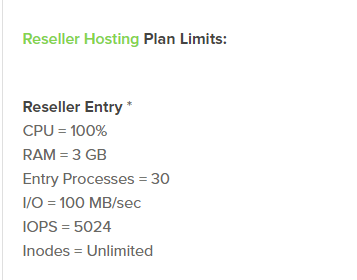
I'm testing and playing with the limits. Will post an extensive report ("review").
From the preliminary results - CPU is by far the greatest bottleneck for WordPress and forums (the stuff running on PHP).
The rest are less critical. 2EP per website can do it. 5 if you want to be on the safe side.
 )
)
(my cycling website has thousands of daily visitors and EP usage doesn't go over 2!
Similar goes for the other resources - apart from I/O for WooCommerce websites where, depending on the size and how busy (and well-optimized) they are, you might need to go as high as 5 MB/s, or more.
With that in mind, HM Enterprise Entry reseller with 2.5 vCPU makes a lot more sense than their Advanced Reseller.
The Advanced has more cPanels, more storage, but only 1.5 vCPU. While Ent. Entry has it a lot more balanced (more CPU and RAM, a bit less of everything else), and it costs less!
Reseller entry can be fine. 1 vCPU per website is OK. But if you are using WordPress, I'd look for at least 1.5, especially if there's more than one website hosted sharing the resources.
My total reseller account usage doesn't go over 1.5 vCPU, some 20 websites, out of which 3 are active, plus some small WooCommerce stores, a moderately busy forum, and a few low-visit count presentation websites + my dev/testing playgrounds.
It worked fine with 1.5 vCPU before I "upgraded."
🔧 BikeGremlin guides & resources
Agree,
I have a simple web analytics website, with just 50 users online now, and CPU usage is at 20%
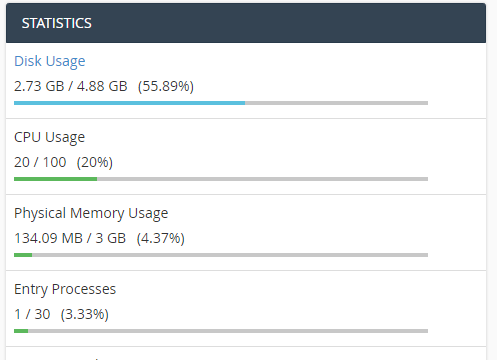
It will make a sense if they allow us to make custom configurations (as on VPS), buy more RAM, more CPU etc...
(UPGRADE).
See the historical resource usage graph - for a day, or two. See what the peaks are.
As for the upgrades - it's a shared hosting environment. You can upgrade to a more powerful plan.
I did that - switching from the Advanced, to Ent. Entry reseller. More CPU, less storage and cPanels.
I'd prefer to have the Ent. Advanced have 2x CPU of the Etnry, because it's more than twice as expensive, but it's their pricing policy. I can see if something fits, or move on.
🔧 BikeGremlin guides & resources
I agree there is a higher security risk with multiple domains/websites on shared entry compared to isolated reseller sub accounts, however, in my case, I only host 1 website and subdomain there, so I don't really mind. For reseller&sub accounts I have @MikePT MyW lifetime anyway ;P
Ympker's VPN LTD Comparison, Uptime.is, Ympker's GitHub.
what can I say
blog archives
Recurring discounts TM
Ympker's VPN LTD Comparison, Uptime.is, Ympker's GitHub.
Right now, croc web give more resources hmmm
I hope that they will upgrade the CPU at all packages for resellers.
a single account is fine with this limmits.
I'm nearing my first 1 month subscription on Hostmantis entry reseller DA plan, i have around 20 clients accounts in it.
With this new policy on reseller limit, should i keep continue to add more accounts to it or should i find another provider? any thoughts?
If it's of any help, here's my "preliminary" (until I get a few more months of experience) HostMantis Reseller Hosting review.
🔧 BikeGremlin guides & resources
I just read your review (awesome one), thanks!
Well, luckily those 20 accounts are small wp sites with low traffic, but i guess i shouldn't add more to it unless i 100% sure that the new account will use very small resources (kinda bad wish lol).
so now I'll be looking for a new reseller, i guess
>
Keep an eye on the total resource usage (in LVM).
Enterprise Entry Reseller for example lets you host a few larger websites that might otherwise have required a separate, “Enterprise Shared” account.
That flexibility is a plus.
The downside is having to keep an eye on the clients’ resource usage.
So far, I am pleasantly how little resources all my sites take. Seems like I could easily add at least 10 more to the same reseller account.
It’s all a shared hosting environment. I discussed the CloudLinux vCPU here:
https://io.bikegremlin.com/23107/what-is-vcpu/
🔧 BikeGremlin guides & resources