

Need VPS for Encoding

I Need a cheap vps for encoding videos via ffmpeg and don't wanna deal with issues arising from abuse or what not and would like any recommendations suggestions or offers.
Budget:
10$ (I'll appreciate anything lower though & I might consider up till $15)
Locations: (Continents: Europe, America )
(I'm kinda new here so sorry in advance)
(Can some help me move this to a different thread my bad 🥲)
Teehee!
Tagged:
Comments
Why not get cheap dedi for guaranteed resources and no bs? OVH Eco range has $25 E3v2 and $30 i7-4970K dedicated servers... https://eco.ovhcloud.com/en/
Surely better than using a VPS and potentially getting throttled.
ExtraVM - KVM NVMe VPS in USA, EU, APAC -|- RackColo - Find Colo -|- SRVCheck
Wow!
I would recommend getting Google colab pro/pro+.
@Nubuki I have moved this thread from "Free Offers and Stuff" to "Requests".
Additionally Wishosting offers VPS that have unlimited CPU use for a pretty reasonable price.
You didnt say anything about the location but you could get something cheap with dedicated cpu from php-friends in this black friday
Don't those die if left alone for more than an 1hr and is the cpu fast?
I've used the original colab and didn't like it one bit
Teehee!
Better use Dedi or Cloud computing.
If you don't need it 24/7, an hourly billed VPS with a GPU would probably work, check out TensorDock (or the other big boy clouds that offer GPU compute).
Not on the paid account. Pro has latest GPUs.
Would recommend data ideas to just Rent a rasbery pi. Gpu encoding usually faster than cpu and you won't find a cheaper option.
Recommended hosts:
Letbox, Data ideas, Hetzner
What do you define as cheap (please provide a price range)
Synteq Technical Support, Technical Writer.
Contact me at: +1 (307) 428 8111 or [email protected]
1$ - 15$ -_-'
Teehee!
Will it hold up
Don't wanna get suspended
Teehee!
Nowadays, I encode my push-ups with an on-premise machine that has 4 Skylake cores.
I can use the cores at 380% without triggering any abuse notices.
It's much faster than using a cheap VPS where I have to limit CPU usage to 150% or less.
While I researched how to encode with GPU, I don't generally use it because GPU encoding almost always produces inferior results compared to software encoding, although the difference could be small.
Moreover, GPU supports fewer codecs than software encoders.
The last flan is taken. 🍮 affbrr
Grab a cheap GPU VM from the TensorDock Marketplace: https://marketplace.tensordock.com/order_list
Good comment. We do this in Azure with a queueing system.
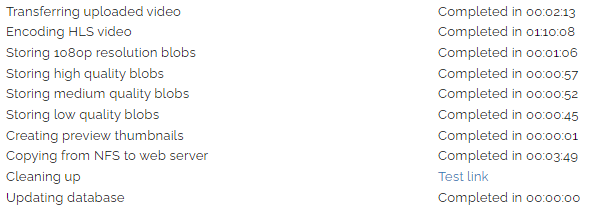
We've got instances for CPU and GPU, and generally lean towards an 8-core CPU which codes 4 streams + thumbnails in real time. GPU is faster but costs more per hour, so CPU ends up saving us a few pennies but our main reason for that preference is better control of the output.
We don't use TensorDock for a few reasons. Mostly because the storage cost when the instance is deallocated is more expensive than Azure and eliminates any cost savings while running.
I also prefer CPU encoding than GPU. I recommend Hetzner Cloud (CPU encode, hourly billing).
Issue here is that I intend to use a python script to automatically get new videos when they are available, encode, then upload out
to maybe gdrive
Teehee!
How expensive is it ?
Teehee!
+1 for tensordock, great service. I also agree with @yoursunny and mostly encode video on my dedicated machines, since I'm able to max out the CPU 24/7.
The results highly depend on the GPU. We've found NVENC with Turing+ architecture is pretty good. Agreed about the number of codecs, but that's only relevant if you want to use an encoder which the GPU doesn't support.
In the end it depends on your use. For live video we always offload the encoding to NVENC. For on-premise batch encoding we're doing it in software with 32 cores since we hit the nVidia limit on parallel NVENC instances for consumer cards.
You haven't said how much encoding time you need, which is the key question.
For the normal grab and encode an hour or less per video
Teehee!
DM'd
Synteq Technical Support, Technical Writer.
Contact me at: +1 (307) 428 8111 or [email protected]
That's not particularly helpful without the number of videos.
From their AUP regarding KVM VMs from the link I gave you above, " KVM line has an unlimited CPU usage policy if you use one VM per package. " It says "if you use one VM per package. " because they have/had some packages you can split into two VMs.
There could be a 5950x package open shortly on their flash sale page as I know someone who has one expiring today.
His use case was very CPU intensive and he never had an issue getting suspended.
I have also put in a ticket to sales to confirm your question. I'll let you know what they say when they get back to me.
EDIT: Ticket response from WisHosting. "Yes, you can use the CPU 100% 24/7"
Of course if @skorupion makes you a decent offer that fits your needs I would take it.
Four ideas from me
0 dollars per month: https://www.oracle.com/cloud/free/ - actually I'm using ffmpeg on their ARM servers myself! (btw, the ARM repo ffmpeg binaries tend to be old, be sure to get a static build from John Van Sickle)
caveats: there are cases of (apparently random) bans out there
4 euros per month: https://www.ikoula.com/en/dedicated-server/raspberry-pi-4-micro-server
caveats: IPv6 only, 16GB disk
over 6 dollars per month: Azure D2a v4 spot Mumbai + the smallest possible HDD
caveats: outgoing bandwidth past the first 100GB every month is expensive, spot instance implies they might be randomly terminated any time, and the location is not what you requested
19 dollars per month: https://us.ovh.com/us/order/dedicated/?configure=1&v=2&ecorange=#/dedicated/configure?selection=~(datacenters~(~)~invoiceName~'KS-LE-1) (this is about the same as the Oracle ARM instance, at least judging by their respective Geekbench 5 scores)
caveats: over your budget, but hey, it's a great deal! (unless you're biased against OVH)
EDIT: fixed broken KS-LE link
EDIT2: sorry I give up, just copy paste the last link (alternatively order from here https://eco.ovhcloud.com/en-ie/ or https://eco.ovhcloud.com/en-gb/ depending on your preferred currency )
Contribute your idling VPS/dedi (link), Android (link) or iOS (link) devices to medical research
It's a refurbished mini desktop for $300 one time.
There's no recurring marginal cost.
The processor is Intel Core i5-6700T.
Redo the setup with a script every time from a clean machine, which eliminates stopped storage cost.
The last flan is taken. 🍮 affbrr
Running cost is more expensive than Azure spot as well (about double).
It varies on a busy day I'd say 10
Teehee!
This means 200% CPU usage for 10 hours per day.
$15/month isn't enough at professional providers.
You'd better buy a $200~300 desktop (or reuse your old laptop) and host it on-premise, using your existing Internet connection.
The last flan is taken. 🍮 affbrr
Can't seem to get pass the order now screen
Getting stuck with circle loading animation.
Teehee!
I'm assuming you mean you're having problems with OVH? Sorry if I wasn't clear enough, the link is broken, you need to copy paste the whole thing i.e.
https://us.ovh.com/us/order/dedicated/?configure=1&v=2&ecorange=#/dedicated/configure?selection=~(datacenters~(~)~invoiceName~'KS-LE-1)- unless you already did so, and are still having problems nonetheless - in case of which I'm afraid I might be out of ideas (since it's working fine for me).. maybe try opening the URL using another browser?Contribute your idling VPS/dedi (link), Android (link) or iOS (link) devices to medical research
It became $ 37.98 😭
After adding setup fees
that's way beyond my budget
Teehee!
Well, that server seems to be sold out already lol, so unless they restock it, you might also consider getting the slightly more expensive version whose CPU is approx. 1.5x times better
https://us.ovh.com/us/order/dedicated/?configure=1&v=2&ecorange=#/dedicated/configure?selection=~(datacenters~(~)~invoiceName~'KS-LE-2)(this has even better performance in terms of raw computing power per dollar - but then again, it's even more above your original budget... )As for the setup fee, if you're a new customer you can get it waived by using the promo code ECOSETUP
One other option I forgot to list yesterday would be Avoro (2 dedicated cores for 9 euros per month). Or maybe just wait a bit more - you may be able to get something nice on the cheap on Black Friday/Cyber Monday
Contribute your idling VPS/dedi (link), Android (link) or iOS (link) devices to medical research
Says something about entering an hostname
I got none I can ignore that right?
Teehee!
You can enter push.ups as hostname.
It would work at most providers.
The last flan is taken. 🍮 affbrr
Two final (?) suggestions:
Really cheap stuff, paid biennially in advance - starting from 1/2 CPU core for 48 euros every 2 years
4 dedicated cores for around 10 euros per month - slightly less if choosing the 12 month contract, slightly more if going for monthly - the latter is available in English on netcup.eu as well (be sure to read a warning regarding the contract terms by fellow LES member Falzo if going for the former)
Contribute your idling VPS/dedi (link), Android (link) or iOS (link) devices to medical research
I used to provide support for this kind of workload, my client were heavily encoding anime using custom-build handbrakecli (literally taking almost every seen 720p airing in nyaa/bakabt)
at start we were using one from serverroom, $13 setup fee then $5 monthly afterward (you need to poke the billing if wanted monthly payment), the server is using AMD X2150, 8GB RAM, 32GB SSD in US location, each 24min anime took like ~8000 second to finish, so the server get hammered day and night about a year non-stop, after that i recall they're just moving to ovh for bigger dedicated server
Fuck this 24/7 internet spew of trivia and celebrity bullshit.
I'm also interested in this, do you recommend Netcup 4 vCore EPYC™ 7702 (with RAID 10?) or Server-factory 4 vCore Ryzen 9 5950X?
Or maybe I should go with a different plan? budget is around $20 - $25
Thanks!
Can't vouch personally for either provider (=never used either of them), but judging by face value, the Server-factory Ryzen seems to be a better deal - compare price vs. specs: https://browser.geekbench.com/processors/amd-ryzen-9-5950x and https://browser.geekbench.com/processors/amd-epyc-7702p
Contribute your idling VPS/dedi (link), Android (link) or iOS (link) devices to medical research
Thanks for your reply, the link you mentioned was for 7702P and not 7702, but still Ryzen seemed to perform a bit better or have similar results
However I think it's worth spending extra €3 and get 6 vCore AMD EPYC™ 7702, but not sure if the RAID 10 setup will impact the encoding performance
Because it seems they are basically the same as per single GB scores (difference within low single digit %), and there was no nice link for 7702 like the above one
A bit better? Lol, 1 Ryzen core = 1682, 1 Epyc core = 888
Why?
Contribute your idling VPS/dedi (link), Android (link) or iOS (link) devices to medical research
Oracle my be fit you