Uses for a few short-term VPSes

tetechtetech OG
edited January 2022 in General

I'm cleaning house and have a few (7 +/- 1) VPSes that I'm not going to renew. They have at least 5 months remaining on the term and in one case over a year. They're generally lower-end, 0.5-4GB RAM, various storage/locations.

I'll probably make a couple available for transfer soon, but they're low-cost so in general the amount I'd recover wouldn't be worth it, particularly in cases where an admin fee is charged. So I was wondering whether any short-term community project makes sense.

They're already running nested LXC containers in a private/encrypted cloud. It would be trivial to hand out a few free LXC containers. But I'm hesitant to do this (even with severe constraints) because I don't want the headache of dealing with the inevitable abuse and I'm not sure if having it short-term (~6-ish months) is useful to anyone. Plus I don't have a provider tag and don't know where this would land me.

I did wonder about leveraging the encrypted cloud part - you could access the LXC in one location with storage mounted from another, for example. So for now I'll just put it out there for thoughts.

RAM  Storage  Processor (FSU)  BW (TB)  Location
0.5G  60GB    2x Ryzen 3700X   0.5      Amsterdam
0.5G  250GB   1x Xeon E5-2620  2.0      Amsterdam
1.0G  17GB    1x Xeon E5-2680  3.0      Amsterdam
2.0G  15GB    1x Xeon E5-2690  0.8      Buffalo
1.0G  15GB    1x ?             5.0      Chicago
1.0G  15GB    1x Ryzen 3950X   1.0      Dallas
1.0G  5GB     1x ?             1.0      Düsseldorf
4.0G  10GB    1x Xeon E5-2690  1.0      Hong Kong

It isn't a crisis if they just idle out, so not trying to force anything here.

(No, I won't give/sell/rent my account info to you; No, don't PM me asking for something)

«1

Comments

  • You don't have to sell your account info you can just transfer them to others.

    Team push-ups!

  • Hi @tetech! If you wanna give me the Dallas instance, it might be helpful. If you can sell the transfer, that's fine. If somebody else wants it for free, it's no big deal. I might just run some network tests involving your Dallas instance and two other servers I already have in Dallas.

    Thanks for thinking of giving away stuff within the LES community! ✨💖

  • I'm interested in the 1st and second Amsterdam machines.

    Team push-ups!

  • tetechtetech OG
    edited January 2022

    @Sensei said:
    You don't have to sell your account info you can just transfer them to others.

    Perhaps the original post wasn't clear on this. For a small number, yes it does make sense to transfer, and for those ones I will generally ask for the pro-rated amount remaining on the term. That's the "I'll probably make a couple available for transfer soon" part. I'll do that separately.

    However, for most on the list either (a) the VPS providers do not permit transfers, or (b) they are charging a high admin fee which in some cases is more than the renewal price of the VPS (if people want to pay it then OK, but I don't think there would be much interest). These ones I am basically expecting to be "stuck" with and am trying to do something useful besides idle them for 6-12 months.

  • what the price of each?

  • I understand it is only for short-term but if you eventually go handing out any LXC container, I would still love to try it out. :)

  • @Ganonk said:
    what the price of each?

    That's irrelevant, since they're not up for transfer at this moment.

  • @Not_Oles said: I might just run some network tests involving your Dallas instance and two other servers I already have in Dallas.

    If you want to collaborate more generally on network tests in Dallas, let me know. I have 8 KVMs being actively used in Dallas at the moment. Unfortunately they are a bit concentrated at Carrier-1 but I've got a few at other DCs like Infomart and Digital Realty.

  • @tetech said: No, I won't give/sell/rent my account info to you; No, don't PM me asking for something

    good luck with that. people do not read, they only "look". and all they see is a list of possibly cheap service and the word transfer somewhere in between - no matter the context.

    you probably won't get any useful answers to your actual question anyway, but tons of question like who, where, when, and most importantly: how much :lol:

  • @Falzo said:

    @tetech said: No, I won't give/sell/rent my account info to you; No, don't PM me asking for something

    good luck with that. people do not read, they only "look". and all they see is a list of possibly cheap service and the word transfer somewhere in between - no matter the context.

    you probably won't get any useful answers to your actual question anyway, but tons of question like who, where, when, and most importantly: how much :lol:

    True, true.

  • vyasvyas OG
    edited January 2022

    @Falzo said:

    @tetech said: No, I won't give/sell/rent my account info to you; No, don't PM me asking for something

    good luck with that. people do not read, they only "look". and all they see is a list of possibly cheap service and the word transfer somewhere in between - no matter the context.

    you probably won't get any useful answers to your actual question anyway, but tons of question like who, where, when, and most importantly: how much :lol:

    And….
    There is the ever popular
    $7 !

  • @vyas said:

    And….
    There is the ever popular
    $5 !

  • edited January 2022

    Two ideas:
    1. Check my sig ;) (assuming they come with a dedicated/unlimited CPU, or the provider gives clear limits e.g. no more than 30% of CPU that you could apply on the thing with cpulimit or a cgroup or something )
    2. http://warrior.archiveteam.org/

    Contribute your idling VPS/dedi (link), Android (link) or iOS (link) devices to medical research

  • This is what I'm running on servers with spare I/O.
    I use Docker setup for straightforward CPU limits, and haven't ruffled any feathers so far.

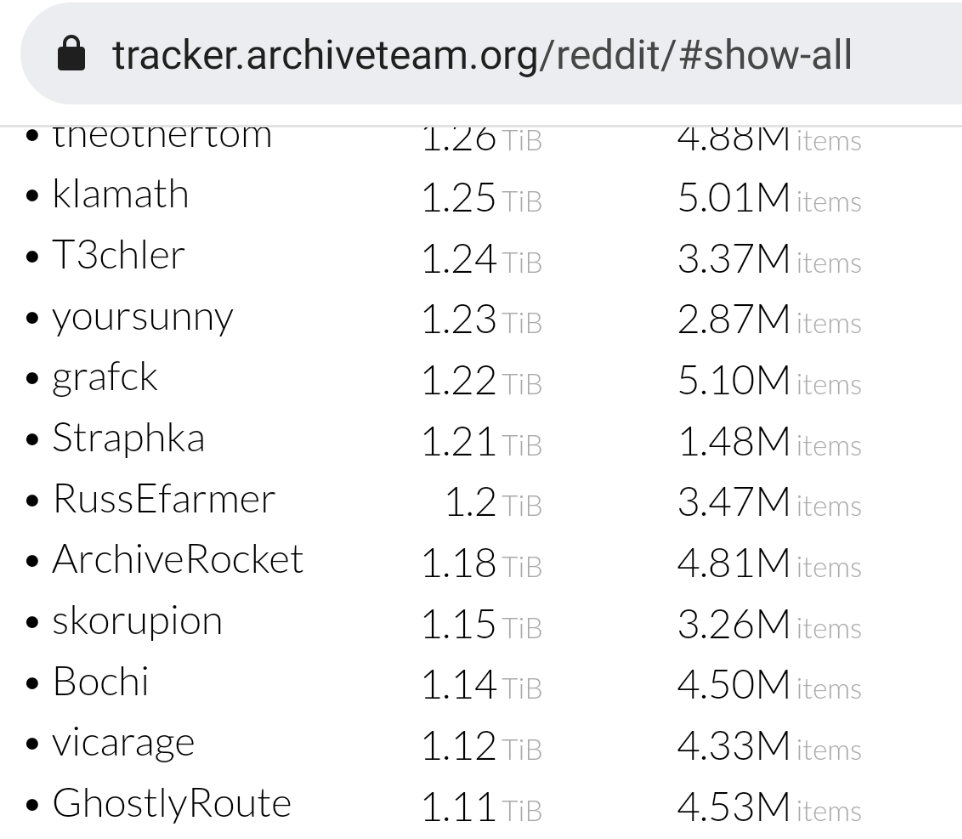
    Where's @skorupion on the Reddit leaderboard?
    We accept Karma donations for the last flan. 🍮 affbrr

  • Not_OlesNot_Oles Provider
    edited January 2022

    @Ganonk said:

    @vyas said:

    And….
    There is the ever popular
    $5 !

    I think it is quite funny how @Ganonk subtracted $2! It's been added to Best-of-LES! :)

  • @Not_Oles said:

    @Ganonk said:

    @vyas said:

    And….
    There is the ever popular
    $5 !

    I think it is quite funny how @Ganonk subtracted $2! It's been added to Best-of-LES! :)

    Also
    Possible that
    @Ganonk hangs around with @FAT32 a lot.
    .#squeezeadeal

  • @chimichurri said:
    Two ideas:
    1. Check my sig ;) (assuming they come with a dedicated/unlimited CPU, or the provider gives clear limits e.g. no more than 30% of CPU that you could apply on the thing with cpulimit or a cgroup or something )
    2. http://warrior.archiveteam.org/

    Thanks for the ideas. First one is no go since none of the cores are dedicated and ToS for most of the plans specifically disallows such distributed compute. Second one seems more viable. I'll look at that, thanks again for the idea.

  • @yoursunny said:
    Where's @skorupion on the Reddit leaderboard?

    Nice, that's me on the list! I should go and find some idler to not loose the spot. :P

  • @Bochi said:
    I should go and find some idler to not loose the spot. :P

    "loose" is not skint.
    It should be "lose".

    We accept Karma donations for the last flan. 🍮 affbrr

  • If they would be bigger, more memory and disk, you could run your own microLXC and rent them for whatever.

  • @Neoon said:
    If they would be bigger, more memory and disk, you could run your own microLXC and rent them for whatever.

    Where to get the webapp of microLXC control software?

    We accept Karma donations for the last flan. 🍮 affbrr

  • @yoursunny said:

    @Neoon said:
    If they would be bigger, more memory and disk, you could run your own microLXC and rent them for whatever.

    Where to get the webapp of microLXC control software?

    LXD has a JSON API right, he in theory could build it.

  • @Neoon said:

    @yoursunny said:

    @Neoon said:
    If they would be bigger, more memory and disk, you could run your own microLXC and rent them for whatever.

    Where to get the webapp of microLXC control software?

    LXD has a JSON API right, he in theory could build it.

    It ain't microLXC if it isn't microLXC control software.
    We want the real microLXC control software.

    We accept Karma donations for the last flan. 🍮 affbrr

  • @yoursunny said:

    @Neoon said:

    @yoursunny said:

    @Neoon said:
    If they would be bigger, more memory and disk, you could run your own microLXC and rent them for whatever.

    Where to get the webapp of microLXC control software?

    LXD has a JSON API right, he in theory could build it.

    It ain't microLXC if it isn't microLXC control software.
    We want the real microLXC control software.

    That's what she said.

  • @Neoon said:
    If they would be bigger, more memory and disk, you could run your own microLXC and rent them for whatever.

    How much time do you spend dealing with tech support and/or abuse in that case? Or do your eligibility filters largely solve that.

    Technically, the LXC containers are already running. Potentially there's some things could be done, e.g. 6x 128M on the Amsterdam 1G and then NFS mount 30-40GB disk. From memory they're both in Equinix.

    root@debtest:/# free -m
                  total        used        free      shared  buff/cache   available
    Mem:            128           9          86           6          31         118
    Swap:           256           0         256
    root@debtest:/# df -k
    Filesystem       1K-blocks   Used Available Use% Mounted on
    /dev/vg0/debtest   1992552 482728   1388584  26% /
    none                   492      4       488   1% /dev
    devtmpfs            497900      0    497900   0% /dev/tty
    tmpfs               503716      0    503716   0% /dev/shm
    tmpfs               503716   6648    497068   2% /run
    tmpfs                 5120      0      5120   0% /run/lock
    
  • @tetech said:

    @Neoon said:
    If they would be bigger, more memory and disk, you could run your own microLXC and rent them for whatever.

    How much time do you spend dealing with tech support and/or abuse in that case? Or do your eligibility filters largely solve that.

    Nearly zero, maybe 1-2 requests per week, abuse is usually 1 or 2 per year.

  • @Neoon said:

    @yoursunny said:

    @Neoon said:

    @yoursunny said:

    @Neoon said:
    If they would be bigger, more memory and disk, you could run your own microLXC and rent them for whatever.

    Where to get the webapp of microLXC control software?

    LXD has a JSON API right, he in theory could build it.

    It ain't microLXC if it isn't microLXC control software.
    We want the real microLXC control software.

    That's what she said.

    Really? She asked you for the software? #doubt

  • @yoursunny said:

    @Neoon said:

    @yoursunny said:

    @Neoon said:
    If they would be bigger, more memory and disk, you could run your own microLXC and rent them for whatever.

    Where to get the webapp of microLXC control software?

    LXD has a JSON API right, he in theory could build it.

    It ain't microLXC if it isn't microLXC control software.
    We want the real microLXC control software.

    At least I put a routed /64 in each LXC, in this case via tunnelbroker.

    # ./mlxc.sh add --name=debtest2 --mem=128M --swap=256M --disk=2G --cpu=10 --distro=debian --rel=bullseye
    CREATING CONTAINER...
    Using image from local cache
    Unpacking the rootfs
    
    ---
    You just created a Debian bullseye amd64 (20220108_05:24) container.
    
    To enable SSH, run: apt install openssh-server
    No default root or user password are set by LXC.
    CONFIGURING RESOURCES...
    CONFIGURING NETWORK...
    # lxc-attach -n debtest2
    root@debtest2:~# ping6 -c 5 google.com
    PING google.com(dfw25s25-in-x0e.1e100.net (2607:f8b0:4000:80e::200e)) 56 data bytes
    64 bytes from dfw25s25-in-x0e.1e100.net (2607:f8b0:4000:80e::200e): icmp_seq=1 ttl=120 time=1.07 ms
    64 bytes from dfw25s25-in-x0e.1e100.net (2607:f8b0:4000:80e::200e): icmp_seq=2 ttl=120 time=1.40 ms
    64 bytes from dfw25s25-in-x0e.1e100.net (2607:f8b0:4000:80e::200e): icmp_seq=3 ttl=120 time=1.05 ms
    64 bytes from dfw25s25-in-x0e.1e100.net (2607:f8b0:4000:80e::200e): icmp_seq=4 ttl=120 time=1.40 ms
    64 bytes from dfw25s25-in-x0e.1e100.net (2607:f8b0:4000:80e::200e): icmp_seq=5 ttl=120 time=1.40 ms
    
    --- google.com ping statistics ---
    5 packets transmitted, 5 received, 0% packet loss, time 8035ms
    rtt min/avg/max/mdev = 1.052/1.261/1.399/0.165 ms
    root@debtest2:~# free -m
                   total        used        free      shared  buff/cache   available
    Mem:             128           7          97           0          22         120
    Swap:            256           0         256
    root@debtest2:~# df -k
    Filesystem        1K-blocks   Used Available Use% Mounted on
    /dev/vg0/debtest2   1992552 339264   1532048  19% /
    none                    492      4       488   1% /dev
    devtmpfs             497904      0    497904   0% /dev/tty
    tmpfs                503716      0    503716   0% /dev/shm
    tmpfs                201488     44    201444   1% /run
    tmpfs                  5120      0      5120   0% /run/lock
    
  • @tetech said:
    At least I put a routed /64 in each LXC, in this case via tunnelbroker.

    # ./mlxc.sh add --name=debtest2 --mem=128M --swap=256M --disk=2G --cpu=10 --distro=debian --rel=bullseye
    CREATING CONTAINER...
    Using image from local cache
    Unpacking the rootfs
    
    ---
    You just created a Debian bullseye amd64 (20220108_05:24) container.
    
    To enable SSH, run: apt install openssh-server
    No default root or user password are set by LXC.
    CONFIGURING RESOURCES...
    CONFIGURING NETWORK...
    

    What's in your mlxc.sh?
    It looks useful.

    I'm using Debian 11 lxc-unpriv-create command.
    It can't set any limits on the container, so that every container could use all the RAM and disk on the host machine.
    Not really a problem for internal use though.

    We accept Karma donations for the last flan. 🍮 affbrr

  • @yoursunny said:

    @tetech said:
    At least I put a routed /64 in each LXC, in this case via tunnelbroker.

    # ./mlxc.sh add --name=debtest2 --mem=128M --swap=256M --disk=2G --cpu=10 --distro=debian --rel=bullseye
    CREATING CONTAINER...
    Using image from local cache
    Unpacking the rootfs
    
    ---
    You just created a Debian bullseye amd64 (20220108_05:24) container.
    
    To enable SSH, run: apt install openssh-server
    No default root or user password are set by LXC.
    CONFIGURING RESOURCES...
    CONFIGURING NETWORK...
    

    What's in your mlxc.sh?
    It looks useful.

    I'm using Debian 11 lxc-unpriv-create command.
    It can't set any limits on the container, so that every container could use all the RAM and disk on the host machine.
    Not really a problem for internal use though.

    The essence of it (cutting out the parameter parsing etc.):

      echo "CREATING CONTAINER..."
      DOWNLOAD_KEYSERVER="keyserver.ubuntu.com" lxc-create --vgname=vg0 -B lvm -n ${NAME} --fssize ${DISK} -t download -- -d ${DISTRO} -r ${REL} -a amd64
      echo "CONFIGURING RESOURCES..."
      echo "lxc.cgroup.memory.limit_in_bytes = ${MEM}" >> /var/lib/lxc/${NAME}/config
      echo "lxc.cgroup.memory.memsw.limit_in_bytes = ${SWAP}" >> /var/lib/lxc/${NAME}/config
      cyc=`echo "50000 100 / ${CPU} * p" | dc`
      echo "lxc.cgroup.cpu.cfs_quota_us=${cyc}" >> /var/lib/lxc/${NAME}/config
      echo "lxc.cgroup.cpu.cfs_period_us=50000" >> /var/lib/lxc/${NAME}/config
      echo "CONFIGURING NETWORK..."
      hwa0="00:16:3e:$(openssl rand -hex 3| sed 's/\(..\)/\1:/g; s/.$//')"
      sed -i -e "s/^\(lxc.net.0.hwaddr\).*/\1 = ${hwa0}/" /var/lib/lxc/${NAME}/config
      lxc-start -n ${NAME}
      lxc-attach -n ${NAME} -- sed -i -e "s/iface eth0.*/iface eth0 inet6 auto/" /etc/network/interfaces
      lxc-attach -n ${NAME} -- bash -c 'echo "nameserver 2606:4700:4700::1111" > /etc/resolv.conf'
      lxc-attach -n ${NAME} -- bash -c 'echo "nameserver 2606:4700:4700::1001" >> /etc/resolv.conf'
    

    I haven't bothered making my own templates, at least yet. These are unprivileged containers.

    # lxc-ls -f
    NAME     STATE   AUTOSTART GROUPS IPV4 IPV6                                  UNPRIVILEGED
    debtest  RUNNING 1         -      -    2001:470:xxxx:yyyy:216:3eff:fe52:41d2 true
    debtest2 RUNNING 1         -      -    2001:470:xxxx:yyyy:216:3eff:fec8:16cd true
    
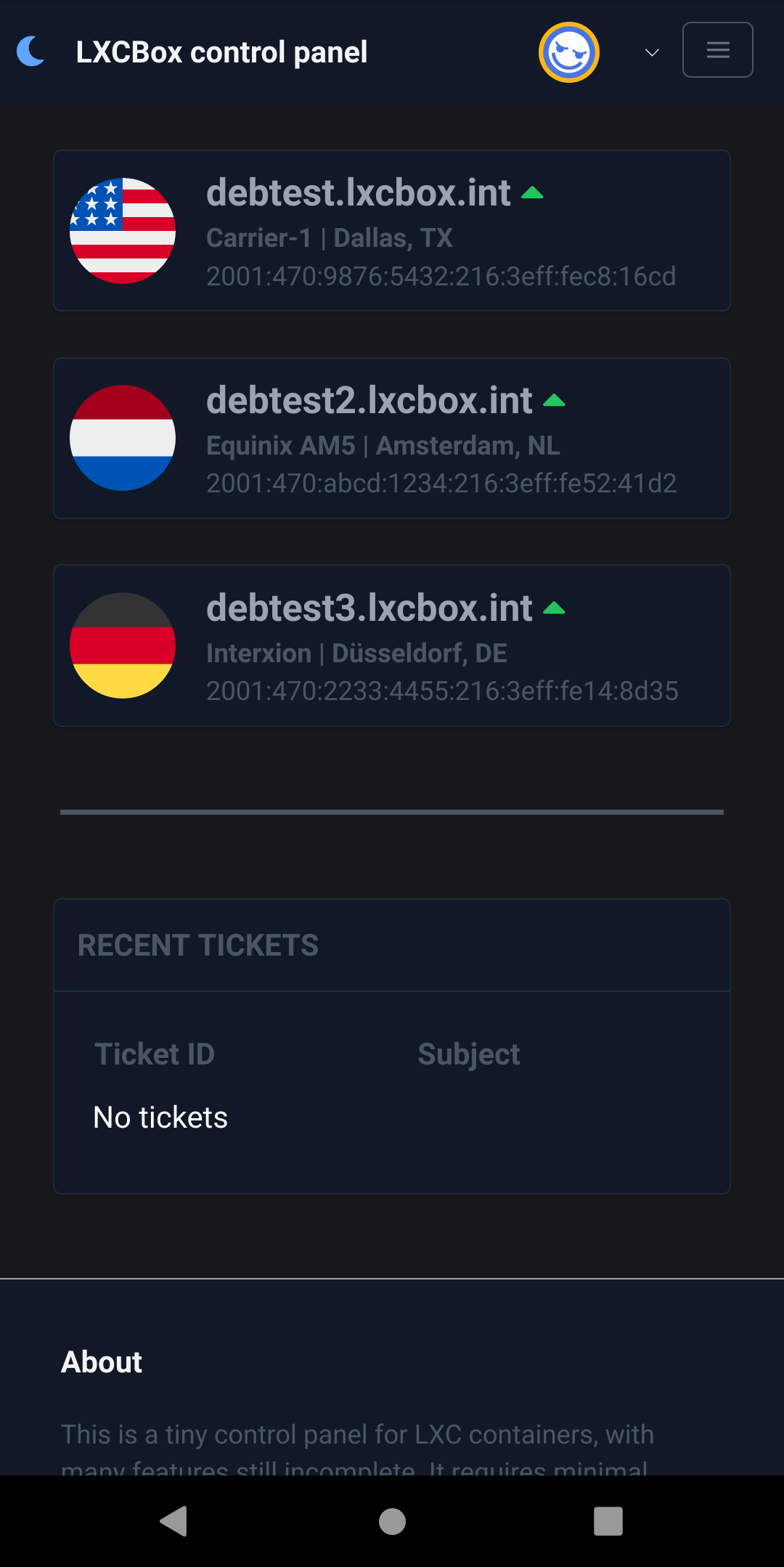
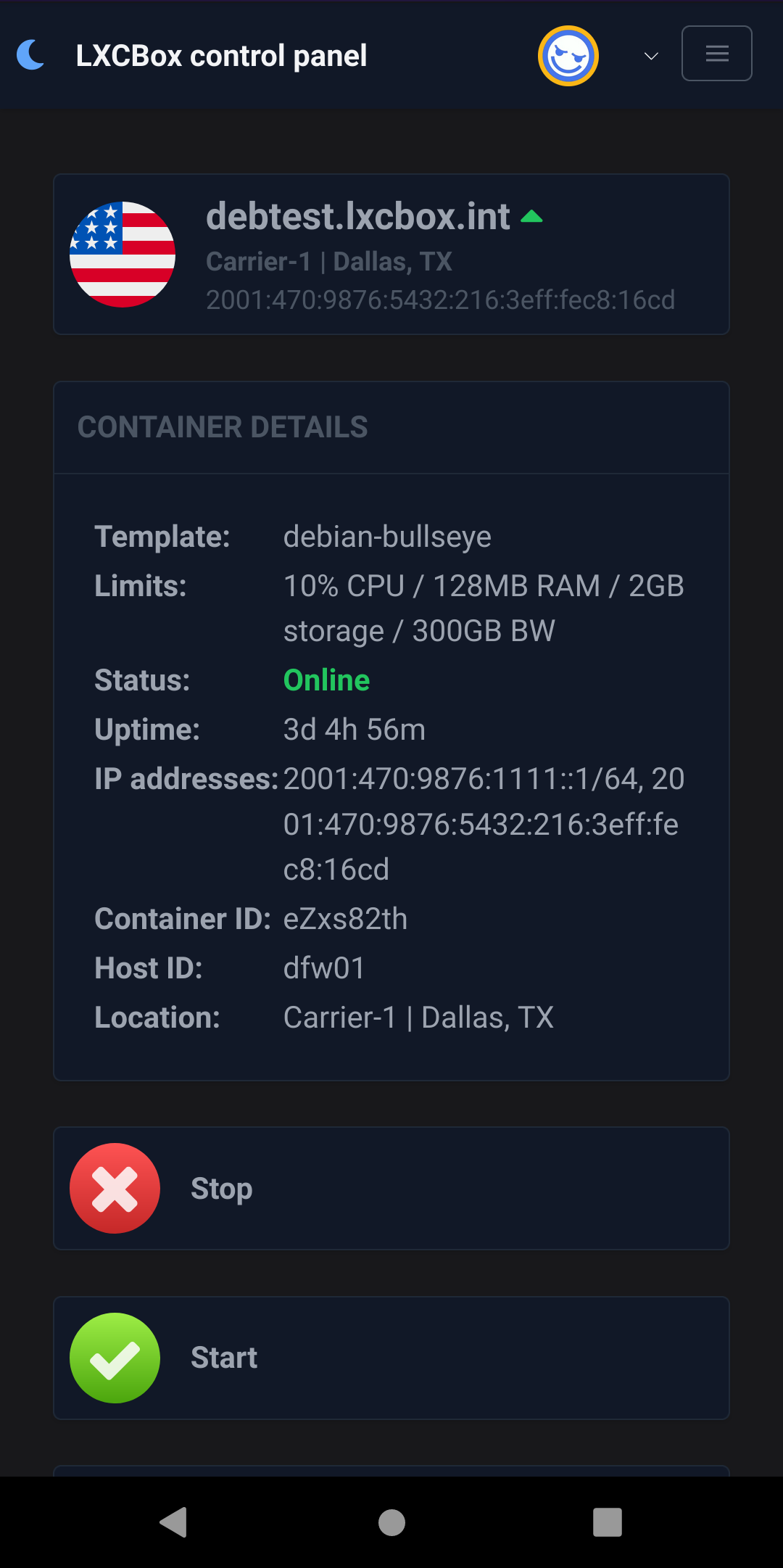
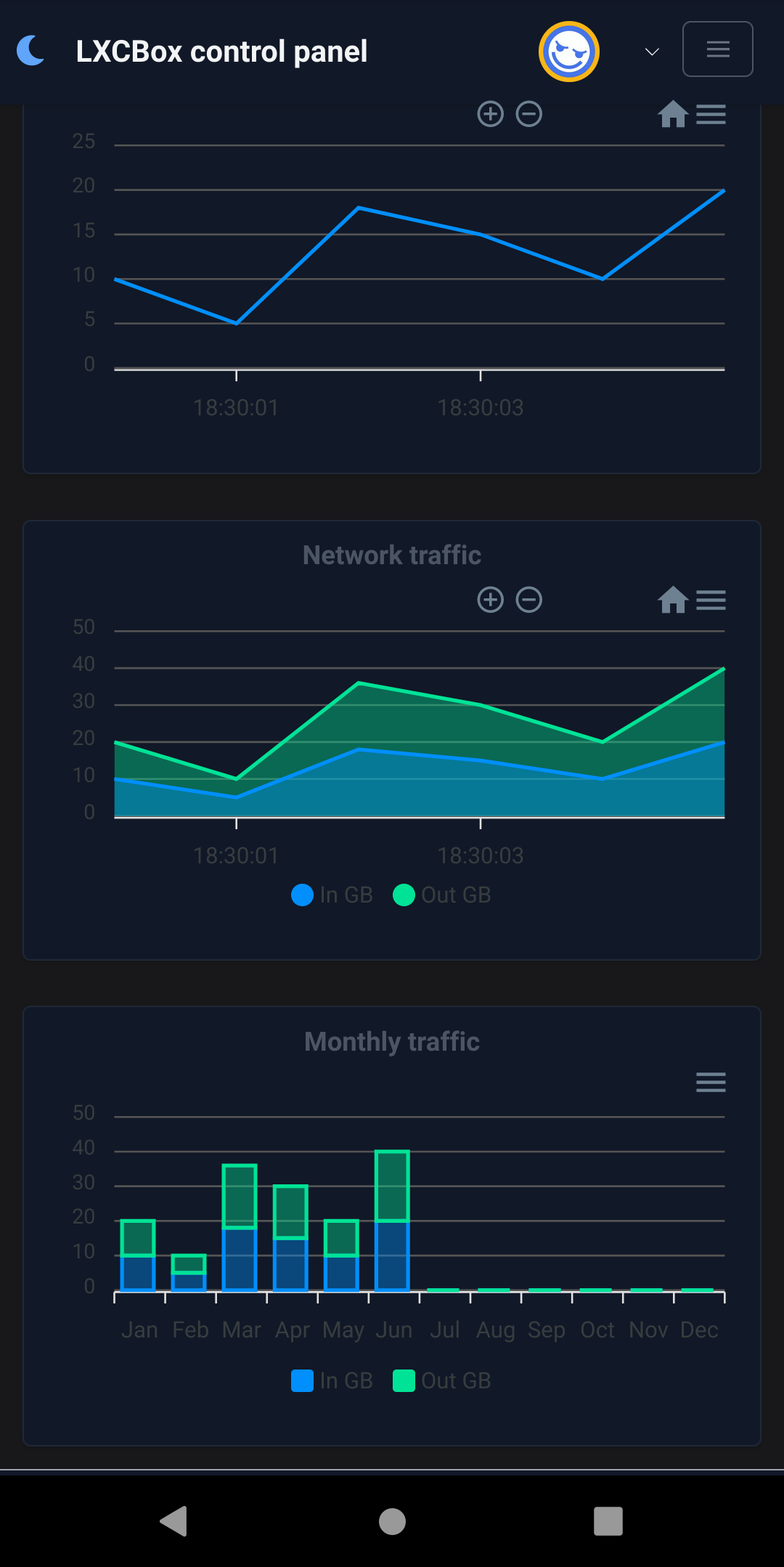
  • I kind of decided I should whip up some type of control panel. Seems nothing works well/properly on the low-end stuff I'm running. Proxmox certainly isn't going to be suitable.

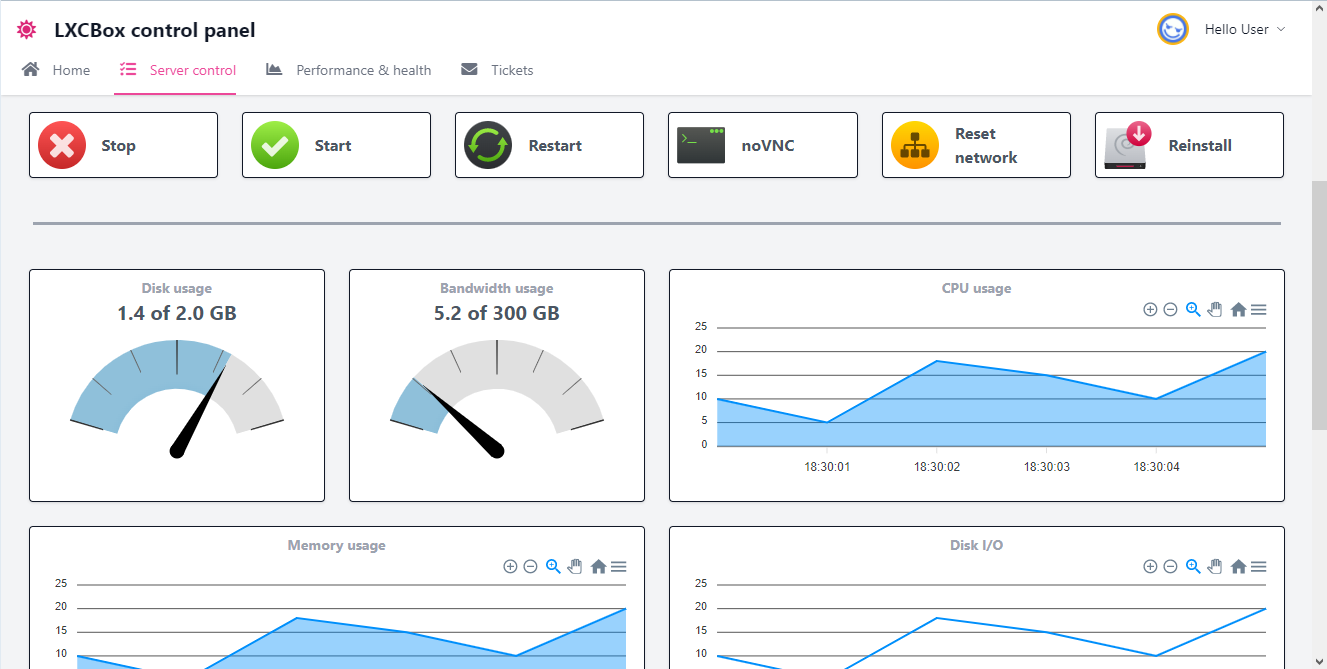
  • I'm the first to admit that it won't win prizes for UI, but this is what I got so far. Stats are obviously faked, I didn't do the Prometheus connector yet.
  • @tetech i encourage you to continue adding mocks with main important functions. Then start the backend API immediately. thats way you can be 70% complete better than nothing at all... so don't worry how it looks like now.

  • tetechtetech OG
    edited January 2022

    @ehab said:
    @tetech i encourage you to continue adding mocks with main important functions. Then start the backend API immediately. thats way you can be 70% complete better than nothing at all... so don't worry how it looks like now.

    Oh, the important functionality is mostly done. Here's noVNC.
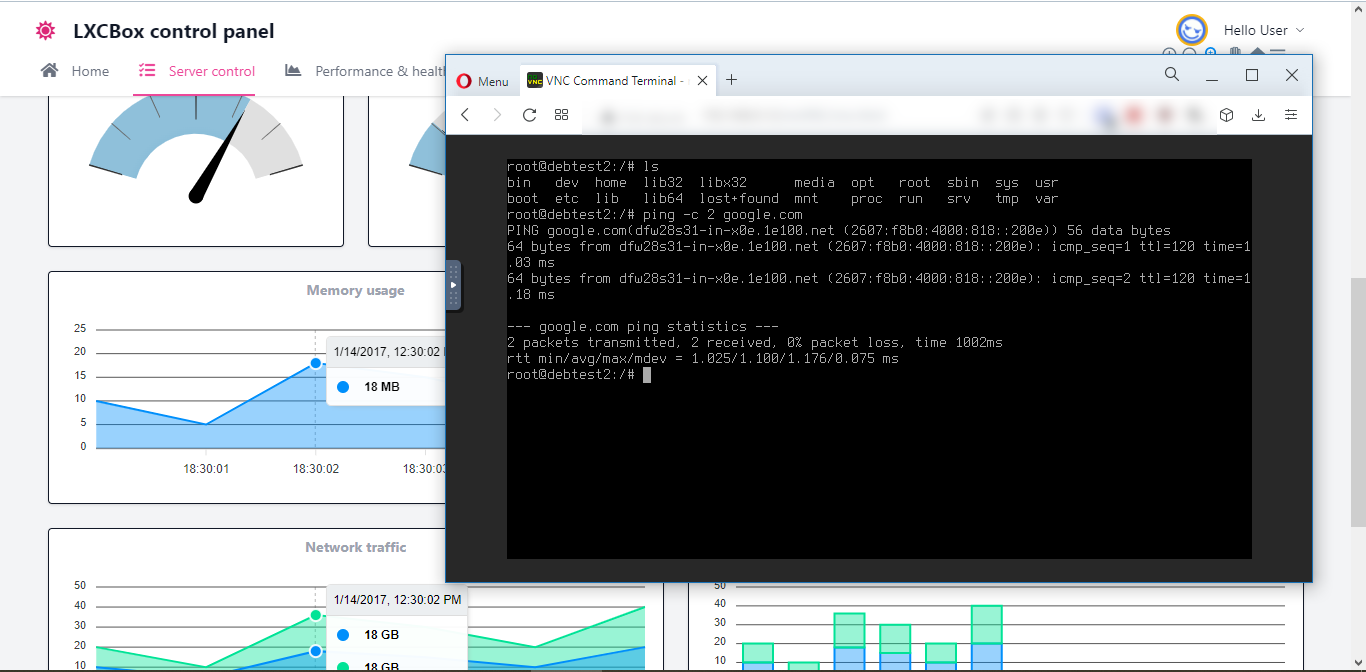
    To be clear, my time budget for this is around 20 hours and I've already burned a third of it, so it won't get too fancy.

  • Status this morning:

    • Minor changes to UI from the screenshots. A few new things like SSH key download.
    • Control (start/stop/restart/noVNC) is complete.
    • Security is mostly finished - login/out, forgot/change password, verifying permissions in API, etc.
    • API is mostly complete (exceptions below) so it is displaying live data

    To be finished:

    • The remaining things in the API are related to profile: changing avatar, updating preferences
    • Reinstall/reset network functionality not done yet
    • Stats are reported but not recorded (integration with Prometheus not done yet)

    I came up with a longer list for the future (like 2FA) but the main goal of this is to get something super light-weight which might make mini containers feasible.

  • Prometheus integration is working, plus the profile/preferences. Fiddled with the UI a bit, but still don't claim it is good.

    I'll set up a new node and optimize the memory usage a bit, then maybe it is time for someone else to take it for a test-drive. Memory is already not bad:

    # lxc-ls --running
    debtest2 eZxs82th
    # free -m
                  total        used        free      shared  buff/cache   available
    Mem:            984          78         190           0         715         886
    Swap:          1024           0        1024
    # ps -o comm,rss | grep m$
    systemd-journal   10m
    node_exporter     19m
    

    So under 100MB of RAM used for two LXC containers, and that includes 20MB for Prometheus monitoring.


  • Not_OlesNot_Oles Provider
    edited January 2022

    @tetech said:
    To be clear, my time budget for this is around 20 hours

    Seems like a lot has been accomplished in a short time! Congrats! 🎉

  • @Not_Oles said:

    @tetech said:
    To be clear, my time budget for this is around 20 hours

    Seems like a lot has been accomplished in a short time! Congrats! 🎉

    It blew out to at least 30 :( I had to learn the Prometheus API from scratch and after that I refactored some things.

  • @tetech said:

    @Not_Oles said:

    @tetech said:
    To be clear, my time budget for this is around 20 hours

    Seems like a lot has been accomplished in a short time! Congrats! 🎉

    It blew out to at least 30 :( I had to learn the Prometheus API from scratch and after that I refactored some things.

    It's okay! Lots of folks like Prometheus so you learned something useful! 🆗

  • NeoonNeoon OG
    edited January 2022

    Quite possible, I think the initial NanoKVM Panel was 40 hours including Documentation.
    If you know the stuff you are going to work with, its easy possible in this time.

    The big time eater, is solving issues, if I did not had run into a few, I likely would be done faster.

  • (off-topic, but I remember finding a nice "night sky" monitor service from @Neoon on the og lowendspirit forum when I was learning the ropes on my first little ovz nat from deepnet solutions)

    HS4LIFE (+ (* 3 4) (* 5 6))

  • @Neoon said:
    The big time eater, is solving issues, if I did not had run into a few, I likely would be done faster.

    Yeah, agreed.

  • tetechtetech OG
    edited January 2022

    Looking for a volunteer/sucker/guinea pig to do an initial test. Same requirements as @Neoon,

    • Your account needs to be 6 months old
    • You need to have at least 50 Posts
    • You need to have at least 50 Likes

    But I don't have a fancy bot so the invite/provisioning is manual at the moment. In terms of the actual LXC container, it would be 128 MB RAM in Chicago, most notably IPv6 only. You'll get a routed /64 from tunnelbroker. Anyone want to kick the tyres and share some thoughts? https://www.lxcbox.cloud

    root@FG74Tru9:/# ping6 -c 10 cloudflare.com
    PING cloudflare.com(2606:4700::6810:85e5 (2606:4700::6810:85e5)) 56 data bytes
    64 bytes from 2606:4700::6810:85e5 (2606:4700::6810:85e5): icmp_seq=1 ttl=58 time=2.43 ms
    64 bytes from 2606:4700::6810:85e5 (2606:4700::6810:85e5): icmp_seq=2 ttl=58 time=2.59 ms
    64 bytes from 2606:4700::6810:85e5 (2606:4700::6810:85e5): icmp_seq=3 ttl=58 time=2.59 ms
    64 bytes from 2606:4700::6810:85e5 (2606:4700::6810:85e5): icmp_seq=4 ttl=58 time=2.70 ms
    64 bytes from 2606:4700::6810:85e5 (2606:4700::6810:85e5): icmp_seq=5 ttl=58 time=2.47 ms
    64 bytes from 2606:4700::6810:85e5 (2606:4700::6810:85e5): icmp_seq=6 ttl=58 time=2.39 ms
    64 bytes from 2606:4700::6810:85e5 (2606:4700::6810:85e5): icmp_seq=7 ttl=58 time=2.47 ms
    64 bytes from 2606:4700::6810:85e5 (2606:4700::6810:85e5): icmp_seq=8 ttl=58 time=2.63 ms
    64 bytes from 2606:4700::6810:85e5 (2606:4700::6810:85e5): icmp_seq=9 ttl=58 time=2.48 ms
    64 bytes from 2606:4700::6810:85e5 (2606:4700::6810:85e5): icmp_seq=10 ttl=58 time=2.66 ms
    
    --- cloudflare.com ping statistics ---
    10 packets transmitted, 10 received, 0% packet loss, time 9097ms
    rtt min/avg/max/mdev = 2.393/2.540/2.697/0.099 ms
    
  • MasonMason OG
    edited January 2022

    @tetech said: Looking for a volunteer/sucker/guinea pig to do an initial test.

    May be worth opening a new thread with all this info depending on how many users you want to bring on since it's pretty well buried in this thread :)

    Good luck!! Panel looks great

    yabs daddy

  • Not_OlesNot_Oles Provider
    edited January 2022

    @tetech said: volunteer/sucker/guinea pig to do an initial test.

    Me. If you want. I don't need it for anything, but delighted to help you test! 🤩

  • @Mason said:

    @tetech said: Looking for a volunteer/sucker/guinea pig to do an initial test.

    May be worth opening a new thread with all this info depending on how many users you want to bring on since it's pretty well buried in this thread :)

    Good luck!! Panel looks great

    Thanks for the encouragement. I don't consider being inconspicuous a bad thing at the moment ;)

    That may change, but at first I'd like to do a sanity check of whether the containers work and I haven't done a major screw-up!

    @Not_Oles said:

    @tetech said: volunteer/sucker/guinea pig to do an initial test.

    Me. If you want. I don't need it for anything, but delighted to help you test! 🤩

    Thanks! Happy for you to take it for a test drive for however long you want. Preference for template? Debian bullseye? (can't choose that yourself yet... probably next week)

  • @tetech said: Preference for template? Debian bullseye?

    Sure, Debian, please. Will be fun! 🎉

    I expect to be busy Monday, but other days next week should be fine.

    Have a nice weekend! :)

  • First, a big thank you to @Not_Oles for testing! He's picked up several dumb errors and made good suggestions.

    The ability to reset networking and reinstall the LXC container (same or new template) has been added to the control panel. Still a bit fragile but in the process of improving. You can (in theory) choose any of the available LXC templates.

    Next thing when time permits is I'll let people provision their own container. It has a lot in common with reinstalling, so shouldn't be too much work.

  • @tetech said: First, a big thank you to @Not_Oles for testing!

    Hi @tetech! You're welcome! It's fun to work with you! I appreciate your prompt replies and kind suggestions! :)

    He's picked up several dumb errors and made good suggestions.

    I didn't see any dumb errors! :) It all looks pretty good to me! ✅

    Best wishes and kindest regards! :)

  • @Not_Oles said: I didn't see any dumb errors!

    I would say changing the firewall and killing network access to the container was a dumb error! :disappointed: But easily fixed.

    The panel now allows users to provision their own containers. The way I'll do it (at least initially) is give each user a total "RAM budget", e.g. 128MB. You can allocate it on whichever node has free RAM, split it into two 64MB's, etc.

    The amount of disk/bandwidth is given as a ratio "per 64MB of RAM". In the example below, it is 1GB disk and 0.5TB BW per 64MB RAM, so if you create a container with 128MB of RAM you'd get 2GB disk and 1TB RAM. The reason for doing it like this is that the plans of the KVM "host" are pretty different - one is 1GB RAM / 5GB NVMe, another is 0.5GB RAM / 250GB HDD. But RAM is almost always the most severe constraint.


    Thanks again to @Not_Oles for valiant testing. I'm probably going to stop adding panel features and add more hosts to the pool, then take up @Mason's suggestion of a new thread.

Sign In or Register to comment.