

YABS Updates! Stats... Wiki... RISC-V... Oh my!!


Hey all! Wanted to share a slew of updates that have rolled out to YABS lately. Some bug fixes, some behind-the-scenes improvements, and a few additions.
Feedback, suggestions, cheers and jeers are welcome!
Summary of recent major changes below. Disclaimer: I absolutely used AI to assist with much of this work (combination of GitHub Copilot and Devin.ai).
Daily & Historical Usage Stats
A little side project I put together to get an idea of just how often YABS is actually being run, and where in the world it's being used.
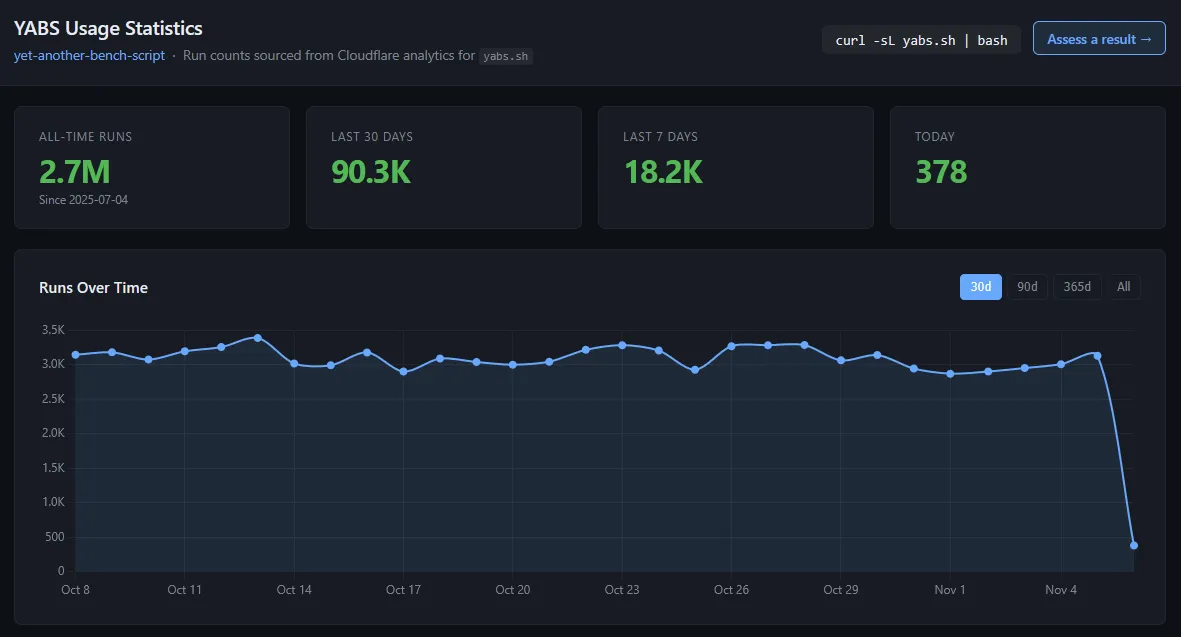
The YABS Stats dashboard pulls aggregate usage data from Cloudflare analytics and provides a breakdown of YABS runs over various time periods (7/30/90/365 days, or all-time).
Some of the things available:
- Daily and historical run counts.
- Top countries by usage.
- Unique IPs per day.
- Activity by hour (UTC).
I've also spent some time cleaning up how runs are counted to filter out noise. The numbers are based on requests that actually get served the YABS script (curl/wget), rather than just counting every random request that hits the domain. Had a handful of IPs skewing the numbers pretty badly at one point.
The whole thing is also pretty lightweight behind the scenes. Cloudflare analytics are pulled on a schedule via GitHub Actions, rolled into a static JSON file, and published through GitHub Pages. No database or application server to babysit.
Check it out: https://stats.yabs.sh/
Wiki
Finally got around to putting together some actual documentation for YABS. The YABS Wiki went live recently and has quite a bit of content in it already. I personally found the History of YABS page the most interesting based on what my AI minions were able to find in old LES/LET/HB threads.
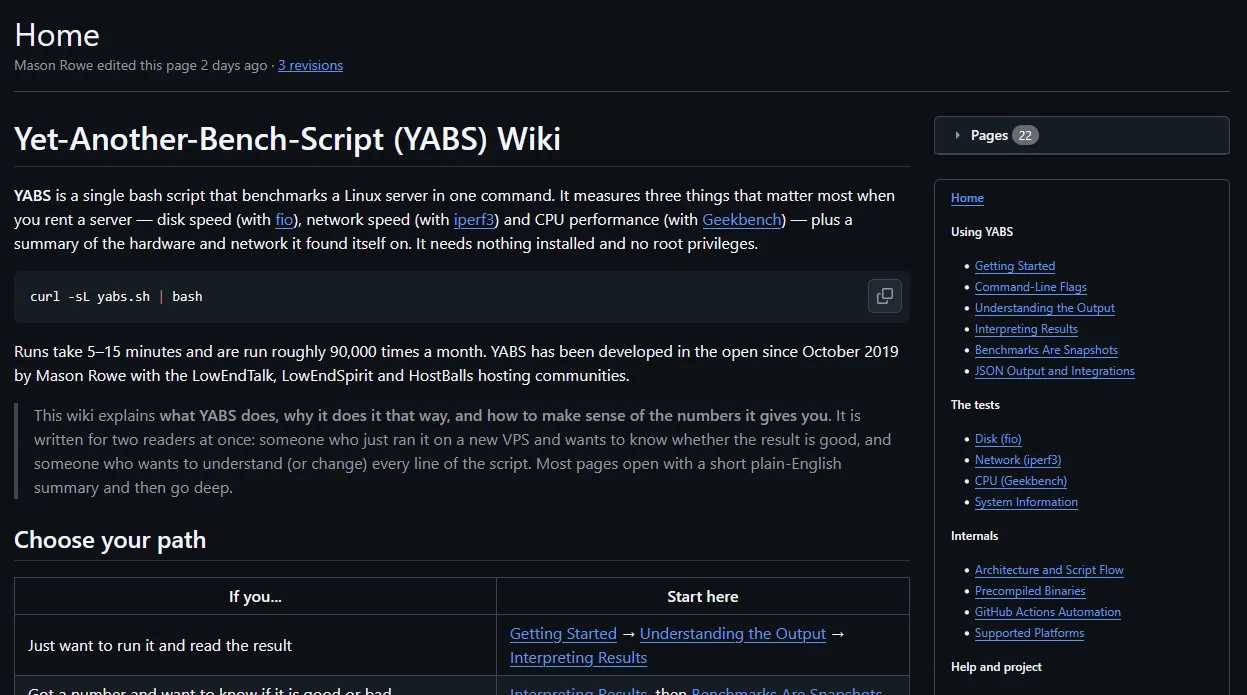
The goal here was to have somewhere people can go to understand what YABS is actually doing and what all the numbers mean. I more or less unleashed my agent minions to scour threads and posts about yabs and yabs results to build enough understanding about what folks are looking for and care about.
A few of the major sections:
- Getting Started & Understanding Output: A walkthrough of how to run YABS and what each section of the output actually represents.
- Interpreting Results: Expected performance ranges for different storage types, CPU performance, network speeds, etc. Also covers things like caching, throttling, QoS limits, overselling, and other common reasons benchmark results can be misleading.
- Testing Details: A fairly deep dive into exactly how the fio, iperf3, and Geekbench tests work, including the commands, parameters, and methodology behind them.
- Command-Line Flags & JSON Output: Documentation for the available flags, skipping tests, reducing bandwidth usage, selecting Geekbench versions, and working with JSON output/integrations.
- Supported Platforms: Architecture and distro compatibility, containers, WSL, and some of the known limitations.
- Internals & Automation: How the script is put together, where the precompiled binaries come from, and how the new GitHub Actions build pipelines work.
- Troubleshooting & FAQ: Some of the more common errors and quirks people run into.
There are a bunch of other pages in there as well.
Particularly interested in feedback on the Interpreting Results section. There's obviously a lot of nuance involved in benchmarking VPS/dedicated server hardware, and I'm hoping this helps provide some useful context beyond just throwing a bunch of numbers at people.
Wiki: https://github.com/masonr/yet-another-bench-script/wiki
Quick YABS Results Assessment
This one is brand new. Ever run YABS on a VPS and wonder whether the results are actually any good or meet the advertised specs? This tool gives a quick assessment of the provided results.
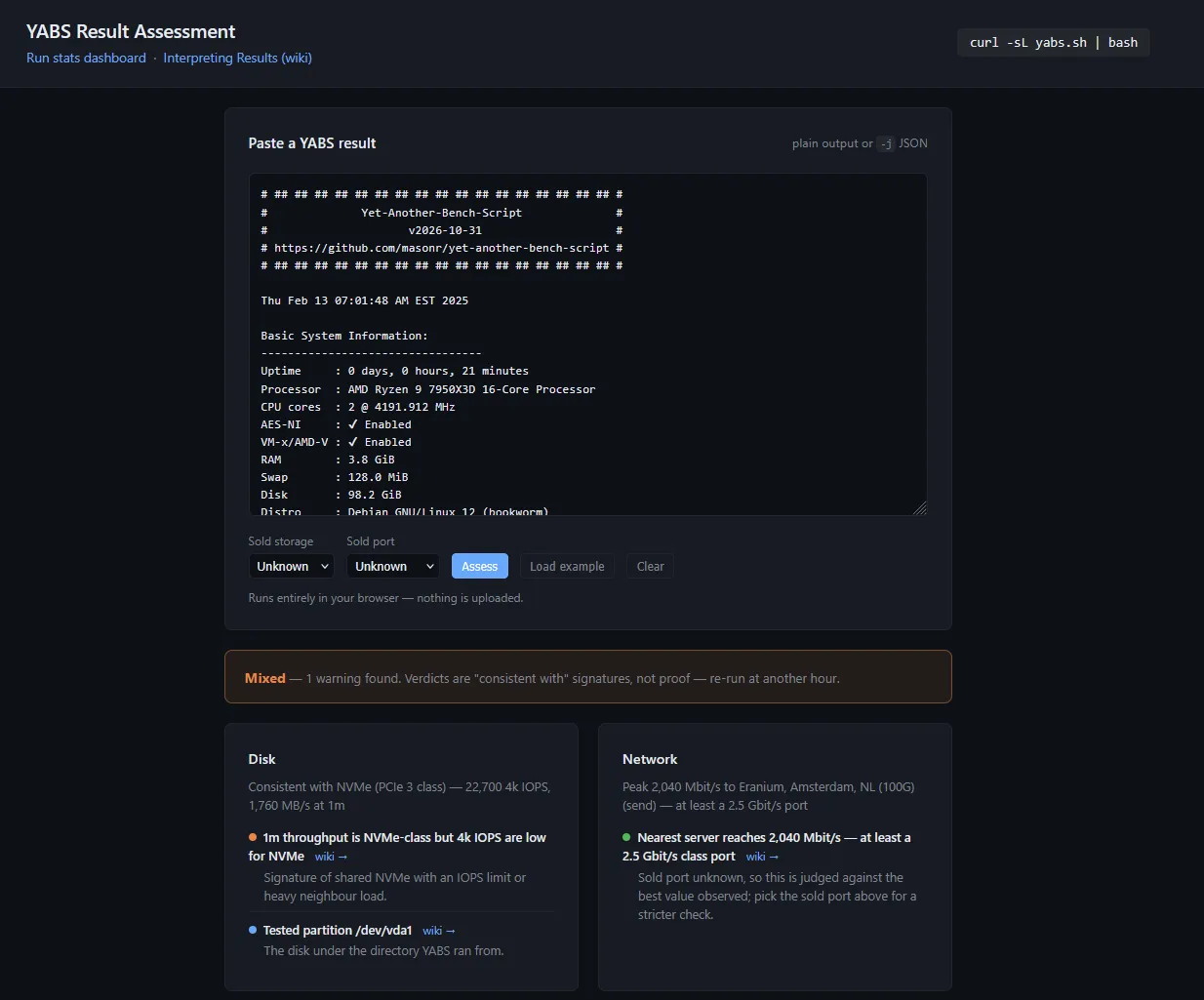
I've added a Quick Results Assessment tool to the stats website. You can paste your YABS output into it, optionally provide some additional context about what the provider is advertising (storage type, network port speed, etc.), and it'll give you a breakdown of what it sees.
It looks at things like:
- Disk performance relative to the advertised storage type.
- Potential caching, throttling, or QoS limitations based on the fio results.
- Network throughput relative to the expected port speed.
- CPU performance and Geekbench single/multi-core scaling.
- Other common benchmarking gotchas and potential red flags.
It'll also point you toward the relevant Wiki sections if you want to dig into something a little further.
Obviously this isn't intended to be some definitive pass/fail grade for your server. There are a ton of variables involved with benchmarking shared infrastructure, and a single YABS run is just a snapshot in time. The idea is to give people a quick sanity check and some additional context when looking at their results.
Also worth noting: the assessment runs entirely in your browser. Nothing gets uploaded or sent anywhere.
Give it a whirl: https://stats.yabs.sh/assess
Geekbench Results & Improvements
After working with the Geekbench devs for several months, we were able to get this bug finally patched up.
Previously, YABS would run Geekbench, grab the resulting URL, and then make an additional curl request to the public Geekbench Browser results page to scrape the single-core and multi-core scores. It worked up until a CloudFlare challenge was slapped in front of all the results pages.
Newer Geekbench 6 and 7 releases actually print the scores directly to stdout in their Benchmark Summary section. YABS now consumes those values directly from the native Geekbench output instead of making another HTTP request to scrape the results page.
Also, for those who missed it, Geekbench 7 support was added back in July. You can select it with the -7 flag. Geekbench 6 remains the default for now (feedback on when to switch?).
RISC-V Architecture Support
YABS now has experimental support for 64-bit RISC-V (riscv64)!
This includes architecture detection, hardware/system information reporting, precompiled fio and iperf3 binaries, and support for Primate Labs' RISC-V preview builds of Geekbench 5, 6, and 7.
There was a bit of extra work involved here beyond just compiling some binaries. RISC-V reports certain hardware information differently from the more familiar x86/ARM platforms, so some of the system information detection and reporting needed adjustments as well.
This is still very much experimental. I don't exactly have a rack full of RISC-V hardware sitting around to test against, so validation across different devices is limited. If anyone here has a RISC-V system and wants to give it a try, I'd certainly appreciate the feedback.
Automated binary builds via GitHub Actions
A bit more of a behind-the-scenes improvement, but a pretty significant one from a maintenance standpoint.
Historically, the precompiled fio and iperf3 binaries included with YABS were built and updated manually. That meant compiling the various architecture-specific binaries, checking them, and then uploading everything whenever I got around to bumping the versions.
That's now been moved over to automated GitHub Actions workflows. The workflows periodically check upstream for new fio/iperf3 releases and, when a new version is available, automatically build the portable static binaries for all supported architectures.
There's a little more to it than just compiling and uploading:
- Builds are performed through GitHub Actions across the supported architectures (x86, x86_64, ARM, ARM64, and RISC-V).
- Binary portability/static linking is checked as part of the build process.
- Each binary is submitted to VirusTotal for scanning.
- SHA256 checksums and the upstream source archives are included with published releases.
- Releases are only published when the build and scanning steps complete successfully.
There's also a ShellCheck workflow that automatically lints the main script on pushes to the repository.
The end result is a much more reproducible process, less manual maintenance, and hopefully more frequent updates to the binaries without me having to remember to do it myself.
You can see the workflows and build details here: GitHub Actions Automation.
There have been a bunch of smaller changes sprinkled throughout as well, particularly around architecture detection, hardware information reporting, compatibility with minimal Linux environments, and various edge cases in test execution and output handling. Not all that exciting individually, but they add up.
Anyway, that's the gist of the more significant changes.
For anyone who hasn't checked it out in a while:
GitHub: https://github.com/masonr/yet-another-bench-script/
Wiki: https://github.com/masonr/yet-another-bench-script/wiki
Stats: https://stats.yabs.sh/
Results Assessment: https://stats.yabs.sh/assess
Cheers!,
-Mason
yabs daddy
Comments
Awesome set of updates Mason, I recall fondly one of the first messages about YABS when you first released the script (late 2019/early 2020 ish?)
@cybertech - released in time for weekend. Hope your calendar is clear
blog archives