

Writers Section
 InceptionHosting
Retired
InceptionHosting
Retired
@vyas @Ympker you should be able to see this post, you can create posts in the category "Writers Section" no one else can see this section or the posts in it except me and you guys.
You should also have unlimited edit rights in this section.
You can start to transfer/create your posts here and they will essentially look the same in grav as they do here, actually they look a bit better the code and quote tags etc actually look better in grav.
https://inceptionhosting.com
Please do not use the PM system here for Inception Hosting support issues.
Comments
Thanks for this "writing space", Ant
The following posts of mine (Divi, Mobirise, Pinegrow, Architect) are already completed (and checked against Grammarly) as is. So to speak they can be published at any time, however I'd suggest we wait for @vyas to finish his (way bigger part of writing) content, too in order to publish kinda simultanousely. But that's for you guys to decide. I don't mind tbh.
Ympker's VPN LTD Comparison, Uptime.is, Ympker's GitHub.
1) Divi - ElegantThemes
Short note : My review of Divi will probably end up more thoroughly than on the other Pagebuilders because there is just so much more to say and also because I use it the most.
Introduction: Why do Pagebuilders for WordPress exist in the first place?
Probably everyone that has had to do with WordPress websites within the last years and has only remotely read about the diverse Pagebuilders available has most likely heard the name "Divi" before.
Pagebuilders like Divi, Elementor, Beaver Builder, Brizy, AstraWP, HestiaPro and others were brought to life out of the need to offer the user an enhanced feature set and more intuitive workflow to building pages or blog posts as opposed to the WordPress Standard Page Editor (that unfortunately right now is "Gutenberg" which is even more uncomfortable to use than the Classic WP Editor).
In the future - and with further development of Gutenberg - it could very well be that Premium Pagebuilders won't be that necessary anymore but even if that was the case I can still imagine them to have a bright future as a part of WordPress since they could very well focus on certain niches or just add certain (long-awaited) features faster than the regular WordPress Builder.
So what good does Divi do then?
Features:
Of all the 4 Pagebuilders I will review in this thread, Divi offers probably by far the biggest feature set. There are just too many features to list them all which is why I have linked the "Features" to the official page from Divi so you can see most of Divi's features in more detail. One of the cool things of having available to you a premium Pagebuilder like Divi with so many features is that you probably won't have to pay for any WordPress Themes or Plugins to enhance your page design. Divi is like an AIO solution in that regard. I very well remember the first version of my mother's website I created with WordPress years back. I started out with various free themes only to always hit a paywall if I wanted to optimize the looks of my website. Want full-width and freedom about sidebars & more? Pay up. Want to customize Footer/Header? Pay up. Same with page content: Want a slider? "Hey, here is a basic one... but if you really want one that can be used in production please pay up". "Want an image gallery? Sure, here you are. Oh, you wanted to show a description below the images or show their title? You wanted to have a black box? Please pay up in that case". Quickly enough my mother had to pay for a (still shitty compared to Divi) image gallery plugin at 40€/year, some slider plugin, a theme and whatnot. Literally every time I thought I found a free solution that worked, I hit another paywall when it came to customizing it the way I want. Now, I am not saying premium features should be free or Devs don't deserve their money but after years adding one premium plugin/theme to the "paid yearly" I decided this couldn't go on. It was then when I found out about Pagebuilders and read a bit into them. "Divi" was what one of them was called...and it looked great...and it included a gallery by default...and various sliders...and so much more modules...and it had a lifetime unlimited site sub , was actively maintained and being updated, a huge knowledgebase also including video articles and a huuuge community (and this nice Facebook group with the Devs being part of it) behind it. The discounted price on some CM/BF sale was 199$ for lifetime and we didn't have to do the math for long to find out we could save quite some coin going with this AIO solution that bundled everything we ever had to pay for and so much more in one Theme/Plugin.
Why do I say Theme/Plugin? Isn't Divi a Plugin like other Pagebuilders? Well, not really. Divi is actually a whole Theme that offers all the customization options of a premium theme you'd usually have to pay for and includes a Pagebuilder by default to fill your website with content the way you want (gallery, images, sliders, layouts, videos, google maps..see "modules" a bit further up). The Pagebuilder ("Divi Builder") also exists as a standalone plugin (like other Pagebuilders) to allow for usage of Divi Builder with any other WordPress theme (in case you wouldn't want to use the Divi Theme). Personally, I can't think of a free theme out there that I'd prefer using over Divi Theme since Divi Theme is already fully "unlocked" and does not bear further paywalls. I already paid for that one. There are, of course, other great Premium themes out there with other/advanced customization options that someone at some point may prefer. Or your client's website runs on a whole different theme and he doesn't want to change the theme. You can then still install Divi Builder Plugin and create super cool pages/content with all the features of the Divi Visual Page Builder.
ElegantThemes also recently added the Divi Theme Builder so you can now create a premade custom theme and use it as a starting base for a new project (which speeds up your workflow tremendously). Another great way of easing your workflow with Divi is its' option to use premade layouts. You can either save a page layout you made yourself to simply 1-click import it to a new page which is supposed to have a similar structure or use one of 110+ premade layouts (more being added weekly) for various categories (Business, Restaurant, Health&Fitness, Online Store, Services, Technology, Simple..) live preview them and 1-click import them to your page:
Here are some more insights of the Divi Visual Page Builder:
I also love the kinda hidden "Wireframe View" through which I usually first plan my site's layout in the "Background" before actually adding content:
There is so much more to say about Divi and so many more features I probably forgot mentioning but I hope this could give you an idea about what you can expect feature-wise
Pricing:
The pricing from Divi is pretty straight forward with a yearly plan available and a lifetime license. Both plans allow for unlimited site usage (also for client's sites). It's 89$ per year or 249$ a one-time fee. You can also start with the 89$/year and if you like it later upgrade to lifetime by paying the difference iirc.
I straight out bought the lifetime license though, so I don't know for sure. There is also a money-back guarantee. While 249$ (or 200$ on sale) might sound a bit steep, it is really an AIO toolkit you get as far as page building and design is concerned. You also - I didn't mention this before - not only get access to the Divi Theme and Divi Builder, but also the EXTRA Magazine Theme (especially focused on blogging) and Bloom&Monarch as powerful Social Media and E-Mail Opt-in plugins on top:
At that price point one really can't complain. Especially in regard of the lifetime license. With Elementor and other builders, you are paying a yearly fee which quickly adds up and will end up higher than the Divi Lifetime deal. This is not to say Divi is the best Pagebuilder out there, but to say it is definitely worth your money if you are looking for a WordPress Pagebuilder.
My experience using Divi:
There is not so much left to say this time since I have already told you about how I ended up with Divi and what it allows me to do, but there's still something I can say about how I experienced Divi over the years: Overall, I thought Divi has developed greatly over the years I have used it, continuously adding more features and content. I have yet to figure out all ins&outs of Divi because I have only used a fraction of the tools and features available. Just like any page builder (of course also here performance varies), it will add some more load time to your WordPress site but it will also make your life so much easier. My pages have, however, not become super slow like the ones you can read about online when you google smth like "Divi slow". I can only talk about my experience, I while I don't want to point the finger I'd guess that at least some of these pages that load slowly with Divi also perform poorly because of user error (bunch of not optimized extra plugins, potato web host, poor resource allocation..).
I really grew fond of the Divi workflow and one of the things I love is that using the Divi Theme I never have to worry about plugin/theme compatibility when upgrading WordPress or the Divi Theme because I don't have any other content-related plugins installed that might break. Everything is included in Divi Theme. That's the advantage of an AIO kit. When I think back to the times some Gallery Pro plugin, a slider or some other plugin I purchased broke upon updating...ouch.
Conclusion:
Ultimately, I can only recommend you go and check Divi out. It is definitely worth the money.
It has served me well over the years and also works great for building client sites from scratch or enhance them with Divi Builder. You can enable and disable API keys so you can even charge your clients a yearly "Divi" fee if they want to keep getting updates for it (with some cheapo clients I do that, with local clients that pay a whole different price for their website I don't charge them and include lifetime Divi theme/builder updates as a nice extra
Oh? Not a fan of WordPress? Build your website with the Divi Builder and export it as a static HTML&CSS site using smth. like WP2Static. Speeds up performance and adds security to your website. Especially nice for non-dynamic websites that only require an update in a while. That's it! Hope I could help you get an insight about Divi
I am sure @Unixfy can also share a bit more Divi Love if that was not enough :P
Ympker's VPN LTD Comparison, Uptime.is, Ympker's GitHub.
2) Mobirise - HTML&CSS + Bootstrap Page Builder Software
What, now, is Mobirise?
Mobirise - as opposed to Divi - is actually a piece of software. It requires the installation of a Desktop client either for Windows or Mac. Furthermore Mobirise is not a WordPress pagebuilder but instead a Drag&Drop Pagebuilder GUI Software that outputs pure HTML&CSS Code and comes with templates & blocks based on Bootstrap 4. The content it outputs is super mobile friendly and you can publish your project locally, to FTP, Github Pages and other solutions which is super convenient
Here is a short preview of the blocks you can choose from and the respective block categories covered (see list to the right on the image below the GIF). Once you dragged the block of choice to the canvas it's just exchanging the sample content with your own (media/text) and adjust some styling parameters:
https://talk.lowendspirit.com/uploads/editor/yl/kd1m7ku926rp.gif
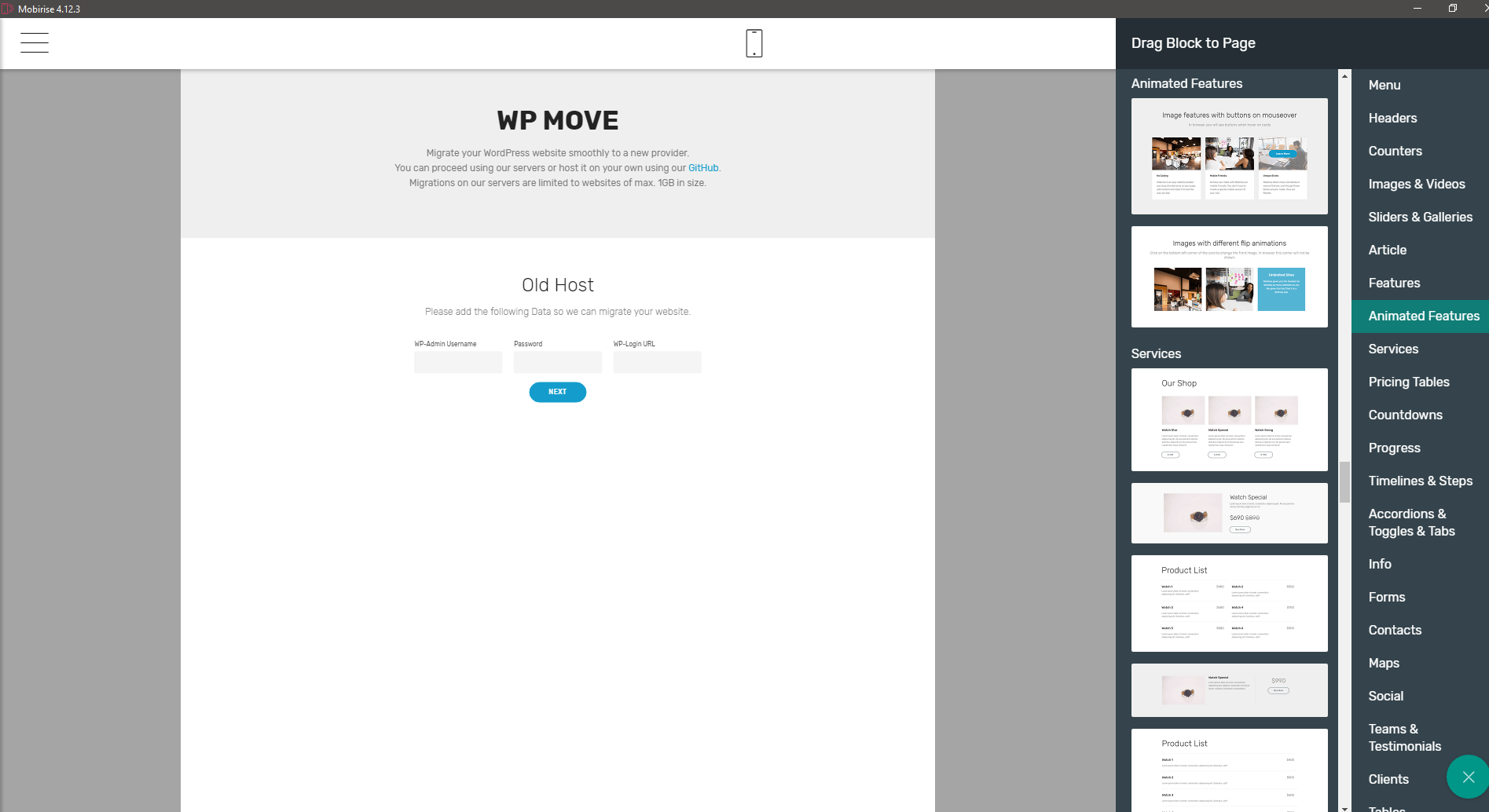
It is worth mentioning that it is really convenient that Mobirise integrates flawlessly with royalty free stock image site "Pixabay" making it easy to import required media for your projects
There is some other gimmicks worth mentioning making for a useful addition:
Pricing:
As for the pricing, you can the Mobirise core functions entirely for free. Personally, I haven't paid a dime for Mobirise (so far). You can however, browse through several plugins and HTML Templates that could make life even easier (it is already easy enough, believe me). Usually when you look at the prices of single templates (some 40-50$ usually) you will quickly realize that it may be more profitable to purchase the AIO kit (all templates&plugins) for some 100-200$ (depending on the sale). There are a lot of cool templates and plugins and you could very well find some worth for your money there.
What I didn't like in particular about buying Mobirise AIO kit, is that it only entitles for updates for 1 year before you need to pay again. With the pricing being at 150-200$ most of the times I can't compare it to other Lifetime Deal pagebuilders though and Divi and Hestia Pro (Theme Isle), as well as AstraWP sell on similar pricing on sale and that's on a license with lifetime updates (ofc these are all WP page builders/themes but still..).
While I don't mind if after one year I won't get any template updates or new templates, things become a bit more problematic with some plugins: The "HTML/CSS Editor" plugin (69$ plugin only or included in AIO Kit) takes care of one of the features I am missing the most in the free core builder and I'd almost consider it essential: Editing the HTML/CSS code live in the program (by simply selecting a block). It also removes all "Mobirise" backlinking in the HTML code (this is not so important for me tbh).
I wouldn't mind paying for that plugin but if after 1 year they change Mobirise software in a way that requires an update for the plugin to properly work again, I'd have to purchase it again. Same with some other plugins.
My experience using Mobirise:
I will keep this one short. Overall, Mobirise does a great job in allowing you to quickly build a mockup HTML+CSS Bootstrap powered website in little to no time. The code it outputs and the website's performance appears to be clean and the "automagic" in terms of mobile compatability for websites created with Mobirise is great. The tools available to you (such as Pixabay integration and Cookies alert) are a nice addition to ease your workflow. The little shortcomings it has don't really justify for being called "Cons". Go, give it a shot. The following image shows a mockup webhost one-page site I created in a "build a website in 20 minutes" challenge using Mobirise. While I didn't get as much done as I would have wanted I am still very happy with the result in this time frame:
Conclusion:
Ultimately, the "Cons" (if they can even be considered Cons at all) for this freely availabe software gem that is Mobirise are just some nit-picking on my part I believe. Go, give it a try!
Pay to support the developers if you love it. It won't be your worst purchase either
As far as I am concerned I make up for the lack of a live Code Editor in the free version of Mobirise by just editing code in Sublime Text and push the update to Mobirise. While this is a little inconvenient it's still doable. Any extra styling I do in Pinegrow (the next "Pagebuilder" Software I will introduce). It's a powerful tool you will not regret having heard about! So...stay tuned
Ympker's VPN LTD Comparison, Uptime.is, Ympker's GitHub.
3) Pinegrow Web Editor - HTML&CSS Website Builder
What, now, is Pinegrow?
Pinegrow is a bit different than your average Pagebuilder in the sense that it isn't really a pagebuilder?
Because it is that different and maybe kind of hard to grasp by just explaining it shortly in the lines dedicated to this short review, I'll leave the following video here as a starting point. It's up to you to decide if you want to continue reading without it or not. For the sake of getting a better idea of what Pinegrow is, I recommend doing so.
So... like you may, or may not have seen in the video, it can probably be said that Pinegrow is targeting a rather "advanced" audience. Developers, so to speak. Pinegrow is built for Frontend usage focusing on HTML&CSS. Oh, and you can also quite easily create WordPress themes with Pinegrow, define editable areas etc... (I won't go into detail here).
Basically, when you start up Pinegrow, there are 3 main ways you can proceed. I will explain these, mention some features along the way and then continue with the Pricing.
a) Starting a new project from scratch: If you choose this option, you will be presented with the following prompt:
Once you picked your poison you can then proceed "building" your website. Again, however, Pinegrow is different than other Pagebuilders in the way that the pre-built components/items it offers for Pagebuilding are not made to look fancy or anything. Everything looks rather "professional" and "efficient". This, however, is one of Pinegrows biggest PROs imho. For a Web Developer that knows his ways around the items/components available are just easy to find and use and I'd even go as far as saying Pinegrow is meant to be used to simplify your coding workflow, not to replace it. It's a back and forth between using the prebuilt items/blocks, hacking your own (Pinegrow live syncs with Atom.io and other Code editors so all edits become immediately visible), and using Pinegrow's powerful toolset to quickly style/edit certain page elements.
Here are some examples of the "List"/"Components" tab when building/editing a website with Pinegrow:
You can always jump right into coding in Pinegrow (if you want to do some small edits you don't need your code editor of choice for). Just click on the are on your website and the respective code will be highlighted in the code box below. This is super convenient. On the right panel, you can also see how you can jump straight to styling.
So, you can definitely quickly build new mockup pages from scratch with Pinegrow if you know your ways around in coding.
b) Edit an existing website/project:
You can also open & edit any existing project. Naturally, coding offers way more possibilities than your average Pagebuilder and it wouldn't be fair to compare. That's why I said, Pinegrow is a bit different in the sense that your coding skill and understanding of certain parameters/syntax/properties is highly decisive for the kind of result you can expect with Pinegrow. If you don't fear the code though, Pinegrow makes your workflow much easier (once you get used to it). Obviously I'd rather quickly code a list item than go to components and drag a list, but when it comes to styling or other stuff Pinegrows built-in padding/margin/background/RGB selector/gradients.. are hella fun to play around with!
Here's an example of how an overly crowded Pinegrow panel can look like (I know, I am crazy).
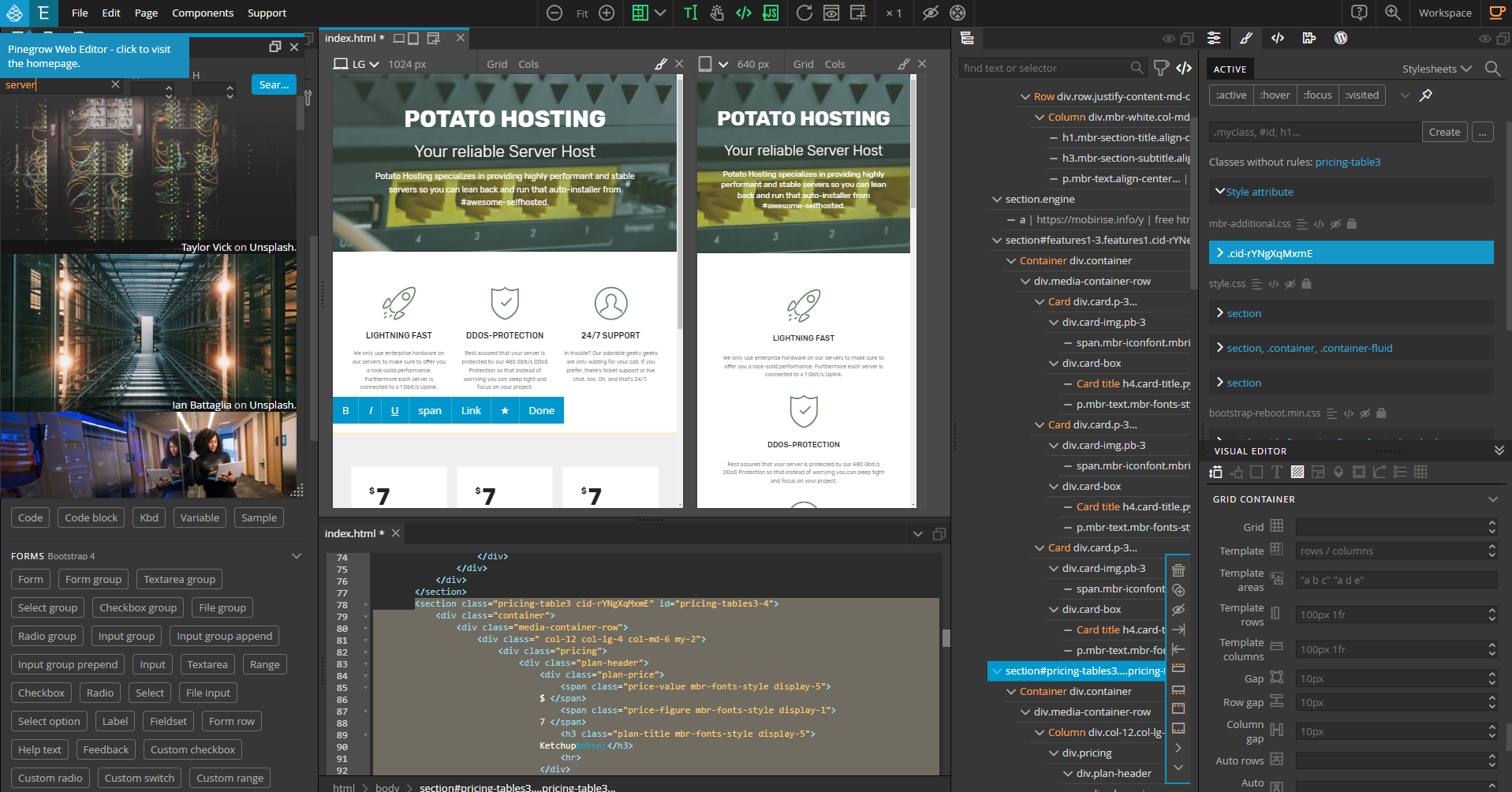
Oh, and I don't know if you noticed in the top left, but Pinegrow integrates with Unsplash stock images.
Search and find images directly in Pinegrow.
Here's also a short video quickly clicking (no explanation) through the different features:
c) Import
This is one of my favourite features in Pinegrow:
Open/import any HTML/CSS based website's frontend via URL. Choose any website you like and learn how it is set up. I had a look at Vultr's website a while ago for example. Of course, you can view the code in chrome dev tools or copy it into any code editor. The thing that makes Pinegrow so great (especially for ppl learning to code but also advanced users alike) is that it directly shows the connection between a certain website element or area to the code. Click anywhere and the relevant part of the code will be highlighted and relevant modification Parameter/settings will also be shown. Play around, have fun (for example Pinegrow's website).
Pricing:
Pinegrow offers three different pricing models:
1) Monthly pricing:
Starts from 11€/month (cheaper on sale). I won't dive much more into this one.
2) One Time Payment - without interactions:
This is the plan I am on. Depending on current discounts and license type you will pay between 40-150€. In my opinion, it's your best bet and very affordable at the same time.
The "Pro" version is basically the Pinegrow Core software without the "WordPress theme creator" toolset. If you don't want to have anything to do with WordPress theme creating you can just get that one. If, on the other hand, you'd like to convert your HTML&CSS into a working WordPress theme (it still takes work; this is not a 1-click converter but still eases the workflow tremendously; you can e.g. assign areas wp-tags like "editable", "login", "blog" etc) get "Pro with WordPress". I have "Pro with WordPress".
With the purchase of any of the two, you get 1 year of updates by default.
The big PLUS of this pricing plan: You own the software. It is yours to keep . I can’t stress this enough but since Pinegrow doesn’t rely on Pinegrow infrastructure or an online infrastructure like many other tools if the company was to shut down one day the software would keep working for you forever.
Only recently, I renewed my owned (one-time) Pinegrow license for another year of updates. My last update had been in 2017 and while it still was working perfectly I’ve seen some new features in the new versions that I’m really looking forward to such as Stock photo integrations and Bootstrap 4.
I could have just kept using the old version as well, though.
Oh, and one more thing: The "interactions" part you apparently miss out on (notice how it says "Interactions are not included" refers to this new addition to Pinegrow that was added a couple of months ago. This one is not included in the one-time payment plan.
Apparently, it can be added as a 50€/year sub apparently, though.
3) Annual sub - with interactions
This is the annual sub which is also ranging from 40€-140€. Although that is, obviously, per year.
It includes interactions (see above) by default and here you can also choose between the Regular Pro version and the one with WordPress.
I never used this one but to me, it sounds like if you don't renew the sub you can't use Pinegrow anymore at all (not even the version of the last update you were entitled to).
Verdict on pricing: Since the one-time payment plan and annual sub is priced the same but the one-time payment allows for continued use only missing out on Interactions, I will choose the one-time payment any day.
My experience using Pinegrow:
Remember how in my Mobirise review I mentioned Code Edits are a pita without the paid plugin?
I usually create a quick mockup site with Mobirise then open it in Pinegrow and tweak it the way I like
I also use Pinegrow to convert WordPress sites to static HTML&CSS (especially one-pagers).
Overall, I don't think I have even grasped all the features Pinegrow has to offer and I'm not that advanced of a coder to make full use of all of its' possibilities but it has been a tremendous help so far and I'll happily continue using it. If I feel like new features that I absolutely want have been added, I'll renew for a year of updates to support the developers and get the features I want.
Last time I renewed for 18€ (since there was a discount going on + I was given a personal discount which kinda stacked with the public one lol).
Conclusion:
The learning curve is steep and although I love it I don’t use it frequently enough (mainly because 80% websites I deal with are WP based and I use Divi for that) to consider myself a Pinegrow expert. But when I work with it, I get into it. And every time I do that. I love it. I recommend you check it out, especially if you are an advanced Web Developer/Coder this will be a great tool at your disposal!
Ympker's VPN LTD Comparison, Uptime.is, Ympker's GitHub.
4) Architect HTML&CSS Pagebuilder:
I will not go into detail on this one. This is just an honorable mention:
Architect HTML&CSS Site Builder from Codecanyon (59$) comes with some basic WYSWIG editing features. It's not the best of the best feature-wise and it is not the most comfortable to use either. Its' feature to have a user frontend (basically people can register and use the page builder to build their website) is pretty cool. Users can create and then publish their website to a subdirectory of public_html, or a subdomain of your domain. They can also download the code. There are a bunch of templates, too. Depending on the license you buy, you can also charge them (subscription system included) for certain features.
Basic interface of the page builder when in editing mode:
TL;DR: It could be interesting if you want a SaaS page builder setup facing towards your customers (and possibly charge them for this). Only basic features though. Not the best of the best. I bought it, though.
I still have a live instance running if you wanna give it a try. A while back, several LE members tested it (can't find the thread though) and the final verdict was that it was "okay to use" iirc.
Ympker's VPN LTD Comparison, Uptime.is, Ympker's GitHub.
These are all the posts I planned so far and right now I have not planned any others as these are the pagebuilders I usually deal with. Surely, @vyas has some more content in the making/at the ready
Ympker's VPN LTD Comparison, Uptime.is, Ympker's GitHub.
gooooooood daaaaaaaaaamn that's a lot of content!
I kind of feel like I should post these as a series rather than a single MASSIVE post, release one every few days and index them all at the top of each post.
https://inceptionhosting.com
Please do not use the PM system here for Inception Hosting support issues.
Thanks @AnthonySmith . (The gear icon still shows 1 hour time limit for me to edit this post, btw)
Edit:
1. yes, Planning to post as a Series
2. @ympker beat me to posting !
3. And I cannot edit his posts, which is I guess good thing
Suggestion:
The number(s) of posts can change depending on th depth of the content
Below is a Test Post Only - pasting formatted raw Markdown
Everything You Always Wanted To Know About PageBuilders* (*But Were Afraid to Ask)
Introduction:
The title, in case you were wondering, is a play on words on a movie by Woody Allen.
And as the title suggests; this post- rather, the first of the a multi-part series, is an introduction to the world of Pagebuilders.
I am writing this in collaboration with @ympker as a series of blog posts. Some of the posts may be long, and focus on one tool or service. Others would be more generic in nature, and provide an overview about different Pagebuilders. The idea behind this initiative is to pool our experiences together and create a reference of sorts for the LowEndSpirit community. Lets' call this an original content for LES. Without further delay, lets' dive into the topic right away.
So you are interested in knowing more about Pagebuilders, Eh?
This perception might be mostly true: majority of page builders exist for this most commonly used content management platform. But if we look at the Universe of web hosting, or its subset, Content Management Systems, you will realize that page builders cover a much wider territory.
I had been looking at the market of page builders for some time. Over the years, I even ended up using some of them without realizing what I was using. Here's an example:
Remember this Logo?
Hint
or
Another Hint
if you are not prone to getting too nostalgic, Wikipedia has great list of HTML editors that I believe were the pre-cursors to Pagebuilders. You may be familiar with some of them - Bluefish, Google Web Designer, Dreamweaver, Seamonkey...
Who uses Pagebuilders Anyway?
This category of web design tools caters to two sets of audience. One category is people who are not comfortable with or familiar with coding. The second is website designers and digital agencies, who would rather focus on customizing the websites for speed, security, efficiency, and so on. For them, the ability to utilize existing tools helps them utilize their time more efficiently, which ultimately has a bearing on cost.
What are the advantages and limitations of Pagebuilders?
Advantages: speed of creation of pages. Flexibility, responsive. Many pagebuilders come with in built image search, codes for embed players, etc. This really adds to the appeal. Then there are features for user engagement such as surveys, forms, etc.
Now we move to the disadvantages. First of all, you're relying on third party systems logins, there could be security issues. Depending on the pricing plan, scope of customization may be limited. A lot of pageuilders come as free subscription, but there may be limitations. The level of control a user may have on the layout, features, etc. may be limited. Many of these use closed source or propereitary software, which means you will depend on them for updates, security patches, and so on. Which is exactly the game some providers play. As you will read in some of our reviews in subsequent posts, many of the Freemium models come as Annual subscriptions. In other words, if you end the subscription, you are no longer able to use the service, or will be stuck with an older, unpatched version of the software after a while.
Are All Pagebuilders Created Equal?
Short answer is no. For the sake of simplicity, I would like to classify pagebuilders into five categories:
The Big boys: Web Hosting + Web builders -Large Webhosts (Squarespace, Wix, Weebly, Jimdo, Duda)
The Younger Siblings: Web Hosting + Page Builders (Carrd.co, Tilda.cc, Bookmark, Epicpixls, Voog). Page builders offered by hosting companies such as GoDaddy, Namechaep, etc. are also included in this list.
So is the omnipresent feature in Softaculous installations: Sitepad, builder.io
Desktop apps (Mobirise, 8b, )
Pagebuilders for Wordpress
Landing page creators : Mailchimp, Hippovideo, Hubspot
Let us look at each of these categories in the following posts.
blog archives
A series doesn't sound bad to me tbh.
All of these in one post would kinda undermine the potential read-time I believe. It's like YouTube videos. After 15 minutes only 20% of people continue.
And yeah.. It got kinda outa hand.
Ympker's VPN LTD Comparison, Uptime.is, Ympker's GitHub.
you know you can make new posts and just pick the writes section as the category as well, it is not limited to this post
https://inceptionhosting.com
Please do not use the PM system here for Inception Hosting support issues.
All right, whenever I feel like I have an idea for something interesting and some time at hand I'll just put a draft in here. Maybe not all posts will be as long as the others. You decide case by case if you wanna use them or it's just the result of some drunken midnight rollercoaster
Ympker's VPN LTD Comparison, Uptime.is, Ympker's GitHub.
We can use the markdown code to reduce the overall scrolling. Those who want to read, can open up the link, others can scroll past.
I have used it (works rather well) in the Intro post- where I talk about Frontpage.
<details><summary>read More</summary> <pre> Text, link or images </pre> </details>blog archives
read More
Ympker's VPN LTD Comparison, Uptime.is, Ympker's GitHub.
Sorry I got a bit lost with this yesterday while doing other things, how do you want it posted then, as a big one with a summary/read more option or as a series of posts over a few weeks?
if you want it as a summary/read more could you please make a new post grabbing all the content (you have full edit rights here) and format it as you would like the post?
https://inceptionhosting.com
Please do not use the PM system here for Inception Hosting support issues.
@AnthonySmith
I tried posting this message a couple of times but something came up. Doesn’t help that I am left to use my phone since Macbook battery is getting replaced.
Here’s trial 3
I would like to propose a 6 part series as against the original 10 plus parts. The entire content will still be ready for publication by May 25th, and in Grav I think you can schedule them for publishing in one go.
The posts will range between 1,500 and 2,000 words- still a good number. I will format them to make it a bit more reader friendly.
Thanks
blog archives
I don't mind whether it's gonna be 6 parts or 10+ as long as the articles themselves are not being shrinked. So, when you say 1500-2000 words per post that means all articles (Divi/pinegrow/mobirise/your articles) would still appear in full length correct ?
I also like the idea of a series more than one big post with all articles (but I think all of us agree on this).
Ympker's VPN LTD Comparison, Uptime.is, Ympker's GitHub.
Ok, when you are ready please make a new individual posts in the Writers section with the formatting as you want it titled as:
Part 1: Title
Part 2: Title
Part 3: Title
etc etc
That will make sure I don't mess up and I will be able to locate them quickly
https://inceptionhosting.com
Please do not use the PM system here for Inception Hosting support issues.
@AnthonySmith this is a bit off script from the above posts:
Today I started writing for my blog about providers who offer free shared hosting. I began to feel more and more that the below topic/ post might be more relevant to LES.
This can be posted either as a blog or a new discussion in the forums. Your call to include in the blog or not (don't want to propose too many things right away)
-Summary: Post that lists/ tabulates the "free shared hosting plans" offered by providers on LES.
-Why: Because I think it is a noble and cool idea (offering free hosting) . I had benefited from them, so can other community members/ readers. On LES the information is a bit all over the place. How about we bring it together?
-Hosts mentioned: (in no particular order) Nexusbytes, Helohost, Teta Host, Khan Web, Hostingcubes. (In past two months they have posted offers, the list may be longer, but I think 5 is a good starting point) - with links to their respective offers in the forums. Google seems to like inter linked posts - a la Wikipedia and Quora.
-Conclusion, takeaways...
Thanks.
blog archives
I would be more than happy to post it on the blog (LESB)
https://inceptionhosting.com
Please do not use the PM system here for Inception Hosting support issues.
Post: Compilation of Free Shared Hosting Offers
Dear @AnthonySmith ,
I am posting the draft below. After a couple of sanity checks and one or two images, this post should be ready for prime time. Thanks,
Free Shared Web Hosting : Offers Galore
Over the past couple of months, providers on LES have generously offered free shared hosting plans for the LES community. The goal or objective behind is simple: they want to give back to the community and help those who can benefit from these offers.
In the below section I have compiled the list of offers by Four providers who have posted such offers since March 2020. Relevant details such as location, bandwidth, number of websites, disk space, are also included. This information is already available in the forums. However, wouldn't it be cool if it was available in a single page? I wanted to keep it simple, and while a more comprehensive tabulation like the one mentioned in this post might make sense for some, I opted for brevity and simplicity.With this thought, let us dive into these offers.
Presenting the offers Together
(Servedez)
Hosting
Germany
conditions
Notes:
1. DA stands for Direct Admin control panel
Free shared hosting plans by Hostingcubes are available for a period of one year at 7 different locations. Visit the offer page by @Lee - for further details
Requirements for Free Shared Hosting by Khan Web:
"All you would need to do is join Discord Channel & send a PM to user @AK_KWH, mentioning your discord username"
The Obvious and Not-So-Obvious
There are several reasons to question the rationale behind such offers. For example,why would anybody offer a service for free? Then there is the suspicion that the providers might use the sign ups as an opportunity to up-sell services.
That may be true in some cases, but more than one provider in the above list has mentioned that these offers rarely result in paying customers. In the words of @seriesn from Nexusbytes,
Risk of abuse by Users
The intention of this post is not to delve upon the pro's and cons of free shared web hosting. But I thought of mentioning that the providers can often face abuses from users and those looking to exploit the gratis service.
This discussion from the forums, based on experiences of Lee with Hostingcubes, offers an interesting perspective.
Free service during beta testing
Some providers can offer free accounts for a limited period when they are launching new products or services. A recent example is Hello Internet @hello, who offered free CPanel hosting in Germany. In exchange, they sought feedback, testing from the users. A provider may choose to continue offering the 'free' service to the beta testers beyond the testing period.

Summing it all up
The act of offering a service for free does not limit itself to shared hosting on this forum. Some users have posted their offers for a 'free' use of VPS. But I thought of limiting this post to shared web hosting offers. One reason was focus. The other reason is more personal: I have benefited over the past years from free web hosting services. This prompted me to compile the offers and write this post that would provide a handy resource the LES community.
The details in the table are compiled from the offer posts. In some cases, I have used the details by checking with the providers, or from my own account. In case of any updates, errors, or additions, do leave your feedback in the comments section below.
Links to free shared web hosting offers by providers:
I have included them in the table above but for ready reference, here they are, in no particular order:
1. Tetahost https://talk.lowendspirit.com/discussion/1047
2. Nexusbytes: https://talk.lowendspirit.com/discussion/850/free-shared-hosting-servedez
3. Khan Web Hosting: https://talk.lowendspirit.com/discussion/772/free-directadmin-nvme-shared-hosting
4. Hostingcubes: https://talk.lowendspirit.com/discussion/636/lab-rats-required-to-test-new-free-hosting-service/p1
blog archives
Are you doing that or do you want me to? (just not sure how to read that so thought I would ask)
https://inceptionhosting.com
Please do not use the PM system here for Inception Hosting support issues.
Edit: Updated the above post
Oh.. I should have clarified. I will do the sanity check.
Specifically,
-typos, links,
-Looking for some stock Creative Commons images as I write this.
-also waiting for reply from @AK_KWH on their offer (2 months old, doesn't hurt to check).
blog archives
@AnthonySmith one last help:
I cannot edit the document any more since the hour has passed. Can that be fixed, or will I have to re-post as a new post here? Thanks
blog archives
Sorry, I must have messed that permission set up, can you edit now?
https://inceptionhosting.com
Please do not use the PM system here for Inception Hosting support issues.
Yes thx
thx
blog archives
because of limitations in vanilla you may have edit rights over other categories, if so I just ask and trust that you do not abuse it which I am confident you would not.
https://inceptionhosting.com
Please do not use the PM system here for Inception Hosting support issues.
I understand
blog archives
Is that it ready now @vyas (nice write up btw)
https://inceptionhosting.com
Please do not use the PM system here for Inception Hosting support issues.
Thanks, and yes.. good to go
blog archives
https://lowendspirit.com/free-les-shared-web-hosting-offers
https://inceptionhosting.com
Please do not use the PM system here for Inception Hosting support issues.
Good read
Ympker's VPN LTD Comparison, Uptime.is, Ympker's GitHub.
Posting Part I of the 6 part series on pagebuilders @AnthonySmith - you may publish as per convenience.
Everything You Always Wanted To Know About PageBuilders* (*But Were Afraid to Ask)
Part I: Introduction
The title, in case you were wondering, is a play on words on a movie by Woody Allen. And as the title suggests, this post is an introduction to the world of Pagebuilders. It is also the first of the a multi-part series on pagebuilders that I have written in collaboration with @Ympker. The idea behind this initiative is to pool our experiences together and create a reference of sorts for the LowEndSpirit community. Lets' call this an original content for LES.
 Image: Pixabay
Some of the posts in this series will focus on one or more available tools for a given category of pagebuilders. Others would be more generic in nature, and provide an overview of a particular tool or category. Without further delay, lets' dive into the topic right away.
So you are interested in knowing more about Pagebuilders, Eh?
If you look up discussions on sites like Quora, you would be inclined to believe that page builders exist for one type of Content Management System: Wordpress. This perception might be mostly true. Indeed, majority of page builders exist for this most commonly used content management platform. But if we look at the Universe of web hosting, or its subset, Content Management Systems, you will realize that page builders cover a much wider territory.
What is a Pagebuilder Anyway?
Site builders offered by Squarespace or Wix
or
add-ons or plugins for WordPress, such as elementor, Divi and Brizy.
But the story does not end there. Over the years, I have even used some pagebuilders, without realizing what I was using. Here's an example:
Remember this Logo?
Hint
or
Another Hint
if you are not prone to getting too nostalgic, Wikipedia has great list of HTML editors that I believe were the pre-cursors to today's website creation tools. You may be familiar with some of them: Bluefish, Google Web Designer, Dreamweaver, and Seamonkey.
Okay, but...who uses Pagebuilders Anyway?
This category of web design tools caters to two sets of audience. One category is people who are not comfortable with or familiar with coding. Particularly with the rise in the no-code movement, the usage of such drag and drop tools has gained popularity.
The second is website designers and digital agencies, who would rather focus on customizing the websites for speed, security, efficiency, and so on. For them, the ability to utilize existing tools helps them utilize their time more efficiently, which ultimately has a bearing on cost.
What are the advantages and limitations of Pagebuilders?
Advantages
One of the biggest advantages of using pagebuilders is they speed up the creation of pages. Flexibility, responsive. Many pagebuilders come with in built image search, codes for embed players, etc. This really adds to their appeal. In addition, there are features for greater user engagement, such as surveys, forms, etc.
Disadvantages or Limitations
Now we move to the disadvantages. First of all, you're relying on third party systems, many of which involve creating an account, and entering payment information. For poorly designed or maintained systems, this could lead to security issues. Next, depending on the pricing plan, scope of customization may be limited. A lot of providers offer free subscription plans, but they come with many limitations.
The level of control a user may have on the layout, features, etc. may be limited. In addition, many of these applications use closed source or proprietary software. This makes the user dependent on the provider for updates, security patches, and so on. Which is exactly the game some providers play.
Are All Pagebuilders Created Equal?
The short answer is no.
For the sake of simplicity, I would like to classify pagebuilders into six categories:
1.The Big Boys
These services are commercially available to a very wide group of audience, and have a large user base. These large web hosts offer web hosting and have custom web builders. Examples include Squarespace, Wix, Weebly, Jimdo.
2. The Rising Stars
These cater to a smaller audience base. Examples of such service providers include (Carrd.co, Tilda.cc, Bookmark, Epicpixls, Voog).
3.Page builders offered by hosting companies such as Page builders offered by hosting companies such as GoDaddy, Namechaep, Dynadot, etc. are also included in this list. The pagebuilder offered by Softaculous (Sitepad) also features in this list. Installtron or Cloudron might also offer similar applications.
4.Desktop apps such as Mobirise, 8b.
5.Pagebuilders for Wordpress
As mentioned in the first half of this post, there are numerous options for pagebuilders for Wordpress . Examples include Elementor, Divi, Brizy. We will cover some of these in detail in a subsequent post.
6.Landing page creators
This is the broadest category in our list, and can include mailing list; video hosting; and CRM services. Some of the examples in this list include Mailchimp, Hippovideo, Hubspot, and builder.io.
Bookmark.com

Intrigued (or confused) enough?
Don't worry, we will cover the above categories in sufficient detail in the following posts. We hope this will help you clear the air on the topic of pagebuilders.
How This Series is Structured
Most blogs, tutorials, and review sites cover the "Big Boys" in sufficient depth, therefore we will not talk about them in this series. We will also not cover the pagebuilders offered by hosting companies for similar reasons. We may, however, include a short review of Softaculous in the last part of this series.
The subsequent posts will be as follows:
Part II : Pagebuilders: The Rising Stars
Part III : Pagebuilders: Desktop App
Part IV : Pagebuilders for WordPress - Part I
Part V: Pagebuilders for WordPress- part II
Part VI: Landing Page Creators (This will also be the concluding part of this series)
Note from @ympker about this project
Screenshot of Brizy Pagebuilder by A Vyas
blog archives
Lookin good! Thanks @vyas
Ympker's VPN LTD Comparison, Uptime.is, Ympker's GitHub.
@AnthonySmith
May I request a small update to the blog post “compilation of free shared hosting offers”...
the “remark” under Hostingcubes in the table
has a mention “1 yr”. The intention was to convey that the renewal happens annually. It is causing confusion...
Can that be changed to “renews after 1 yr”?
Thanks
p.s Part II of the series coming later today.
blog archives
Done.
https://inceptionhosting.com
Please do not use the PM system here for Inception Hosting support issues.
Just chiming in (sorry to disrupt): When is the first pagebuilder post scheduled to go live?
Ympker's VPN LTD Comparison, Uptime.is, Ympker's GitHub.
See:
https://inceptionhosting.com
Please do not use the PM system here for Inception Hosting support issues.
Side note, I was thinking about these posts last night actually, while I know they are HUGE when combined, I am again wondering if they lose impact if posted individually as it is no longer a comparison.
That said they stand up in their own right so individually is fine but it is no longer a comparison if you know what I mean?
Still leaning towards separate posts (daily) but wanted to give that thought again.
https://inceptionhosting.com
Please do not use the PM system here for Inception Hosting support issues.
Ah, but I think @vyas already posted the introductional post as ready to go. About the other posts, my latest posts are ready to go as-is. Just waiting for @vyas to give the go we can post them. You can just use the latest version of the Divi/Pinegrow/Architect/Mobirise posts I posted. It's true that the comparison gets a bit lost when the posts are singled out but I think all together will be a bit much eh? Ofc if seperated into chapters probably ppl could read one chapter at a time and have them all bundled up if searching for a review.
Ympker's VPN LTD Comparison, Uptime.is, Ympker's GitHub.
Right, but I asked for separate new posts under the writer's section category so I know which parts to put in which order rather than using this thread which is a bit of a mess now.
So, as a result, I missed that and I thought I was waiting for you and you through you were waiting for me
I will grab that then and post it today, please make a new discussion post for part 2 so I don't miss it
https://inceptionhosting.com
Please do not use the PM system here for Inception Hosting support issues.
Haha that makes sense. Yeah, I am really busy these days and just was wondering when it'd be published. No worries
Then @vyas can pick any of our finished posts and post it as 2nd part accordingly (or tell me which one I should post as second one). If it's one of mine they are already fully there :P
Ympker's VPN LTD Comparison, Uptime.is, Ympker's GitHub.
https://lowendspirit.com/everything-you-always-wanted-to-know-about-pagebuilders-but-were-afraid-to-ask
posted.
https://inceptionhosting.com
Please do not use the PM system here for Inception Hosting support issues.
I should get my Mac tomorrow so other parts will come faster.
@Ympker agreed your posts are ready but I am adding some seo juice. Keywords, internal/external links, smart ‘alt’ tag for images, etc. Thats what is taking time as well.
Sorry about that
blog archives
No worries
Ympker's VPN LTD Comparison, Uptime.is, Ympker's GitHub.
I updated a few little bits hope you don't mind.
I just added the header giving you credit, I added 'click arrow to expand' on the reveal tags as it was not obvious and finally just linked the mentions e.g. @vyas @ymker to your forum profiles good time to take advantage of the About Me: feature on the forum I announced yesterday!
Finally, I removed a couple of little errors in spaces and hyphens and removed an 'and' after a comma, and one of the bits had the text doubled.
example ^
https://inceptionhosting.com
Please do not use the PM system here for Inception Hosting support issues.
How do you guys feel about me publishing the direct forum link for these as well to improve engagement?
The hidden post: https://talk.lowendspirit.com/discussion/1135/everything-you-always-wanted-to-know-about-pagebuilders-but-were-afraid-to-ask
https://inceptionhosting.com
Please do not use the PM system here for Inception Hosting support issues.
Sure that sounds good! Also, thanks for removing these tiny bits of errors. It always happens to me that after some time I just seem to turn blind on further errors, after re-reading for the n-th time.
Ympker's VPN LTD Comparison, Uptime.is, Ympker's GitHub.
That works, anything to help engagement...
@AnthonySmith
Thx for some reformatting.
The post actually reads better in the hidden link version...
blog archives
@AnthonySmith , posting #Part II below. Posting in two segments since the post is LONG.
Everything you wanted to know about Pagebuilders...Part II
Introduction to part II of this series
In this post, we will briefly mention the leading web hosting companies who also have their custom pagebuilders. But the main focus of this post will be on the "Younger Siblings" as we had described in Part I of this series. Specifically, we will talk about Carrd.co, Brizy, and Bookmark pagebuilders. I have used each of these services quite regularly over the years, and am quite confident that you will find them useful.
Webhosts with Pagebuilders
For those who are keen to know more about the "Big Boys" can click the arrow below to read.
Optional reading
There have been many posts about the large hosting companies that offer drag and drop functionality for creating websites. Shopify, Wix, Squarespace, Weebly, Jimdo are some such popular services. These services have a widespread use, many of them feature in the Top 10 lists for Content Magagement Sytems. In particulay Squarespace, Shopify, Wix and Weebly can be considered as mass market products. The advantage of these services is that they offer a 'plug and play' model, that is, sign up, choose an existing template, and customize it to suit needs. They offers speed, convenience, and are beginner friendly How Tos. The tutorials or How Tos are offered by the providers themselves, or third party sites.On the flip side, they tend to be expensive, and might not be a good fit for everyone.
The Younger Siblings
Younger siblings are companies that cater to a smaller audience, or a niche market. Some of these services include:
Stacksocial has a list of many new and relatively unknown page builders. You may check it out here.
But don't worry , we will only cover three of these services in detail in the sections below.
Carrd.co
Carrd.co is a page builder, as well as a web hosting platform. It is great for designers. freelancers, and professionals looking to create their portfolio or personal sites. It is a fairly popular service among those who are familiar with the world of pagebuilders. Its servers are in the United States, which has caused a headache or two for me due to low network speeds. More on that later.
I came to know about this service through one of the mailers. Initially, I was rather skeptical but when I looked it up, I was actually impressed and I signed up for it.
Kicking the Tyres
Carrd.co offers a freemium service. You can start with the free model to try this service out. In order to do so, you can choose one of their pre built themes or pre built templates. There are templates for a Landing Page, a signup or a feedback form, a portfolio page or a personal page.

Once the layout is selected, you are taken to a page where you get the basic instructions where you can change the text, the font size etc. You can simply edit the fields and you will be good to go in minutes! Note that the fields are customizable.
Optional : Watch the video
In the accompanying video, you will find a screenshot tour 'walkthrough'. My intent is to show how you can create a very simple webpage. I have opted for a very simple Card layout. In other words, the website would be one pager with a picture, name and social media contact details.
Alternate link to video
In case the above link to the video does not work,
I am posting an alternate link to the screenshot tour of carrd.co
Customizing the fields
From "Alex Smith", I change that to my name. Next I changed my image-I put my same image as my avatar on LES. You can change the font size and also change the pattern by adding a drag and drop shadow.
You can preview the draft site in desktop mode and mobile more. Once you are ready to publish, you only have to enter your contact details.
Click to see the test site
I already have a Pro Standard account with carrd.co, and this does offer some additional features like using custom domain, and pro templates. You can add your own stock images own images or use one of the pre built stock images from unsplash, etc.
Carrd.co is under active development- most recently it was updated about three weeks ago the time of posting this message. AJ, the founder and creator of Carrd.co, is the person behind html5up.
Give carrd.co a try, you will be pleasantly surprised!
####What is this service best for
Quirks and limitations
I have two problems with this service:
1. In India, I get low speeds. This makes the creation and loading of the site very slow. I had reached out to AJ back in December 2018, and he had suggested that I use Cloudflare or any other CDN. I did try that, but to no avail. In Europe and North America, speeds might be better.
2. Sometimes, the sites go into something called as 'initialising' mode. This happens probably for 5 minutes every month. For that period, the sites are inaccessible. Recently, I received a mailer from AJ that required me to change the servers for my sites. Maybe with the new server(s) this problem will go away.
3. You can export the site in the higher price tiers only (Pro Plus and Pro Max)
Summing it all up
I am a very happy user of carrd.co; and would recommend it if you are looking for a no frills site that is quick so set up.
In spite of the minor quirks, I give it a thumbs up.
Support page on Carrd.co
Carrd.co also has good documentation, I am adding the link to their support page for reference.

blog archives
@anthonysmith Post II Continued
Bookmark.com
Introduction
Let us take a look at bookmark.com. I learnt about this page builder + web host through a facebook group. The specifications they offered did not impress me much initially. But upon closer look, there was one feature about bookmark made me sign up: the AI backed website builder (AIDA).
Signing up and pricing plans
Bookmark also follows the freemium model. Like other services, in order to use a custom domain, one has to sign up for the paid plans, which start at 12 US dollars a month on an annual subscription.This tier puts you in the 'unlimited bandwidth and unlimited storage' category. Like many members of LES, I am also skeptical about anything 'unlilmited'. Inspire of my reservations, I had purchased the 2 website plan. It made the pricing attractive.
Creating a website
Initially I found AIDA to be gimmicky! But creating a website is fast and super easy with AIDA. In the included video, you can see how I have created a sample website in a very short time.
Customizing the fields
Once the website is created, you can change the fields to your liking: fonts, colours, images and more. This can be done manually or using AIDA, again. It is difficult to change the type of website- for example, from a blog to a photo gallery. Also, the layout cannot be changed easily once it has been chosen. You might be better off re-creating the website. You can save as many sites as you like, until you publish them. The upper limit to the number of published sites is the number of sites included in your plan.
Optional reading
Websites in Draft Folder
I liked the option of a drafts folder- where you can save layouts before choosing one for the actual site. This is useful if you are creating website for a client or stakeholders, and you would need approval for doing the same. You can store multiple draft websites, and delete the ones you no longer need.
e-Learning Courses
Bookmark.com offers some e-learning courses as a part of their paid packages, or you can subscribe to them independently.
Images and videos
Bookmark offers integration with stock image websites, and you can replace the images that come with the stock website. You can also upload your own images, or save them from google drive onto your bookmark.com folder. The site claims there is no upper limit on the number of images or their size. I have not stress-tested the system, so I cannot comment on the actual limits if any.
Concluding remarks
Bookmark is largely catered towards web designers and agencies who want to use the white label service for their clients. But the ease of creating a website using AIDA may make it an attractive option for the non-technically-inclined user. Pricing wise, it becomes quite expensive for the causal user beyond the $12 a month plan.
Brizy
Brizy is an interesting beast, and I mean it in a good way. This service can called as hybrid. It is a pagebuilder and a web host. In that sense, it falls under the "younger siblings" category. They also offer cloud hosting, which uses their custom page builder.
a. You can download the .zip file that has the readymade site, simply upload it on your server, unpack it, and you are good to go. This is a great option if you are not planning to update the site regularly. That is, you are looking to create a static site. This is the "Export HTML" option.
b. The other option is to use your website as a 'front' face, but the page creation, image hosting, etc. happens from brizy. You can update the pages or the data on the webpages, and the content will be sync'ed dynamically with your website. This is the "Server Sync" Option.
The other two options- allow you to host on Brizy using your own custom domain, or use a subdomain with a "subdomain.brizy.io" extension. This option is the default for the free tier. Brizy also offers aWordPress plugin, which we might cover in a subsequent part of this series.
You can read the page Publishing options for Brizy
for more details.
Pricing plans
Brizy has three pricing tiers: Free account, Pro Personal Plan, and Pro Studio Plan. The pricing is at the mid segment : US $ 49 / year for Personal Pro and $ 99 for Pro Studio.
Here is the interesting part: under the free account, you can link 1 custom domain or sub domain. That is, you get one website hosted for free.
Similarly, under the Pro Personal Plan, you can link upto 3 custom domains or subdomains. In the Pro Studio plan there is no upper limit.You can visit the pricing page on their website for details.
Click to see the test site
SSL
Both Custom Domain and Brizy Subdomain publishing options come with free SSL included. According to their website, SSL "Takes up to 24 hours to be installed." In my experience, it DOES take 24 hours for the ssl to be set up.
CDN
Brizy has a list of POPs on their website, which they use for free and paid tiers. Particularly under the paid plan, the CDN locations in Asia Pacific region is quite extensive. This makes it an attractive proposition.
Hosting is on amazon EC2, image processing by Fastly, and their CDN provider may be a name familiar to most readers in the ES community: BunnyCDN.
Overall, they seem to have chosen some good Infrastructure providers, which means that eh performance is expected to be above par. One concern I have about such services is the price they have to pay to the providers. Amazon' s AWS in particular can get expensive. This aspect is best illustrated int he below video.
Video: AWS fees can quickly turn expensive!

Further reading:
1. Basic and Global CDN for Brizy
2. Specifications for cloud hosting
Brizy Cloud
I really like this option. For this review, I have included a video made from screen captures.I created a test site on Brizy cloud, and hosted it on the shared hosting site. I thought this was a good way to put to use the Black Friday offer from 2019 by Gullo's Hosting.
Watch the video
https://gaathastory.hippovideo.io/video/play/idjtxkG6bFT3nJxJKbfNUcFlmwywclicW25lWKIwLk0
Summing it all up
I really like Brizy and the simplicity and options it offers. In particular, you can create a rather complex page (or series of pages) and publish them in a variety of ways. This product is under active development. On the flip side, there are bugs, and the Wordpress plugin had a security incident a couple of months ago. Brizy is worth a try- heck, they offer free of 1 website.
Conclusion: Part II
This wraps up part II of this 6 part series. Hope you found the Sitebuilder options discussed in this post useful. The list I have posted at the beginning of this article is by no means exhaustive. But I thought the best way to create value for the readers was by writing about services that I have used first hand. With that logic, I should have even covered Sitepad, but that is a post for another day. Hope you find the mini-reviews useful. As always, looking forward to your comments, feedback and recommendations if any.
blog archives